44
8.1.2 Domestic hot water menu
For the quick supply of domestic hot water, a DHW comfort
function has been built in. This has the following settings:
► P-On:
The DHW comfort function is switched on within the chosen
time blocks. The heat exchanger will maintain temperature
during these time blocks.
► On:
The DHW comfort function is continuously switched on. The
boiler always supplies domestic hot water immediately.
► Eco:
The DHW comfort function of the boiler is self learning. The
boiler will adapt itself to the pattern of use of domestic hot
water. This means that the heat exchanger will not maintain
temperature during the night or with long absences.
► O:
The heat exchanger is not kept warm, as a result of which
the supply of domestic hot water is somewhat delayed. If
there is no need for a quick supply of domestic hot water,
the DHW comfort function can be switched o.
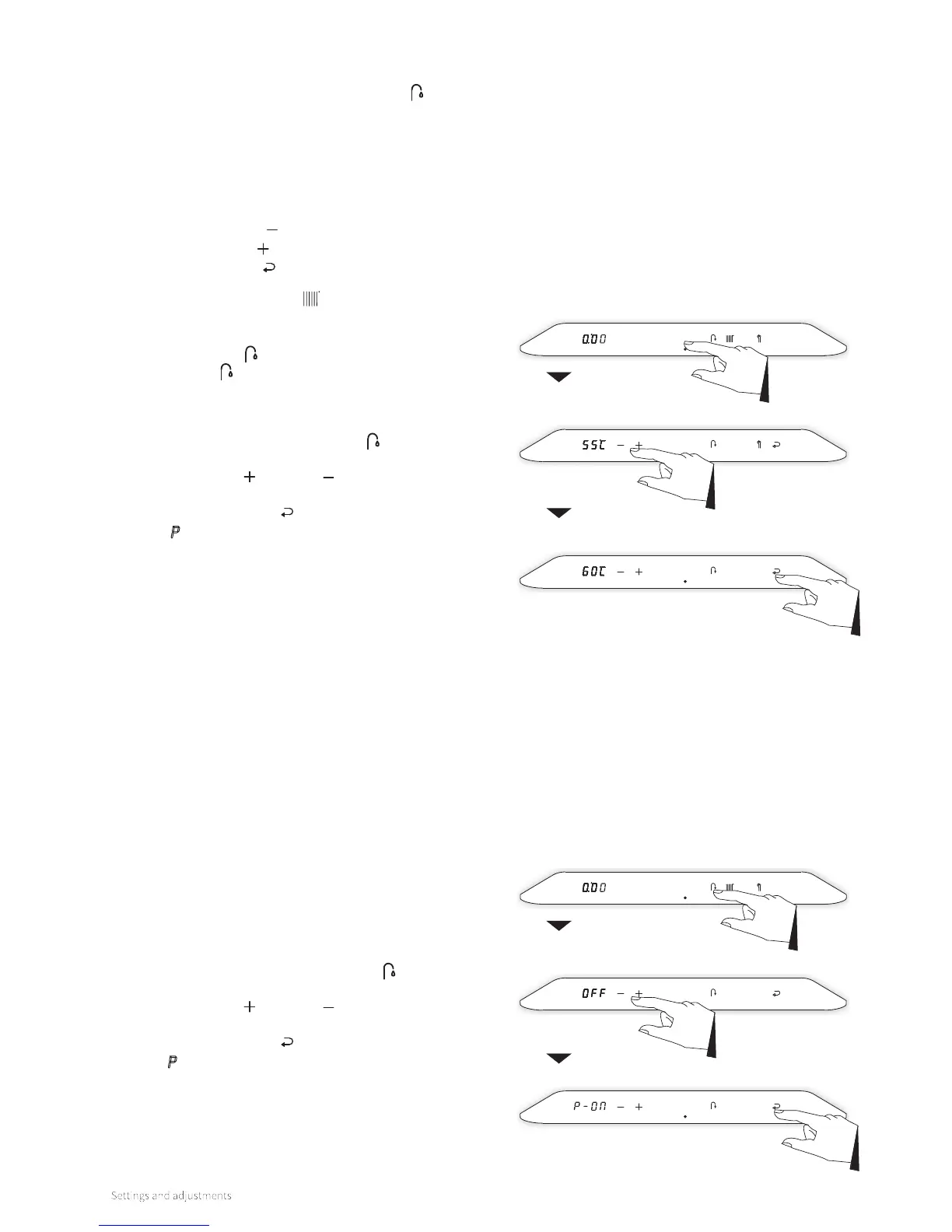
Confirm
Main menu
Domestic hot
water menu
Tap comfort
The domestic hot water menu has 2 settings and is accessible
by tapping on the Domestic Hot Water symbol from the
main menu.
Via the domestic hot water menu:
► the domestic hot water temperature can be modified
► the DHW comfort function can be modified
The following buttons will light up:
► The Minus symbol
► The Plus symbol
► The Enter symbol
The Central Heating symbol will be extinguished.
The le display will light up and will display the current
domestic hot water temperature by tapping on the Domestic
Hot Water symbol . By tapping again on the Domestic Hot
Water symbol , it alternates between ‘modify domestic hot
water temperature’ and ‘modify DHW comfort function’.
To modify the domestic hot water temperature:
1. Tap the Domestic Hot Water button
. The set temperature
is shown on the le display.
2. Using the Plus and Minus buttons, set the desired
temperature (for example, 60°C).
3. Tap the Enter button
to confirm (or wait 30 seconds).
A
P appears on the right display (all other buttons are
extinguished), which means the setting has been stored.
4. The display returns to the main menu.
To modify the DHW comfort function:
1. Tap the Domestic Hot Water button 2x
. The set tap
comfort setting is shown on the le display.
2. Using the Plus and Minus buttons, set the desired tap
comfort setting (for example, P-On).
3. Tap the Enter button
to confirm (or wait 30 seconds).
A P appears on the right display (all other buttons are
extinguished), which means the setting has been stored.
4. The display returns to the main menu.
Main menu
Confirm
Domestic hot
water menu
Temperature



 To Next Page