47
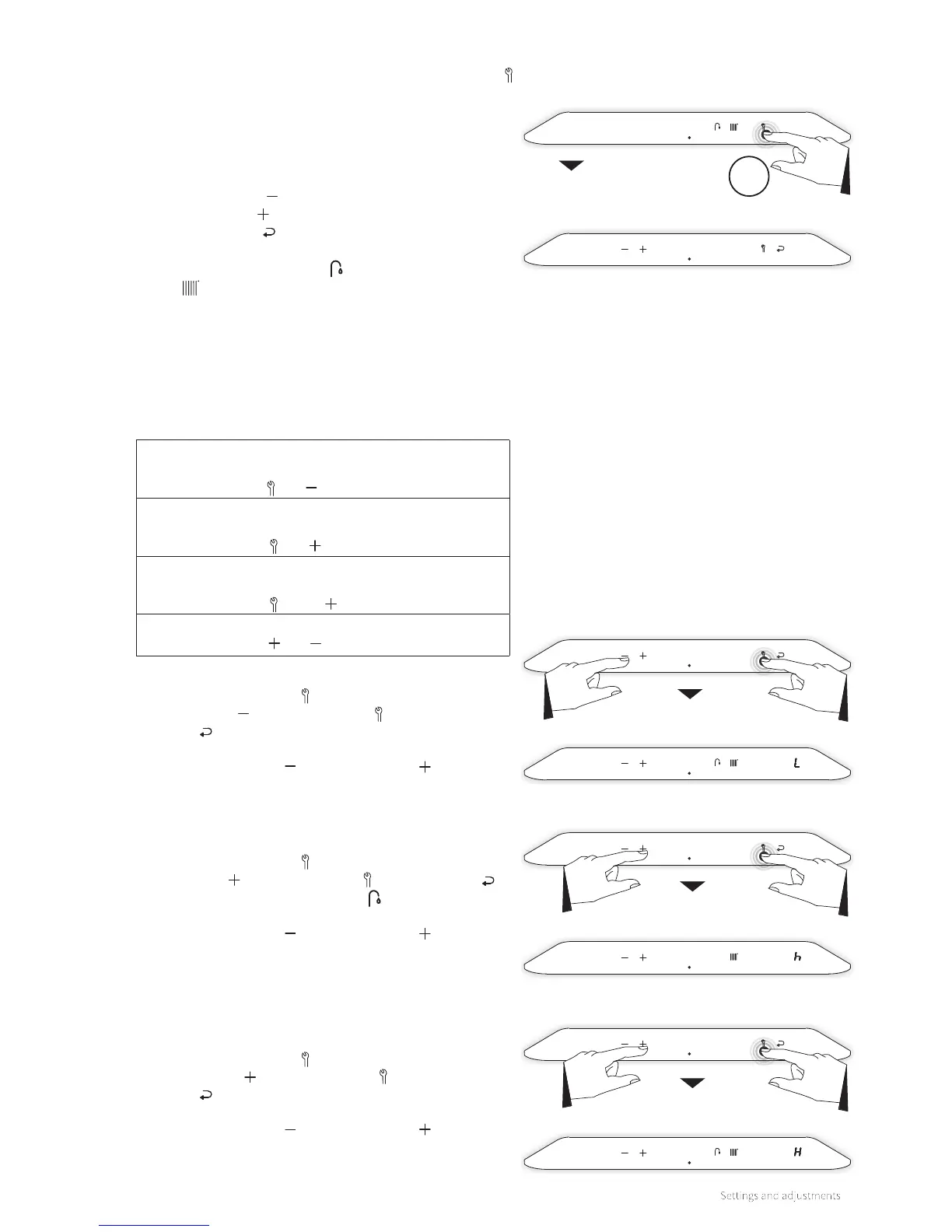
The service menu is accessible by touching the Service button
from the menu and holding it for 2 seconds.
Via the service menu:
► the test programs can be activated
► access to the (installer’s) parameters can be obtained
The following buttons will light up:
► The Minus symbol
► The Plus symbol
► The Enter symbol
The Domestic Hot Water symbol and the Central Heating
symbol will be extinguished.
8.1.5 Service menu
Service menu
Main menu
Service menu
Test program ‘L’
Test program ‘h’
Test program ‘H’
Service menu
Service menu
Test programs
A feature has been installed in the burner controller to bring
the boiler in a test mode. By activating a test program, the
boiler will operate with a fixed fan speed without the control
functions intervening. However, the safety functions remain
active.
The following test programs are available:
Program ‘L’
Burner on with minimum DHW capacity.
Button combination and
Program ‘h’
Burner on with set maximum central heating output.
Button combination and
Program ‘H’
Burner on with maximum capacity.
Button combination and 2x
Switching o test program
Button combination and
To activate the ‘L’ test program:
1. Hold the Service button and at the same time tap the
Minus button . The Service button and the Enter
button will be extinguished. An ‘L’ will appear on the
right display.
2. Tap the Minus button and the Plus button at the same
time to terminate the program.
To activate the ‘h’ test program:
1. Hold the Service button
and at the same time tap the
Plus button . The Service button , the Enter button
and the Domestic Hot Water button
will be extinguished.
An ‘h’ will appear on the right display.
2. Tap the Minus button and the Plus button at the same
time to terminate the program.
To activate the ‘H’ test program:
1. Hold the Service button
and at the same time tap the
Plus button 2x . The Service button and the Enter
button will be extinguished. An ‘H’ will appear on the
right display.
2. Tap the Minus button and the Plus button at the same
time to terminate the program.
2sec



 To Next Page