50
8.2.2 Setting the clock program on DHW operation
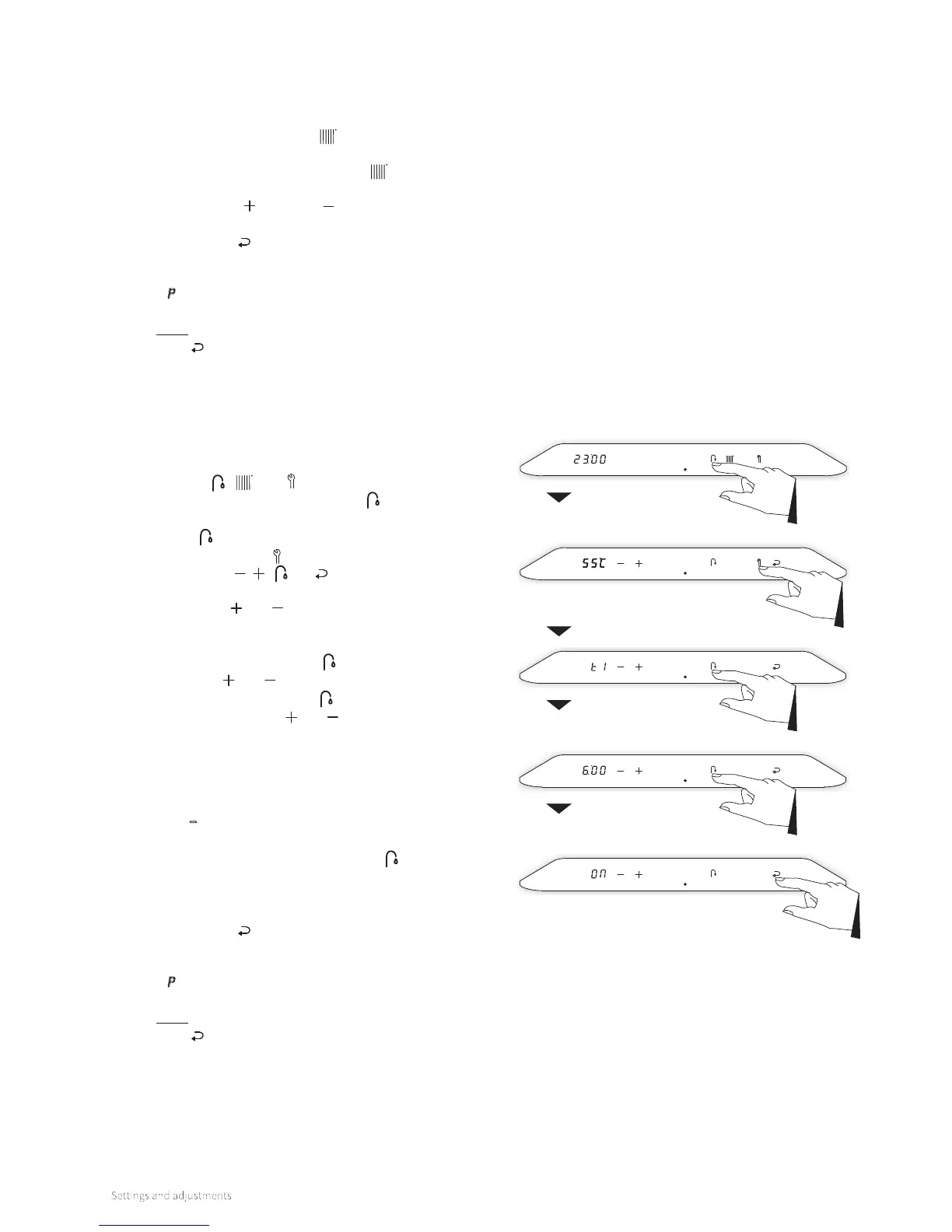
► From a boiler that is in standby or in operational mode tap
just above the power LED to access the main menu. The
symbols , and light up.
► Tap the Domestic Hot Water button
. The set temperature
is shown on the le display. Tap the Domestic Hot Water
button
again to switch to the clock program setting
► Tap on the Service button.
► The symbols , , and are shown. Also the first
switching period "t1" appears on the le display.
► Tapping the and buttons will change between the 4
dierent on/o switching periods.
► Choose a switching period (for instance "t1") and tap on the
Domestic Hot Water button
.
► Tap on the and buttons to set the time and tap the
Domestic Hot Water button
again to set the desired
action by tapping the and buttons.
The actions to be set are as follows:
► On: Start of period DHW on. From this switching point
the heat exchanger will be kept on temperature.
► O: End of period DHW o. From this switching point
the heat exchanger will not be kept on temperature.
► – : No action. This switching point will have no eect
on maintaining the heat exchanger's temperature.
► Tap on the Domestic Hot Water button
to select the
next switching period. Set the switching time and the
corresponding action and repeat this, if needed, for all 4
switching periods.
► Tap the Enter button to confirm. The switching times and
actions will be saved in the boiler controller. Aer 2 minutes
of inactivity changes made will also be saved.
A P appears in the right display and the display returns to
the Central Heating menu.
Note: By tapping just above the power LED instead of the
Enter button the display returns to the Central Heating
menu without storing any changes.
To apply the clock program
► From a boiler that is in standby or in operational mode tap
just above the power LED to access the main menu (also
see §8.1.1).
► Tap on the Central Heating button. The current
temperature of the central heating water is displayed in the
le display. Tap the Central Heating button again to
switch to the clock program setting.
► Using the Plus and Minus buttons, set the desired
program setting (P-on, T-on, On or O).
► Tap the Enter button to confirm. The chosen program
setting will be saved in the boiler controller. Aer 2 minutes
of inactivity changes made will also be saved.
A P appears in the right display and the display returns to
the Central Heating menu.
Note: By tapping just above the power LED instead of the
Enter button the display returns to the Central Heating
menu without storing any changes.
Main menu
Domestic hot
water menu
Temperature
Switch moment 1
Switch point t1
Action moment t1




 To Next Page