Chapter 8: Operating instructions
50 TruVision DVR 12 User Manual
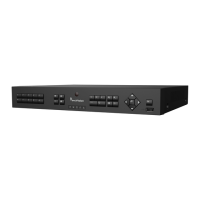
Figure 10: TVR 12 front panel (4-ch model shown)
The controls on the front panel include:
. USB port The DVR supports both a USB DVD and a USB HD on the
front and rear USB ports.
. CD/DVD burner Insert CD or DVD disc.
The CD/DVD burner is not present on all TVR 12 models.
Not all menus are available on models without a burner.
. Eject button Ejects CD/DVD disc. This is only present on models with a
CD/DVD burner.
. Archive button Press once to enter quick archive mode. Press twice to
start archiving.
. Display and Seq
buttons
Live view mode: Press Display to toggle through the
various views single and multiviews. Press Seq
sequencing in live view mode.
Menu mode: Press Enter to select a menu window and
then Seq
to toggle through the tabs along the top of a menu
. Channel buttons Switch between different cameras in live view, PTZ control
or playback modes.
. Live, Menu and Search
buttons
Live: Switch to live view mode.
Menu: Enter/exit the main menu.
Search: Enter the advanced search menu.
. Status LEDs HDD: Green indicates the DVR is working correctly. Red
indicates a fault.
Network: Green indicates the network is working correctly.
Red indicates a fault or no network connection.
Internal: Green indicates the Watchdog is working
correctly. Red indicates that the Watchdog is reporting a
fault.
Alarm: Green indicates no external alarm. Red indicates
external alarm status or motion.
. Alarm button Use to manually acknowledge an alarm.



 To Next Page