11
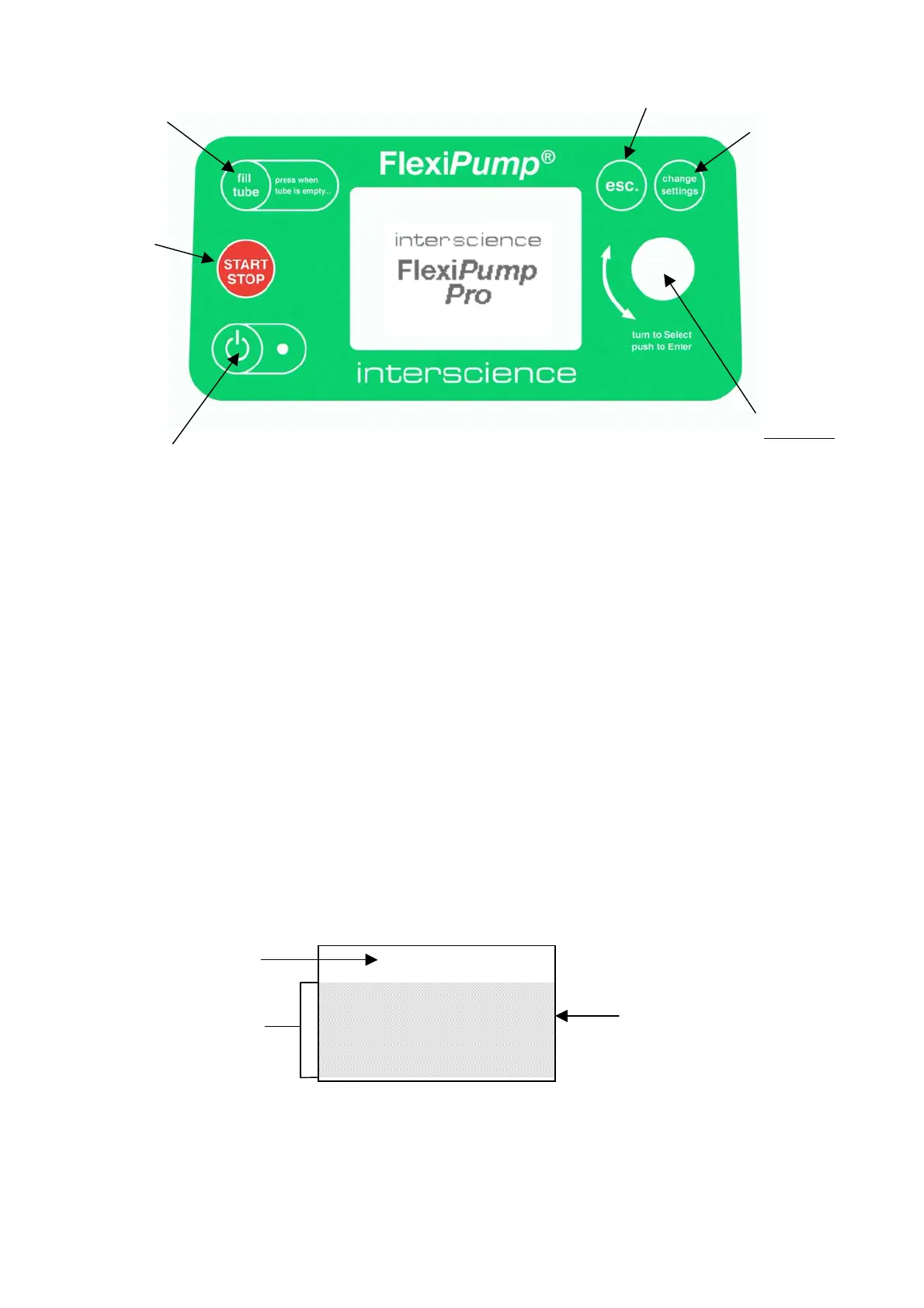
Informations and menus appear on-screen. The rotating button at the right side of the screen is the main
control of the FlexiPump
®
: it enables to choose in the menu the options, launch the operations (e.g.
dispense liquid, calibrate or set a program).
The other buttons have specific functions. They act as shortcuts for specific actions. For example:
START/STOP : To start or stop the pump
esc. : To cancel an operation or a choice
change settings : To put on-screen the program menu.
3.4 Menu
A menu is a list of choices appearing on-screen. The user turns the rotating button to look at the menu
and presses the button to validate his choice. If the list is too long to fit on the screen, the list scrolls as
the user turns the button.
Example of the main menu, when the FlexiPump
®
is turned on:
On / Off
Main button
Turn to select
Press to enter
Cancel
Programs
Start / Stop
To fill in the tube when
starting
MENU
RUN PROGRAMS
MODIFY PROGRAMS
CALIBRATION
BASIC PUMPING
GENERAL SETTINGS
Title of the menu
Liste of the options
Chosen option


 To Next Page