20
3.7.3 Calibration
When ?
- When you change program because calibration is made for each program even if the tubing diameter
remains the same.
- Each time you put the tubing back in the pump head, because the tubing is inserted differently and can
change flow.
Necessity of a calibration
Dispensing of a dose
See introduction on this subject chapter 3.5.2 Programs and calibration.
Dispensing in continuous mode
In the continuous mode, the flow appears on-screen. The flow is proportional to the rotation speed of the
pump. The calibration enables to evaluate precisely this proportionality and put on-screen the precise
flow.
The operation of calibration is not absolutely necessary: if you fill in correctly information about the inner
diameter of the tubing, the FlexiPump
®
can then figure out the flow for an average viscosity and function
correctly. But to maintain an optimal precision, calibration is recommended.
Principle of operations
The operation consists in pouring a fixed volume of liquid in conditions closest to real conditions, to
measure it and then enter the value of the volume in the machine so that it can calculate the ratio
between the volume and the number of rotations made, that is to say the flow rate.
The method to measure a volume is generally to weigh the poured liquid and convert its weight in
volume, knowing the weight of the liquid.
The conditions that must be met:
• diameter of the tubing : install the tubing shown in the program
• viscosity : pour the appropriate liquid, at the appropriate temperature (not other settings)
• volume : choose a container accordingly to a dose
Procedure
Summary: Tare a container corresponding to the volume of a dose. Fill it with the FlexiPump
®
and
measure the volume of the liquid. Then enter the volume in the machine.
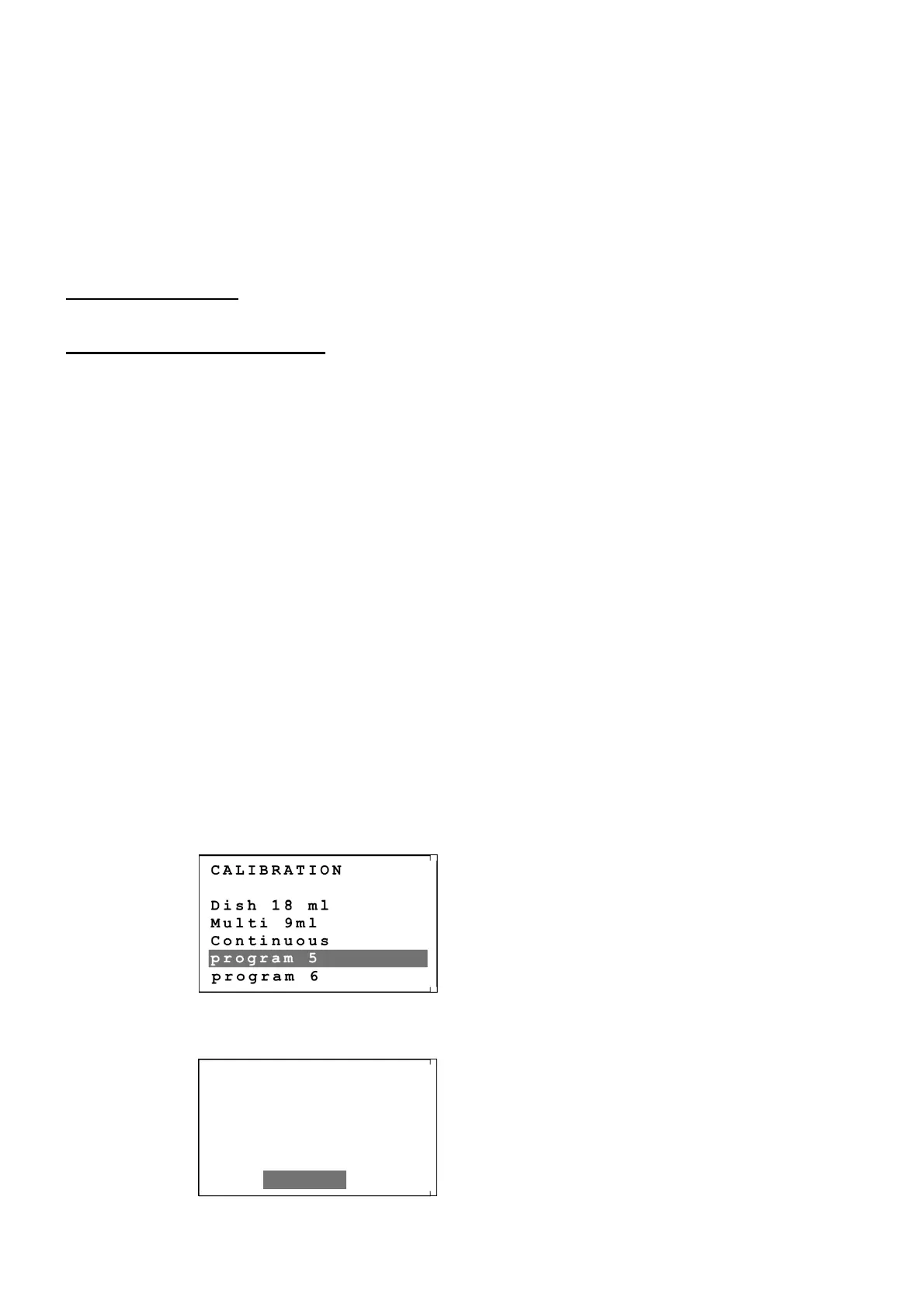
In the main menu, choose the option “CALIBRATION” and in the displayed menu, choose the
program to calibrate. Example :
Follow the instructions on-screen and press on the rotating button to go to the next steps.
At one point, the screen shows:
The button “fill tube” is at the top left side of the screen. Press on this button if the tubing is not totally
CALIBRATION
Dish 18 ml
Multi 9ml
Continuous
program 5
program 6
CALIBRATION
PRESS FILL TUBE
TO AVOID ANY
AIR BUBBLES
ENTER


 To Next Page