32
OPERATION AND SET-UP ON THE CONTROLLER
inVENTer Connect controller platform | Operating instructions
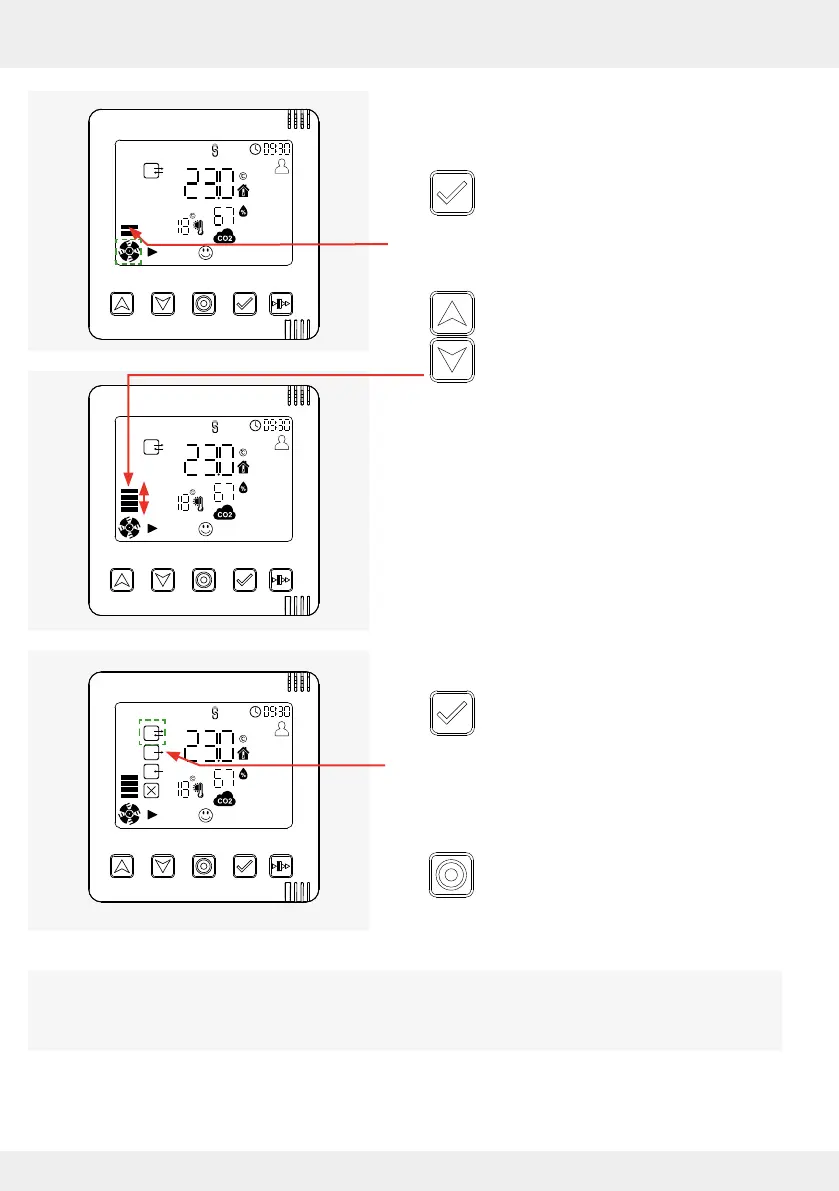
Requirements:
• The "System Information" display screen of the
selected zone is called up.
► Press the selection key.
The symbol for the ventilation level (air ow) starts
to ash.
► Press the arrow keys to change the
ventilation level directly.
• Up arrow key:
The ventilation level is increased,
the fan power increases.
• Down arrow key:
The ventilation level is reduced,
the fan output decreases.
Once the desired ventilation level is reached:
► Press the selection key to move to the
next setting option. Your change is active.
The symbol for ventilation mode (operating mode)
starts to ash.
OR
► Press the mode key to exit the Settings
menu.
Your change is active.
A changed ventilation level is eective for 1 hour as standard and overrides the stored ventilation
prole. This duration can be changed via the app. The system then returns to the values stored in
the ventilation prole.



 To Next Page