33
OPERATION AND SET-UP ON THE CONTROLLER
inVENTer Connect controller platform | Operating instructions
Setting the ventilation mode (operating mode, time-limited change)
The ventilation units operate in three ventilation modes with dierent ventilation levels. These
modes are:
Ventilation mode Symbol
Heat recovery
Unidirectional ventilation (both icons always act together)
OFF
Table 4: Ventilation modes (operating modes)
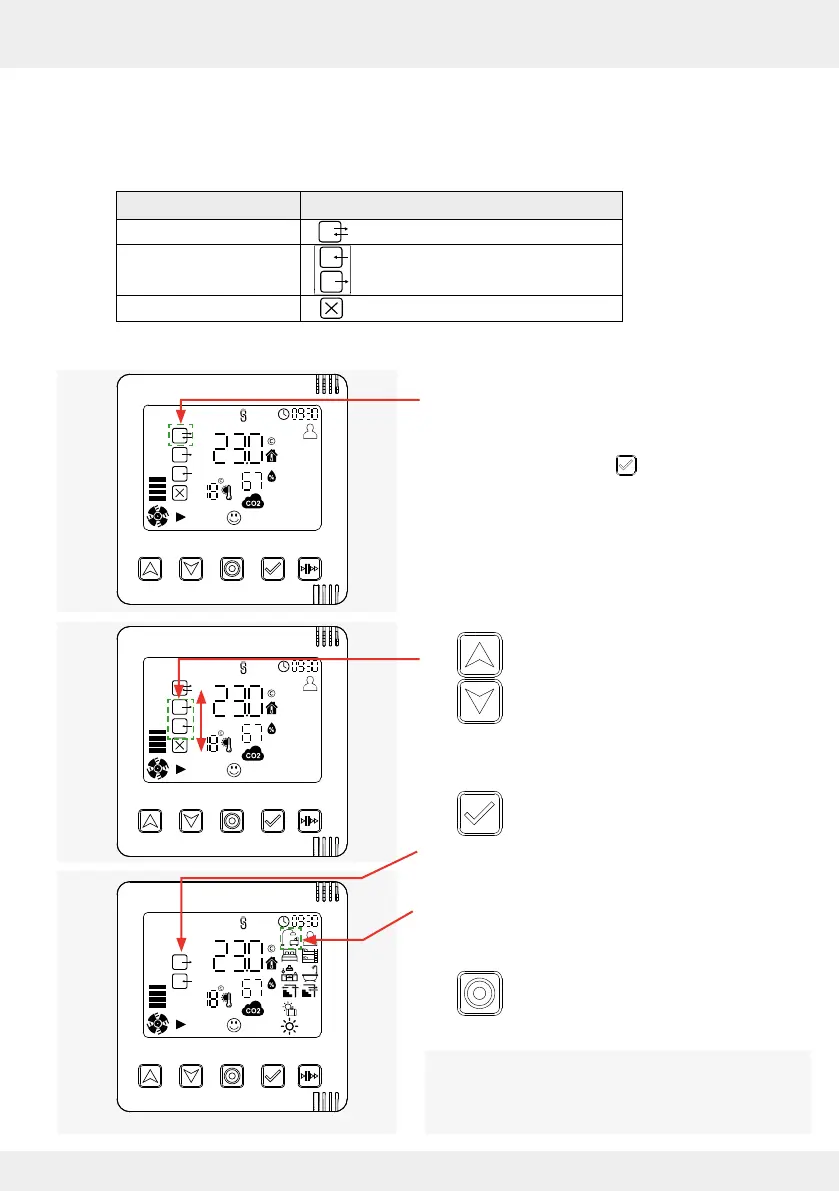
Requirements:
• The symbol for the ventilation mode set in the
ventilation prole ashes
(from the "System Information" screen:
Press the selection key 2 times).
► Press the arrow keys and navigate
through the ventilation modes. The re-
spective selectable symbol ashes.
Once the desired ventilation mode is reached:
► Press the selection key to move to the
next setting option. Your change is active.
The icon for the selected ventilation mode appears
on the display screen.
The next symbol (ventilation prole symbol) starts
ashing.
OR
► Press the mode key to exit the Settings
menu.
Your change is active.
The changed ventilation mode is eective for 1 hour
by default. This duration can be changed via the
app. The system then returns to the values stored
in the ventilation prole.



 To Next Page