60
OPERATION AND SETUP WITH THE APP
inVENTer Connect controller platform | Operating instructions
Setting the ventilation mode and ventilation level
Requirements:
• The window in which settings can be made for the selected
ventilation zone is displayed.
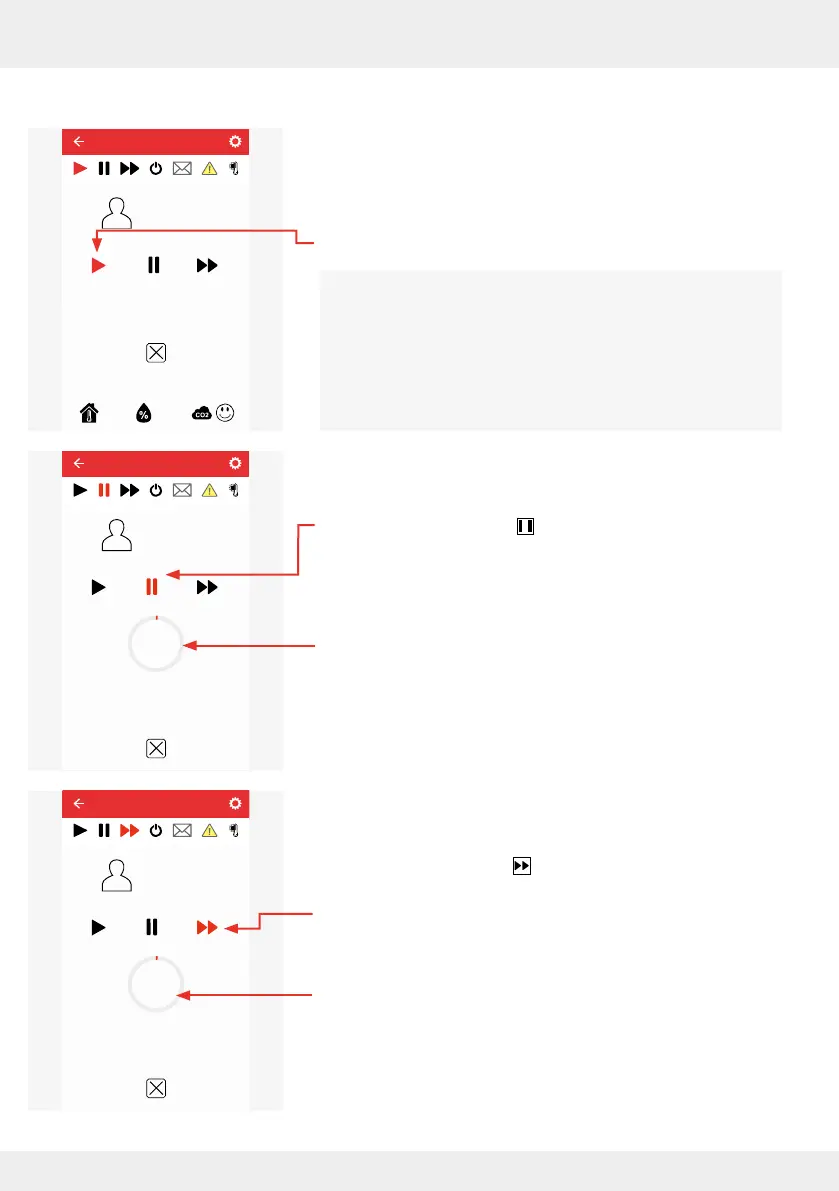
The fan runs in automatic mode (Auto; ventilation mode).
The active mode is indicated by a red symbol.
The following manual changes (overrides) of the set
ventilation prole are possible:
Option 1: Pause mode
Option 2: Boost mode
Option 3: Change ventilation level and ventilation mode
Option 1: Pause mode
► Press the Pause button in the active window and put the
ventilation unit into pause mode.
Pause mode is selected. The pause symbol is displayed in
red.
A countdown appears on the screen to show how long the
ventilation zone is still in pause mode.
Option 2: Boost mode
► Press the Boost button in the active window and put the
ventilation zone into boost mode.
Boost mode is selected.
Ventilation level 4 is set.
The boost symbol is displayed in red.
A countdown appears on the screen to show how long the
ventilation zone is still in boost mode.
Default
Current ventilator power level 1
Ventilation zone 1
Override
25,8°C 24,9%
Default
Current ventilator power level 1
Ventilation zone 1
Override
00:59:34
Default
Current ventilator power level 4
Lüftungszone 1
Übersteuerung
00:59:34



 To Next Page