67
OPERATION AND SETUP WITH THE APP
inVENTer Connect controller platform | Operating instructions
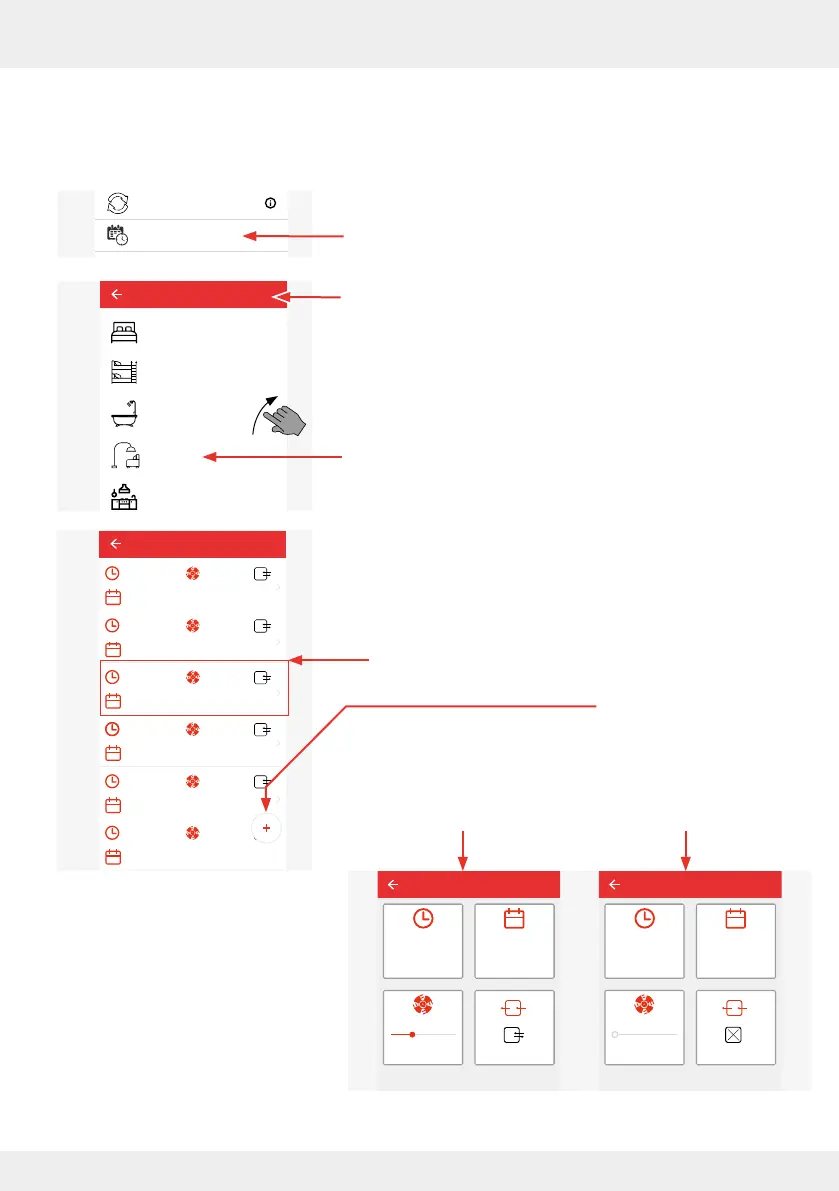
Ventilation prole manager
Here you have the option to make changes to the existing ventilation proles to adapt them to
your personal requirements.
► Press the "Ventilation prole manager" button.
The adjacent window opens and shows the possible
ventilation proles.
► Press the symbol of the ventilation prole you want to
change, e.g. Living room.
The adjacent window opens and shows the
set parameters of the selected ventilation prole.
Option 1: Change prole Option 2: Add prole
► Select the prole interval
for which you want to
change settings and press
this button.
A window opens in which
the set parameters for this
interval can be displayed
and changed.
System update
Ventilation profile manager
Hours run meter
Ventilation levels
Boost and pause (cross-zone)
Filter manager
Maintenance manager
Radio Performance
Change system name
System reset
Restore factory settings
Advanced settings
Ventilation profile manager
Bedroom
Children‘s room
Bathroom
Living room
Kitchen
Living room
00:00 - 07:59 lvl.: 2
Mon, Tue, Wed, Thur, Fri
08:00 - 10:59 lvl.: 4
Mon, Tue, Wed, Thur, Fri
11:00 - 13:59 lvl.: 2
Mon, Tue, Wed, Thur, Fri
14:00 - 21:59 lvl.: 1
Mon, Tue, Wed, Thur, Fri
22:00 - 23:59 lvl.: 2
Mon, Tue, Wed, Thur, Fri
00:00 - 13:59 lvl.: 2
Mo, Di, Mi, Do, Fr
Livng room
Start time
Save
11:00
Mon, Tue, Wed,
Thur, Fri
lvl.: 2
Living room
Start time
00:00
lvl.: 1
Save
► Press the (+) button to
dene a new prole interval
with the desired settings
to supplement the existing
ventilation prole.
A window opens in which
parameters for a new
ventilation interval can be
dened.



 To Next Page