70
OPERATION AND SETUP WITH THE APP
inVENTer Connect controller platform | Operating instructions
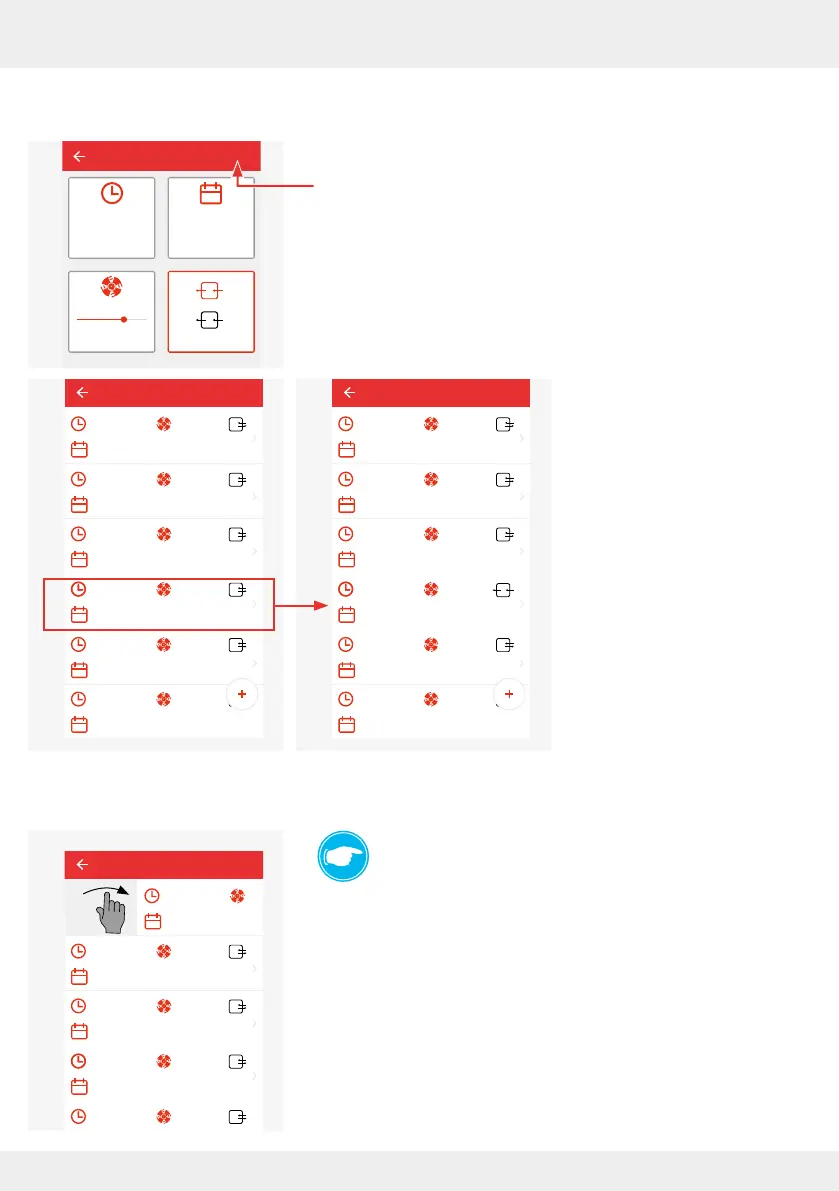
After pressing "Save", you will automatically return to the window with the setting options.
The settings you have specied are displayed.
► If the settings shown correspond to your requirements, press
"Save".
The set values are trans-
ferred to the ventilation
prole or, in the case of
changes in an existing
prole period, changed.
Here in the example, the
period from 14:00.
Removing a prole interval from a ventilation prole
TIP:
Prole intervals can be removed from a ventilation
prole.
► "Swipe" the prole interval you want to remove from the
screen area.
The prole interval is removed from the ventilation prole.
The previous interval takes over the period of the deleted
interval.
Living room
00:00 - 07:59 lvl.: 2
Mon, Tue, Wed, Thur, Fri
08:00 - 10:59 lvl.: 4
Mon, Tue, Wed, Thur, Fri
11:00 - 13:59 lvl.: 2
Mon, Tue, Wed, Thur, Fri
14:00 - 21:59 lvl.: 1
Mon, Tue, Wed, Thur, Fri
22:00 - 23:59 lvl.: 2
Mon, Tue, Wed, Thur, Fri
00:00 - 13:59 lvl.: 2
Mo, Di, Mi, Do, Fr
Living room
Start time
14:00 Mon, Tue
lvl.: 3
Save
Living room
00:00 - 07:59 lvl.:2
Mon, Tue, Wed, Thur, Fri
08:00 - 10:59 lvl.:4
Mon, Tue, Wed, Thur, Fri
11:00 - 13:59 lvl.:2
Mon, Tue, Wed, Thur, Fri
14:00 - 21:59 lvl.:3
Mon, Tue
22:00 - 23:59 lvl.:2
Mon, Tue, Wed, Thur, Fri
00:00 - 13:59 lvl.:2
Mon, Tue, Wed, Thur, Fri
08:00 - 10:59 lvl.:4
Mon, Tue, Wed, Thur, Fri
11:00 - 13:59 lvl.:2
Mon, Tue, Wed, Thur, Fri
14:00 - 21:59 lvl.:1
Mon, Tue, Wed, Thur, Fri
22:00 - 23:59 lvl.:2
Mon, Tue, Wed, Thur, Fri
00:00 - 13:59 lvl.:2
00:00 - 07:59
Mon, Tue, Wed, Thur, Fri
Living room



 To Next Page