69
OPERATION AND SETUP WITH THE APP
inVENTer Connect controller platform | Operating instructions
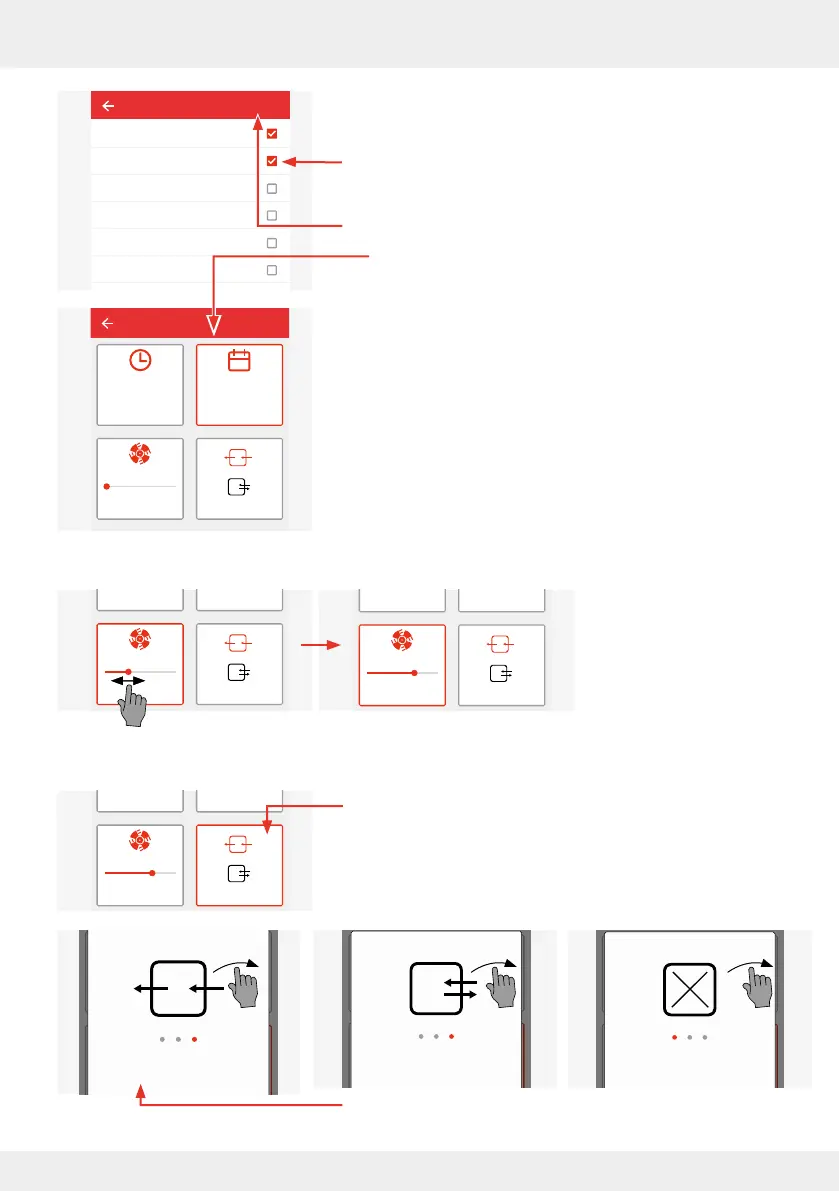
In the window that opens, click on the desired day(s) of the
week. The selected days are marked with a tick.
► Press "Save". You will automatically return to the window
with the setting options.
The set values for the start time and weekday are displayed.
► Now change the ventilation level and/or ventilation mode, if
desired.
Ventilation level
► Change the ventilation
level by pressing the slide
control and dragging it to
the desired level.
Ventilation mode
► Change the ventilation mode by pressing the "Ventilation
mode" button.
► Scroll across the screen in the window that then opens to be
shown the possible ventilation modes in succession.
► Press "Save" on the desired ventilation mode.
Select the day
Mon
Tue
Wed
Thur
Fri
Sat
Save
Living room
Start time
14:00 Mon, Tue
lvl.: 1
Save
Living room
Start time
14:00 Mon, Tue
lvl.: 3
Living room
Start time
14:00 Mon, Tue
lvl.: 3
Startzeit
14:00 Mo, Di
Select ventilation mode
Cancel
Save
Startzeit
14:00 Mo, Di
Select ventilation mode
Cancel
Save
Startzeit
14:00 Mo, Di
Select ventilation mode
Cancel
Save
Living room
Start time
14:00 Mon, Tue
lvl.: 2



 To Next Page