73
OPERATION AND SETUP WITH THE APP
inVENTer Connect controller platform | Operating instructions
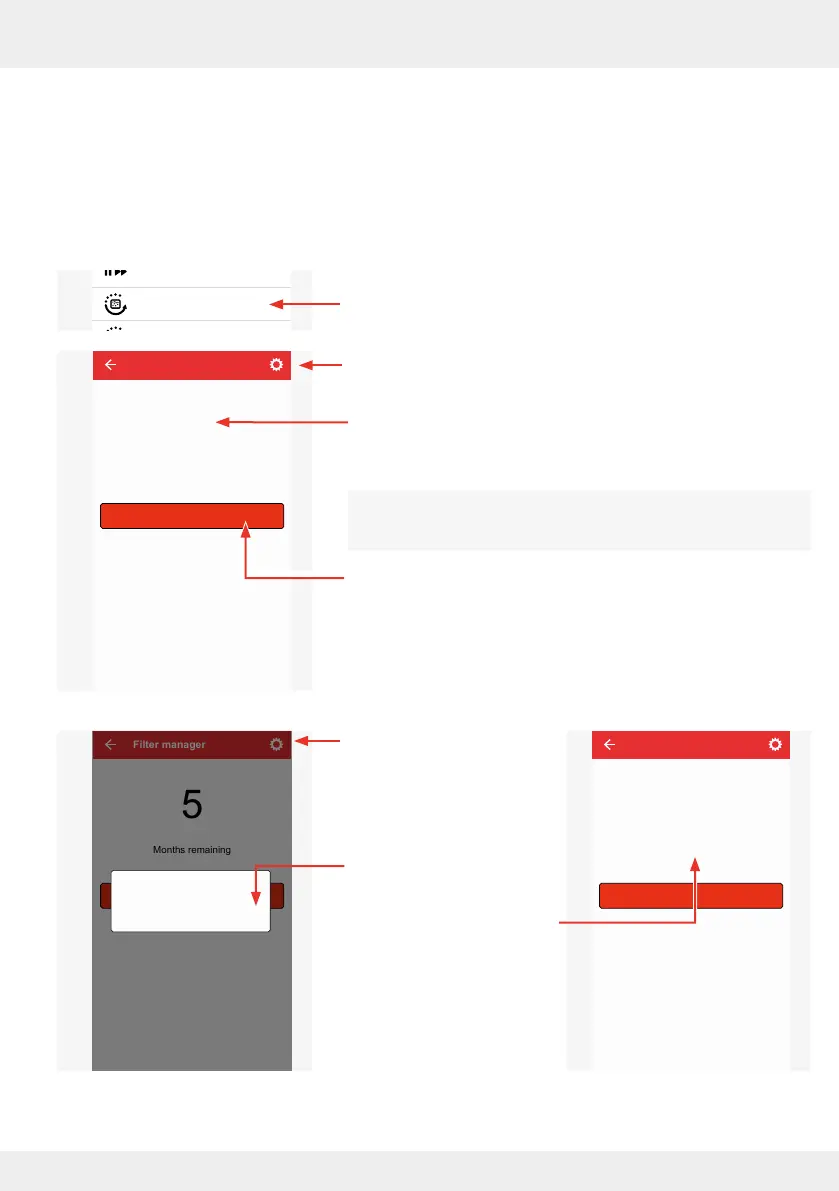
Filter manager
Here you are shown how many months are left before the lter in the ventilation system needs to
be changed. The factory setting for the lter change interval is 6 months.
Once the ventilation system has been set up, the app automatically counts the months remaining
until the scheduled lter change.
► Press the "Filter manager" button.
The adjacent window opens
and
displays the months remaining until the
scheduled lter change.
Resetting the lter change interval
If you have already changed the lter o schedule or for other
reasons, you can reset this interval.
► To do this, press the "Reset indicator for lter change"
button.
The adjacent window
opens.
► Press "OK" to conrm the
reset or "NO" to cancel.
After "OK", the interval
until the lter change is
reset to the factory setting
(6 months) or your person-
al setting.
System update
Ventilation profile manager
Hours run meter
Ventilation levels
Boost and pause (cross-zone)
Filter manager
Maintenance manager
Radio Performance
Change system name
System reset
Restore factory settings
Advanced settings
Filter manager
Reset indicator for filter change
Months remaining
5
Filter manager
Filterwechselanzeige zurücksetzen
5
Months remaining
Reset interval
OKNO
Filter manager
6
Months remaining
Reset indicator for filter change



 To Next Page