74
OPERATION AND SETUP WITH THE APP
inVENTer Connect controller platform | Operating instructions
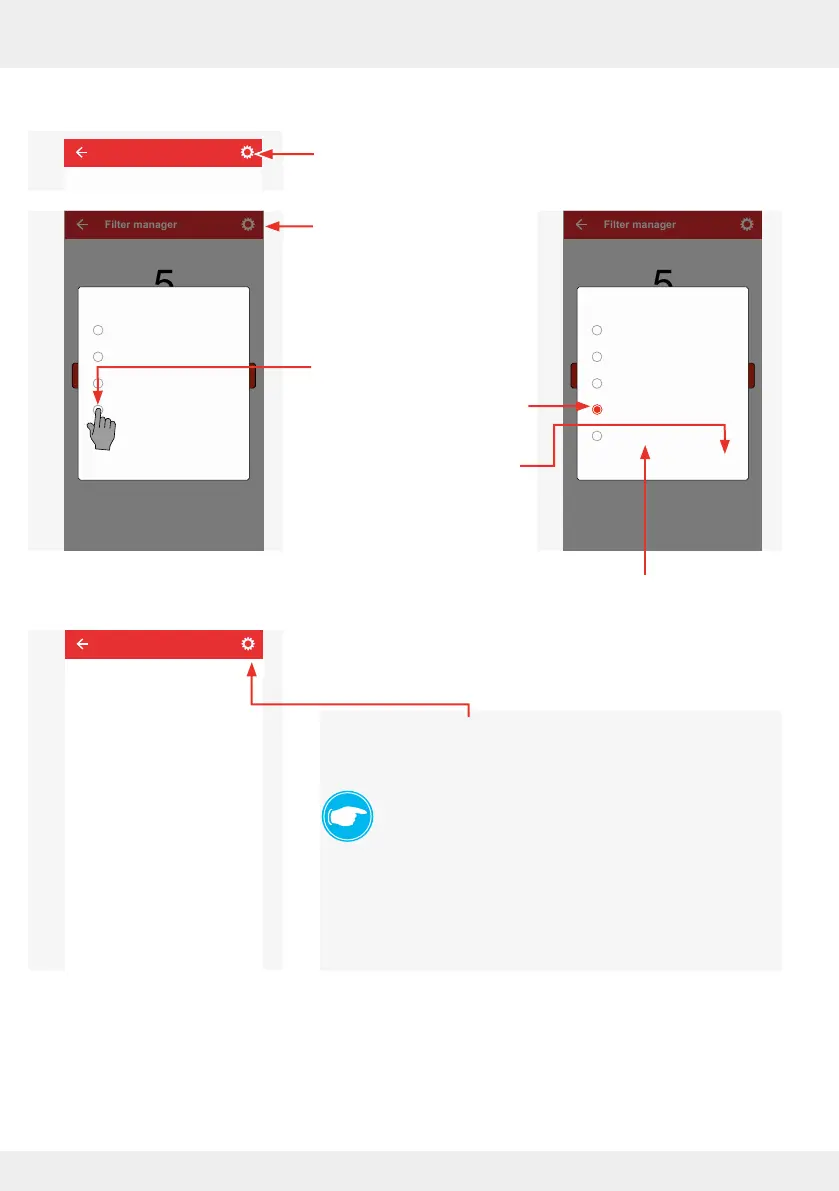
Setting the lter change interval individually
► To do this, press the "gear symbol" in the lter manager.
The adjacent window
opens, in which you can
set the desired interval
by tapping.
► To do this, press the
desired interval,
e.g. 12 months.
The corresponding circle
is marked red.
► Conrm the setting with
"OK" or cancel it by
tapping "NO".
Press this button to disable the lter
manager.
If the function has been disabled, this is indicated by the
adjacent window when you enter the lter manager in
Advanced settings.
By pressing the "gear symbol" (see above), you can cancel the
deactivation by selecting an interval for the lter change again
and conrming the selection with "OK".
TIP:
The following lter maintenance and replacement inter-
vals are recommended:
Dust lter: 3 months
Pollen lter: 1 month
Activated carbon lter: 6 months
Filter manager
Reset indicator for filter change
Months remaining
5
Filter manager
Filterwechselanzeige zurücksetzen
Monate verbleibend
5
OKNO
Disable function
12 Months
6 Months
3 Months
1 Month
Please select
Filter manager
Filter manager ist disabled
Filter manager
Filterwechselanzeige zurücksetzen
Monate verbleibend
5
OKNO
Disable function
12 Months
6 Months
3 Months
1 Month
Please select



 To Next Page