79
OPERATION AND SETUP WITH THE APP
inVENTer Connect controller platform | Operating instructions
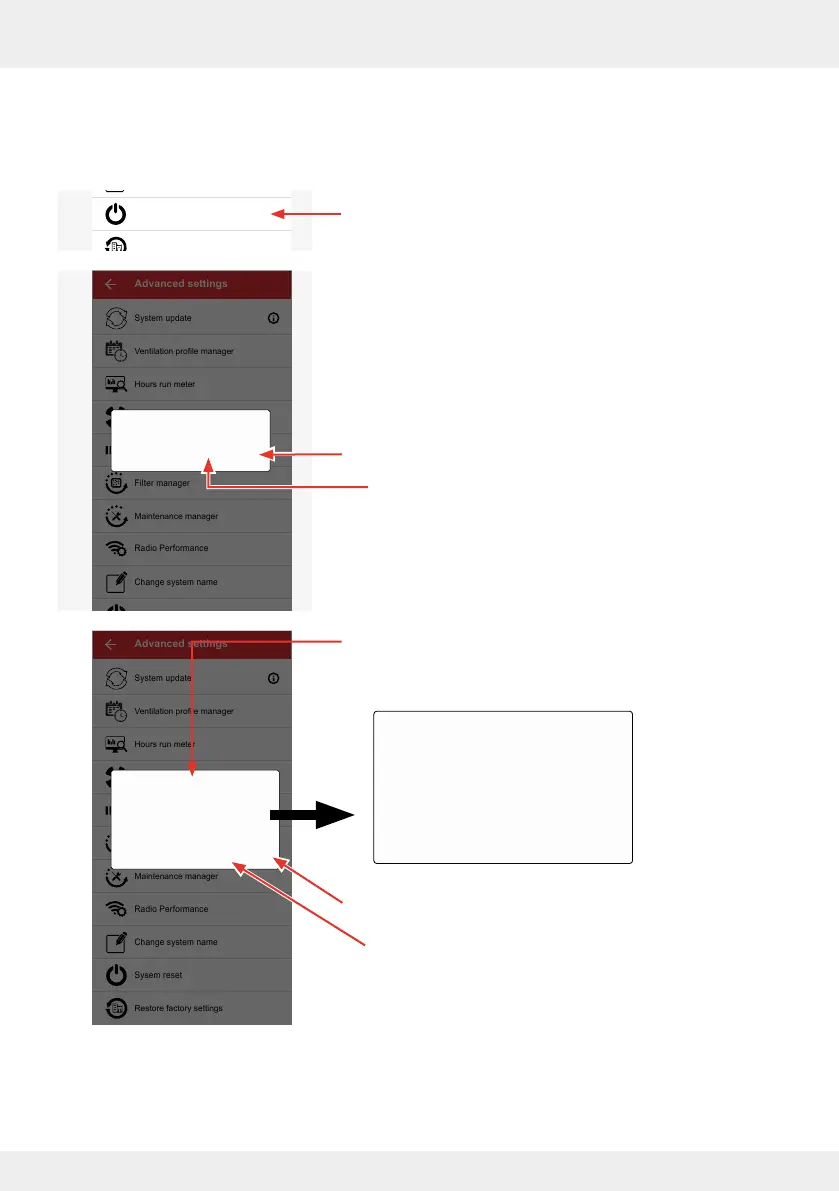
System reset
In this menu, you have the option of resetting the Easy Connect e16 controller and all device
connections.
► Press the "System reset" button.
The adjacent window opens in which you are prompted to
conrm the reset.
► Press "OK" to conrm the reset or cancel the reset
by tapping "CANCEL".
If you have conrmed the reset with "OK", you are asked
again whether you want to reset the system.
► If you are sure, conrm the reset by pressing "OK".
or
press "CANCEL" and cancel the reset.
The system is reset.
► Reset all units and sensors and commission the system
again as described ( 3.2: Initial set-up and 3.3: Device
pairing).
System update
Ventilation profile manager
Hours run meter
Ventilation levels
Boost and pause (cross-zone)
Filter manager
Maintenance manager
Radio Performance
Change system name
System reset
Restore factory settings
Advanced settings
System update
Ventilation profile manager
Hours run meter
Ventilation levels
Boost and Pause (cross-zone)
Filter manager
Maintenance manager
Radio Performance
Change system name
Sysem reset
Restore factory settings
Advanced settings
Confirm reset
OKCANCEL
System update
Ventilation profile manager
Hours run meter
Ventilation levels
Boost and Pause (cross-ne)
Filter manager
Maintenance manager
Radio Performance
Change system name
Sysem reset
Restore factory settings
Advanced settings
Are you sure? The controller is
reset, then all devices and sensors
must be reset and repaired.
OKCANCEL
Are you sure? The controller
is reset, then all devices and
sensors must be reset and
repaired.
CANCEL OK



 To Next Page