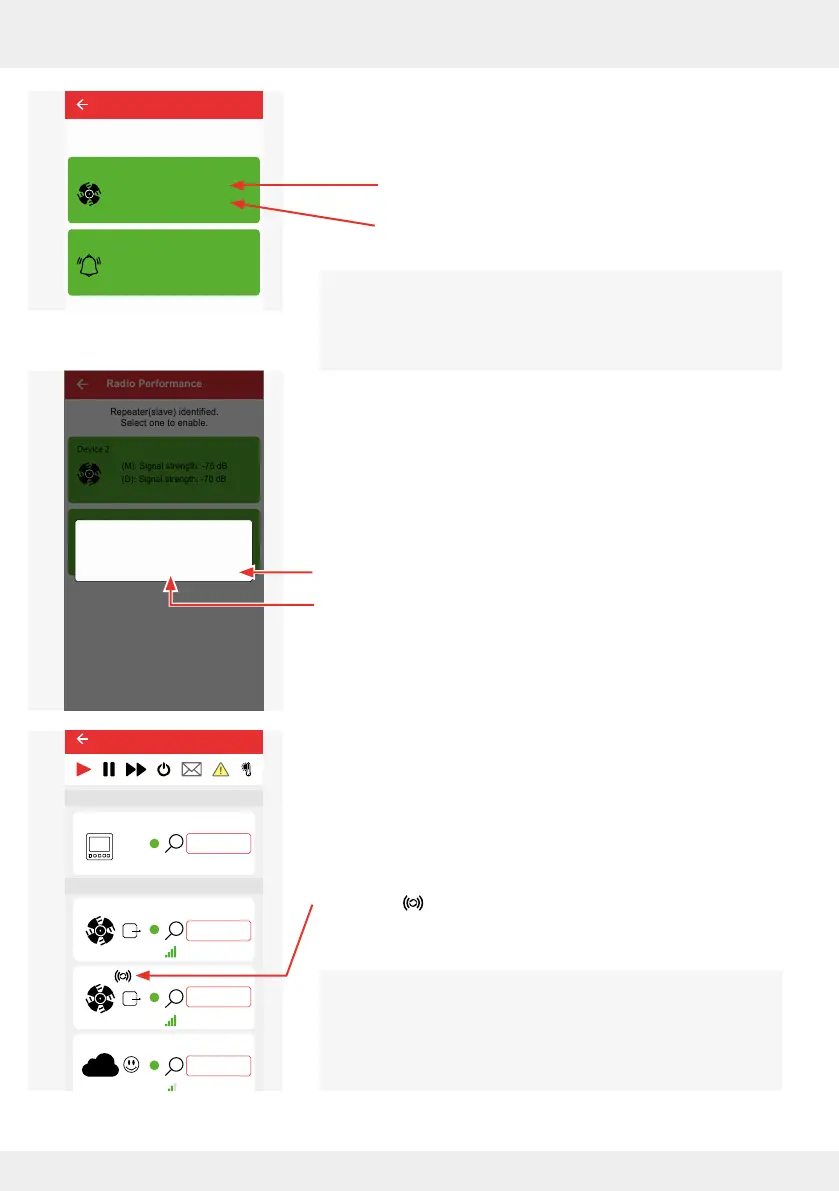
Within a controller system, several devices can be set as sig-
nal ampliers (repeaters). The corresponding symbol appears
next to each device specied as a signal amplier.
We recommend keeping the number of repeaters in the
system low.
82
OPERATION AND SETUP WITH THE APP
inVENTer Connect controller platform | Operating instructions
► Select the device that is to act as a signal amplier from the
suggestions. In this case:
• M: the signal strength to the Easy Connect e16
controller
• D: the signal strength to the component that needs
signal amplication.
Select the device that has the best signal strength to the
controller (M) to obtain a long-term stable connection.
If several devices are suggested as possible repeaters, the
topmost device rated as the most suitable by the app.
The adjacent window opens asking you to conrm that the
device / sensor is to be used as a signal amplier.
► Press "OK" to conrm the device as a signal amplier
(repeater), or cancel the process by tapping "CANCEL".
The selected device is used as a signal amplier (repeater).
Next to the device set as a repeater, the corresponding
symbol is displayed to indicate that the device is acting as
a signal amplier.
Radio Performance
Repeater(slave) identified.
Select one to enable.
Device 2
(M): Signal strength: -75 dB
(D): Signal strength: -70 dB
(M): Signal strength: -74 dB
(D): Signal strength: -74 dB
Device 4
Radio Performance
Repeater(slave) identified.
Select one to enable.
Device 2
(M): Signal strength: -75 dB
(D): Signal strength: -70 dB
(M): Signal strength: -74 dB
(D): Signal strength: -74 dB
Device 4
Do you want to use this device
as a repeater?
CANCEL OK
26°C
26%
Device 5
25,4°C
22,1%
20,4°C
44,1%
CO2
Device 0
Fan 1
Device 2
Device 3
Ventilation zone 1
Ventilation zone 1
Ventilation zone 1
Ventilation zone 1
Ventilation zone 4
Ventilation zone 1
Lorem ipsum
Device 4
Ventilation zone 1
Easy Connect e16
Controller
Device/Sensor



 To Next Page