84
OPERATION AND SETUP WITH THE APP
inVENTer Connect controller platform | Operating instructions
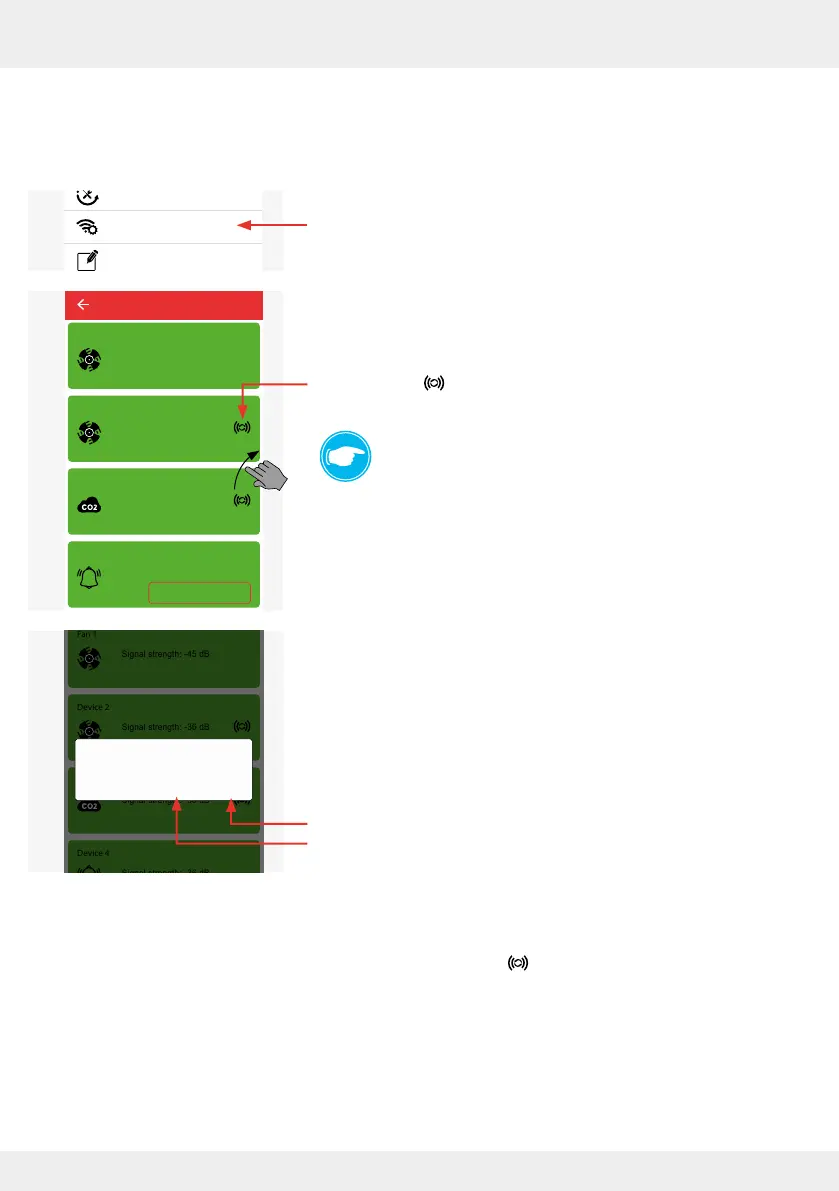
Removing the device as a signal amplier (repeater)
The starting point is the "Advanced settings" menu in the app.
► Press the "Radio Performance" (repeater) button.
The adjacent window opens.
► Press the symbol of the device that is to be removed as
a signal amplier (repeater).
TIP:
By swiping across the screen, you scroll through the
"Radio Performance (repeater)" menu and can see for
each paired device whether it is activated as a repeater.
The adjacent window opens asking you to conrm that the
device is no longer to act as a signal amplier (repeater).
► Press "OK" to deactivate the device as a signal amplier or
cancel the process by tapping "CANCEL".
The selected device is deactivated as a signal amplier
(repeater).
Next to the device, the symbol disappears and is replaced
by the button "Use as repeater".
System update
Ventilation profile manager
Hours run meter
Ventilation levels
Boost and pause (cross-zone)
Filter manager
Maintenance manager
Radio Performance
Change system name
System reset
Restore factory settings
Advanced settings
Use as repeater
Device 2
Device 4
Fan 1
Device 3
Device 6
Device 5
Signal strength: -36 dB
Signal strength: -36 dB
Signal strength: -36 dB
Signal strength: -45 dB
Signal strength: -36 dB
Radio Performance
Device 2
Device 4
Device 3
Device 6
Device 5
Signal strength: -36 dB
Signal strength: -36 dB
Signal strength: -45 dB
Signal strength: -36 dB
Do you want to disable repeater?
CANCEL OK



 To Next Page