87
CLEANING AND CARE
inVENTer Connect controller platform | Operating instructions
The following installation steps are described using the ush-mounted version of the inner cover,
but apply equally to the surface-mounted version.
Cleaning/replacing the dust lter | System cleaning
Requirements:
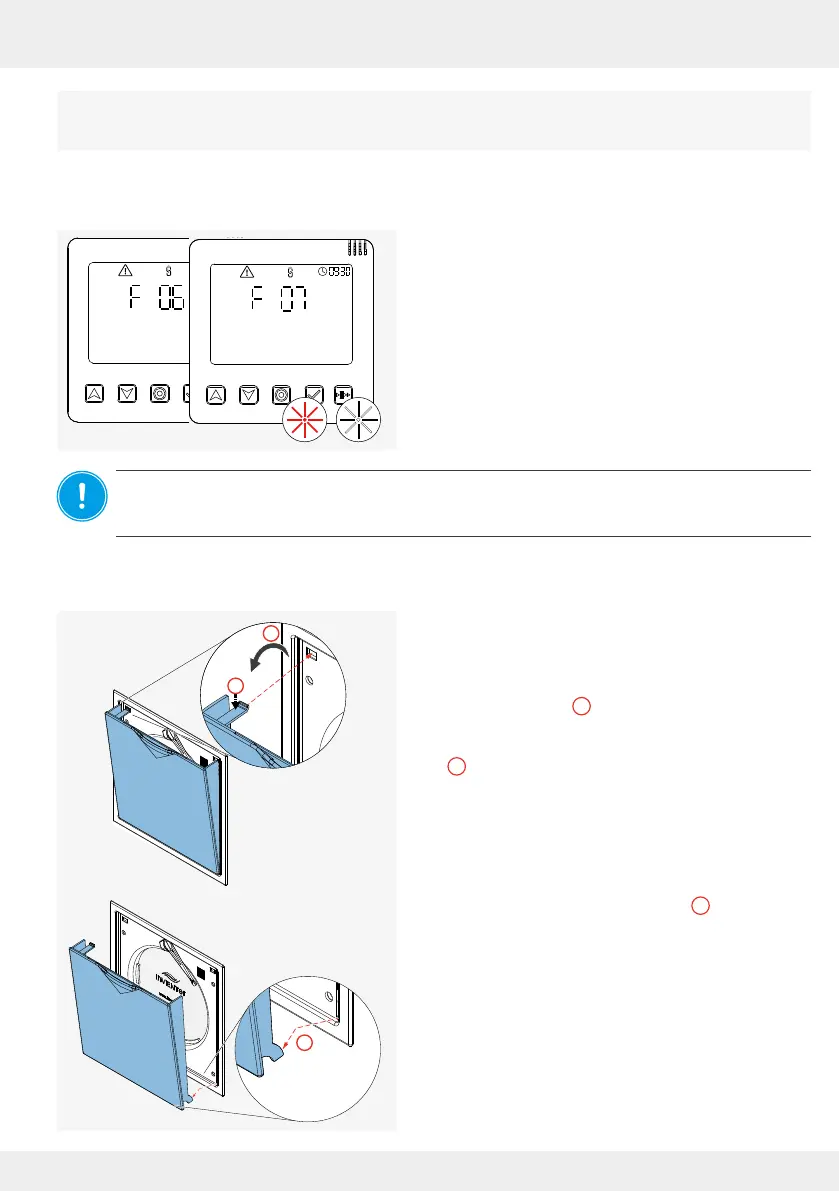
• The LED on the controller is ashing RED
• The error code
F 06 (lter change required) or
F07 (service of the ventilation devices necessary)
is displayed.
• The app reports in a message that the lter needs
to be changed and/or the ventilation system needs
to be serviced.
NOTICE: To clean and check the lter, rst remove the closing ap on the inner cover.
To do this, the entire ventilation system must be switched o at the controller or paused so that
the closing ap's locking arm moves to the right. Never swivel the locking arm by hand.
► Pause the ventilation device or switch it o ( 3.6
[Controller] and/or 4.2 | 4.8 [App]).
The swivel arm moves to the right.
► Pull the closing ap forward, away from the
electronics cover ( ).
► Press the spring clip at the top slightly downwards
( ) so that it slides out of the opening when the
electronics cover is pulled forwards.
► Lift the lower lugs out of the guide (
3
).
► Remove the closing ap from the front.
You have removed closing ap on the inner
cover.
1
2
2
1
3



 To Next Page