88
CLEANING AND CARE
inVENTer Connect controller platform | Operating instructions
The inVENTer ISO Coarse 45 % dust lters are
highly durable and can be rinsed repeatedly. We
recommend cleaning the dust lter regularly and
replacing worn lters. Pollen and activated carbon
lters are available as accessories for special
requirements. The respective removal/tting for this
is carried out in the same way as described here.
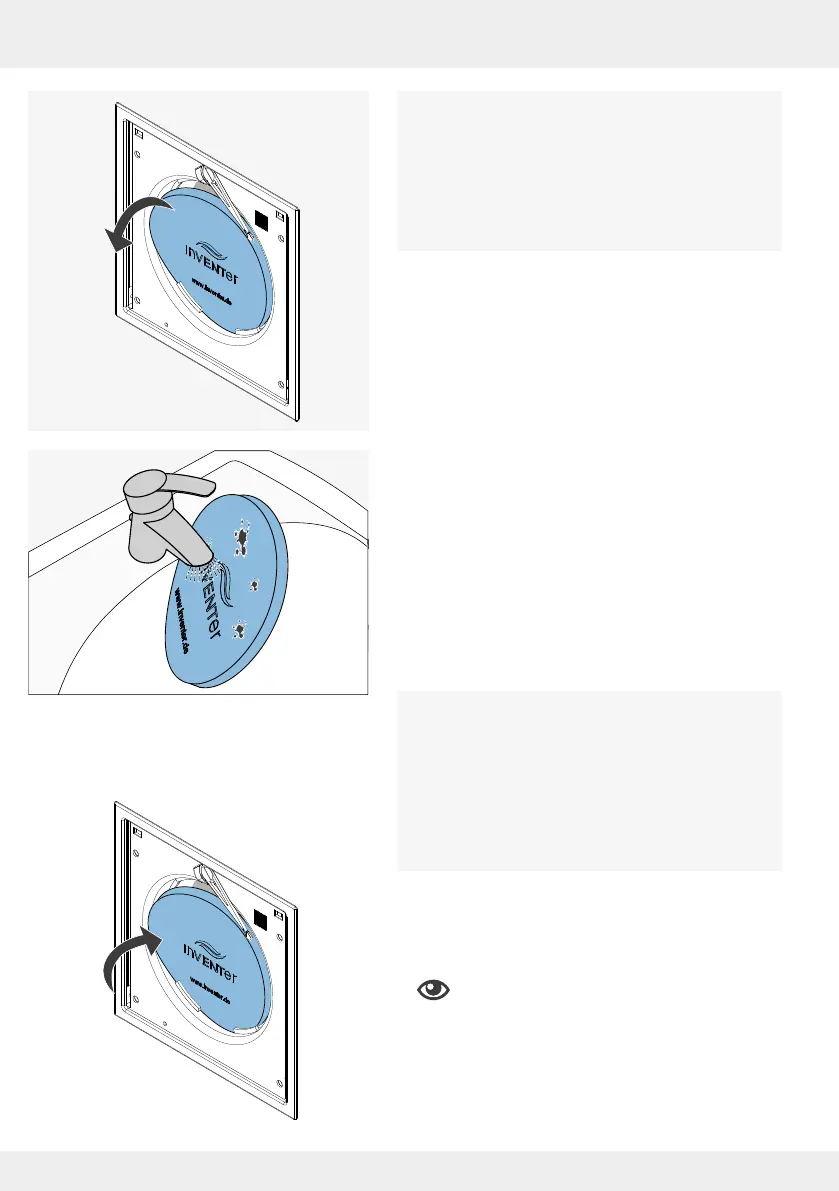
► Carefully pull the dust lter out of the lter holder on
the electronics cover.
You have removed the dust lter.
► Clean the dust lter under warm running water.
► Wait until the dust lter is completely dry.
You have cleaned the dust lter.
Or:
► Discard dust lters if they have defects and replace
them with a new lter.
Error code 07:
When the dust lter has been removed, access to
the ventilation unit is clear. Before replacing the
dust lter, also clean the ventilation unit
components with a vacuum cleaner and soft brush.
Cleaning the ventilation units is also described in
the installation instructions of the corresponding
ventilation unit.
► Slide the completely dried or new lter (dust lter as
standard, alternatively pollen or active carbon lter)
behind the guides provided (lter holder) into the
electronics cover.
Position the lter rmly between the lter
holders.
You have cleaned / changed the dust lter.
!



 To Next Page