To Next Page

S
Sara GrahamSep 13, 2025
Why does the LED flash and the iON Action Camera turn off?
- BBrent FreySep 13, 2025
If the LED flashes and your iON Action Camera turns off, it's likely that the battery is depleted. Recharge the camera to solve this issue.

Why does the LED flash and the iON Action Camera turn off?
If the LED flashes and your iON Action Camera turns off, it's likely that the battery is depleted. Recharge the camera to solve this issue.
Details about trademarks used in the manual.
Information about product design and specifications.
Important warnings regarding product usage and potential hazards.
Precautions for handling and using the camera in various environments.
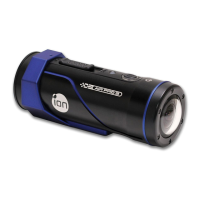
General introduction and features of the ion AIR PRO camera.
Instructions on how to charge the camera's battery.
Guide on how to insert a MicroSD card into the camera.
Steps to set the camera's date and time using the software.
Instructions on how to properly seal the camera's waterproof housing (PODZ).
How to turn the camera on and off.
Detailed steps for recording videos with the camera.
Instructions on how to capture still images with the camera.
How to reset the camera to its default settings.
Information on different PODZ accessories and their functions.
How to use the CamLOCK mount system for attaching the camera.
Instructions for installing and running the ion software on a computer.
Guide on how to view and copy files from camera to PC.
How to configure photo settings via the ion software.
How to configure video settings via the ion software.
How to configure general camera settings via the ion software.
Instructions for resetting camera to factory default settings.
Steps to check for and install camera firmware updates.
Steps to take photos when connected to a TV.
Steps to record video when connected to a TV.
How to play back photo files via TV connection.
How to play back video files via TV connection.
Steps to delete photos or video files when connected to a TV.
How to format the MicroSD card via TV connection.
Troubleshooting for camera power and LED issues.
Troubleshooting for red LED flashing during recording.
Troubleshooting for inability to take photos/videos when Green LED flashes.
Troubleshooting for camera issues with alternative LED flashes.
Troubleshooting for computer not recognizing the camera.
 General
| Aspect ratio | 16:9 |
|---|---|
| Video resolutions | 1280 x 720, 1280 x 960, 1920 x 1080 pixels |
| Maximum frame rate | 60 fps |
| Video formats supported | H.264, MPEG4 |
| Maximum video resolution | 1920 x 1080 pixels |
| Photo mode | Yes |
| Sensor type | CMOS |
| Total megapixels | 5 MP |
| Optical sensor size | 1/2.5 \ |
| White balance | Auto |
| Built-in display | No |
| Aperture range (F-F) | 2.8 - 2.8 |
| USB 2.0 ports quantity | 1 |
| Compatible memory cards | MicroSD (TransFlash) |
| Maximum memory card size | 32 GB |
| Product color | Black, Blue |
| Protection features | Water resistant |
| Mac operating systems supported | Mac OS X 10.4 Tiger, Mac OS X 10.5 Leopard, Mac OS X 10.6 Snow Leopard, Mac OS X 10.7 Lion, Mac OS X 10.8 Mountain Lion |
| Windows operating systems supported | Windows 7 Home Basic, Windows 7 Home Basic x64, Windows 7 Home Premium, Windows 7 Home Premium x64, Windows 7 Professional, Windows 7 Professional x64, Windows 7 Starter, Windows 7 Starter x64, Windows 7 Ultimate, Windows 7 Ultimate x64, Windows Vista Business, Windows Vista Business x64, Windows Vista Enterprise, Windows Vista Enterprise x64, Windows Vista Home Basic, Windows Vista Home Basic x64, Windows Vista Home Premium, Windows Vista Home Premium x64, Windows Vista Ultimate, Windows Vista Ultimate x64 |
| Battery capacity | 1100 mAh |
| Battery life (max) | 2.5 h |
 Weight and Dimensions
| Width | 37 mm |
|---|---|
| Height | 107 mm |
| Weight | 130 g |