Cub Instrument User Manual V2.4
Unrivalled Gas Detection. Page 19 of 46 ionscience.com
The Cubs Page
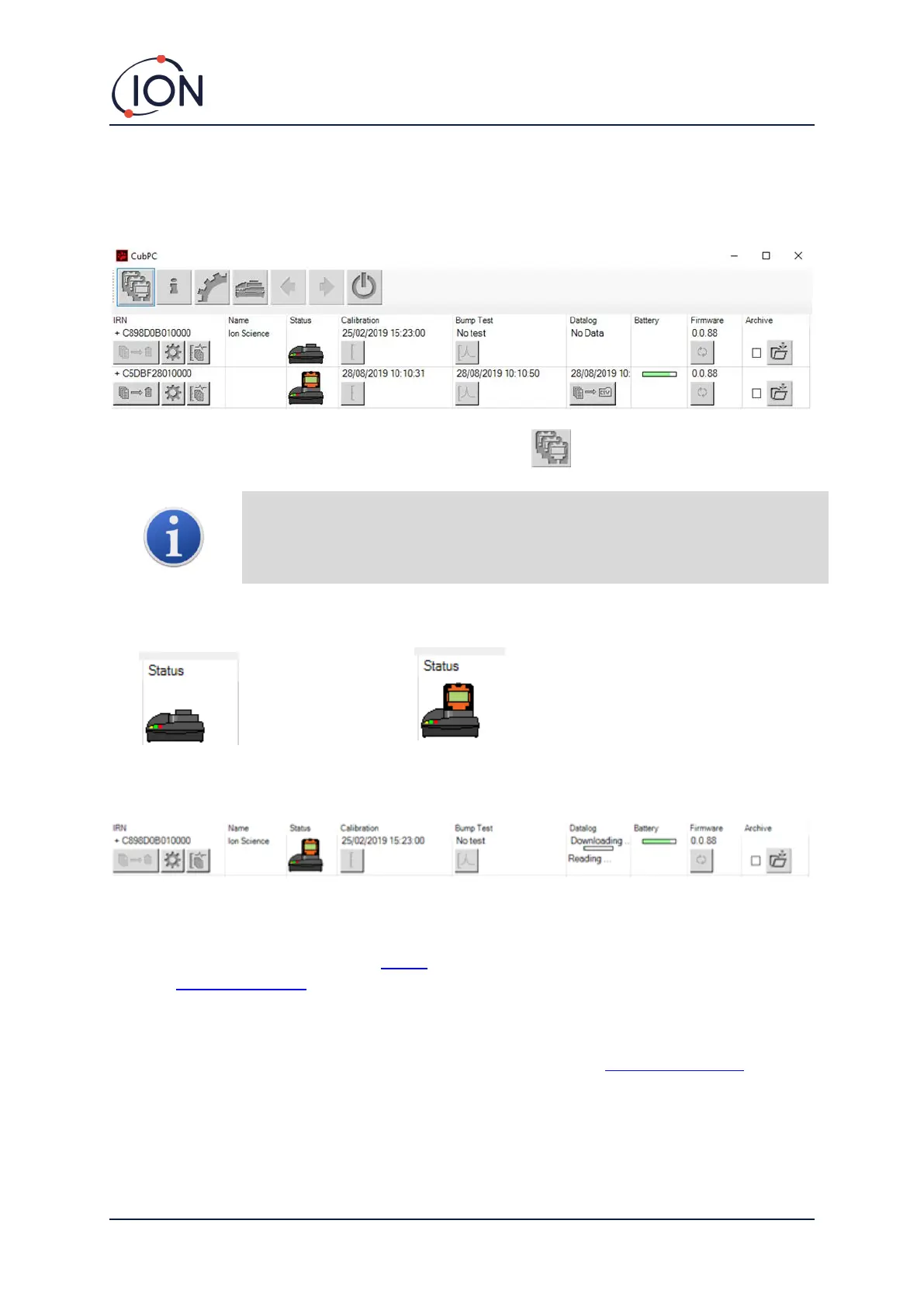
The Cubs page is displayed when CubPC is opened. It lists the currently and previously connected
Cubs.
To open the Cubs page from another page, click this button:
If multiple Docking Stations are connected, it may not be obvious on the page
which is which. In order to identify a unit, click in one of the Status fields. The
Charge and Diagnostic LEDs on that Docking Station will flash purple for a few
seconds
If a Cub is connected to a Cub Doc Docking Station, this is indicated by its picture under the Status
heading:
For each connected Cub, the following are displayed:
1 Cub IRN number.
2 Cub name (if assigned on the Device
configuration page).
3 Cub Doc status.
4 Time and date that the Cub was last
calibrated.
5 Time and date that the Cub was last
bump tested.
6 Time and date of the last data log
transfer from the Cub and the access to
data logs.
7 Battery charge status of the Cub.
8 Firmware version on the Cub.
9 Option to Archive Cub records and
remove the Cub from the list.


 To Next Page