Cub Instrument User Manual V2.4
Unrivalled Gas Detection. Page 20 of 46 ionscience.com
The Cubs page also includes for each Cub buttons to:
• View records of data downloads.
• View the downloaded data itself.
• Save logged data to CSV files.
• Delete logged data.
• Open the Cub Configuration page.
• Calibrate Cubs.
• Perform Bump Tests.
• Update the Cub firmware.
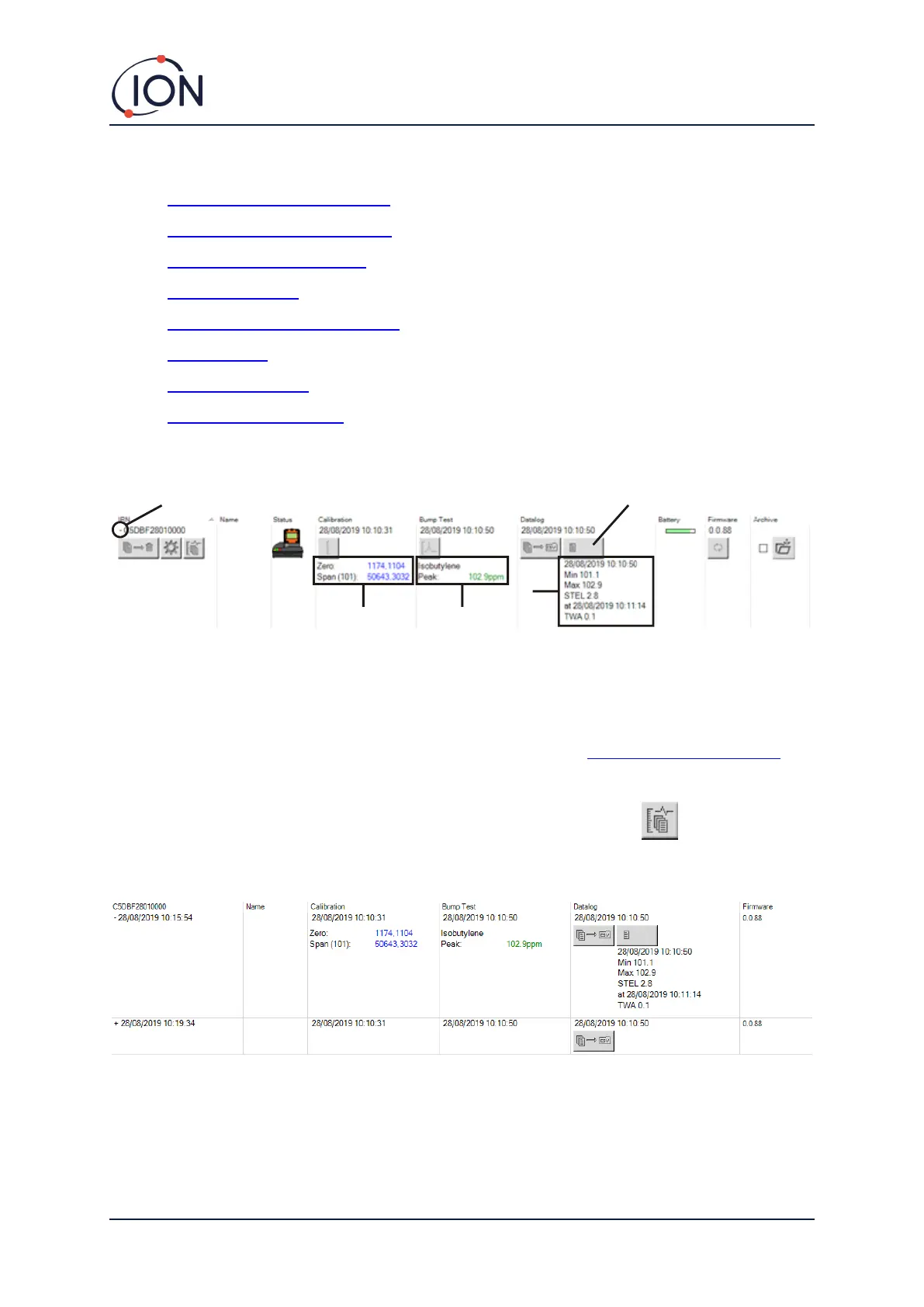
Additional data and facilities for a Cub can be displayed or hidden by clicking the + / - symbols next
to the serial number of that Cub. The additional details are then displayed:
1 + / - control.
2 Calibrated zero and span AD values.
3 Bump test gas used and peak.
4 Minimum, maximum, STEL and TWA
levels recorded in the last data log.
You can scroll up/down between data
logs.
5 Button to access the selected data log.
Viewing Download Records
To view the list of data downloads from a Cub, click this button for the Cub:
The following page is then displayed:
A record is displayed for each time the Cub has downloaded data to the PC.
The displayed download record data includes; time and date of each download, Cub name, Cub
firmware version, calibration time and date, bump test time and date.


 To Next Page