- 13 -
Using IP Service
IP Service is a function which allows user to search for the device easily without having to
remember long complicated IP address. Instead, if user know the device’s name of user’s IP
Power device and user can easily find IP Address with IP Service. To log in the webpage of
9828 on Internet , user still need to do the “Port Forwarding “ in own router.
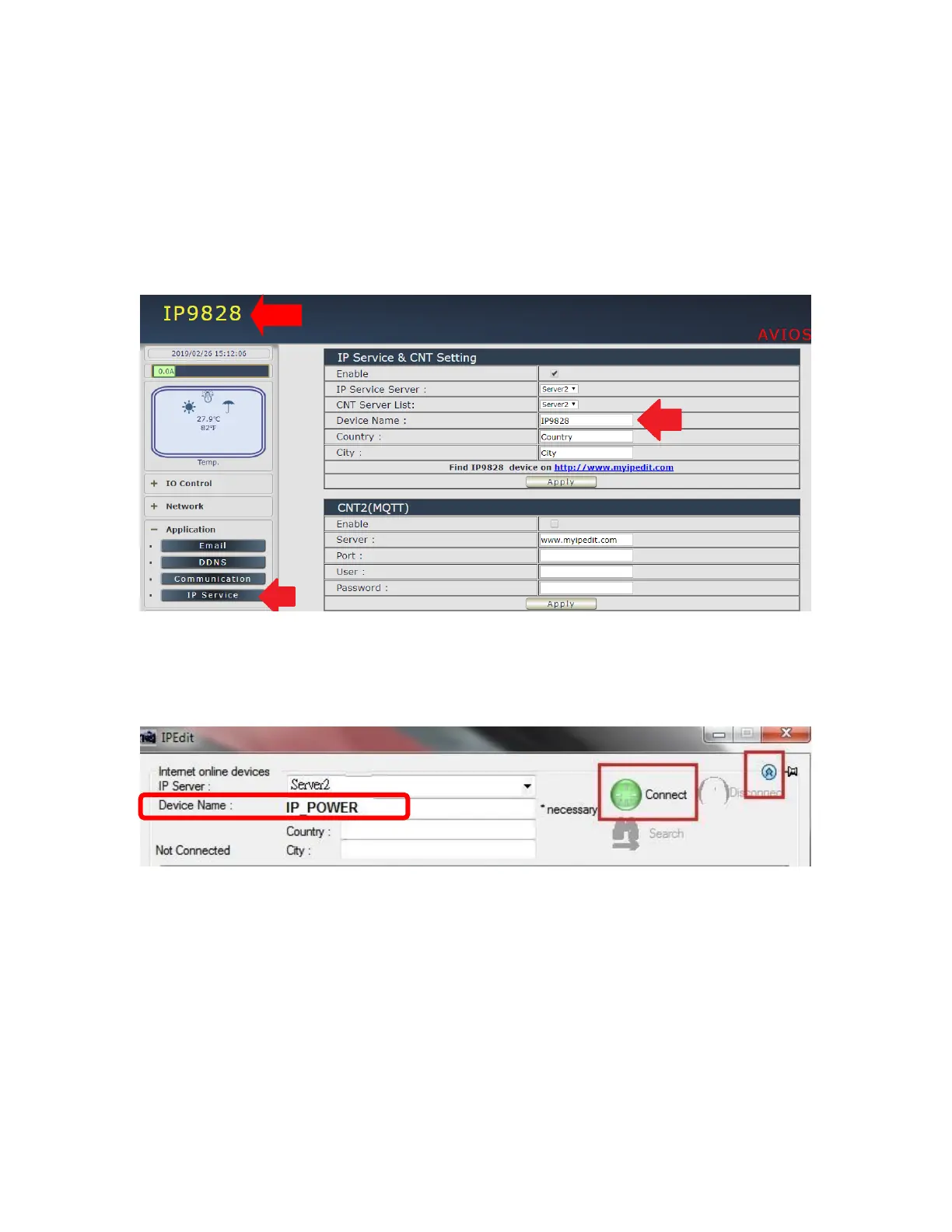
Before using “IP Service “ , please change the device name of user 9828 to avoid similar
name in Host Server.
1.) Open IP Edit and select the server that user’s 9828 is designated to.
Hit the “ Round Green color Connect button “ on the top of IP Edit screen shot below.
2.) Then type in the 9828 Name that user have selected for the device and press the Search
button.
3.) Find user device and double click on the screen and a IE window will pop up connecting to
user device. *User device must be Port Forwarded for the login screen to appear.
EX: The 9828 device name as IP_POWER , and user can search the device easily :
4.) After user has connected to user device, type in the Login and Password for user device



 To Next Page