- 12 -
Notice :
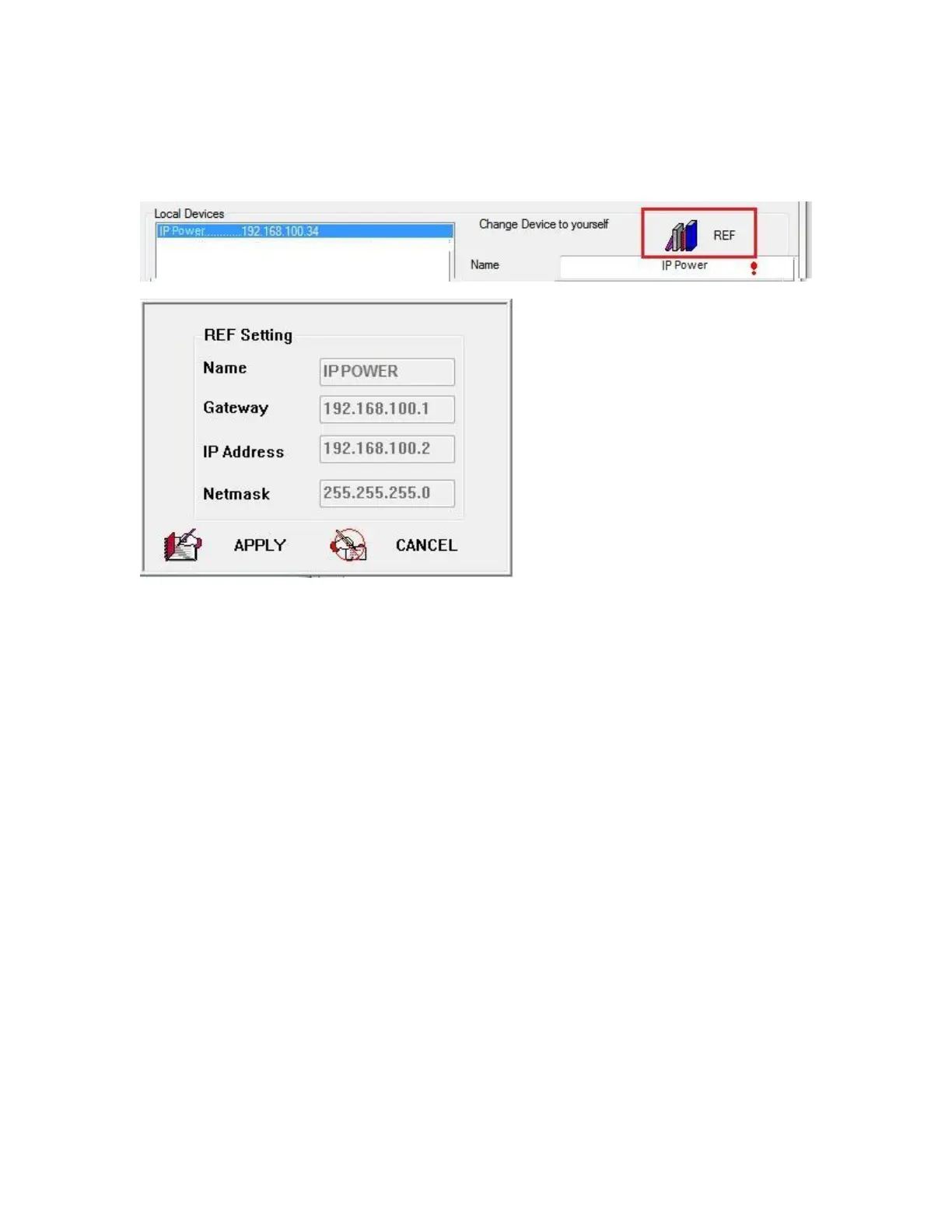
* User can click " REF " in IEPDIT to auto search proper IP setting for 9828.
It will take few minutes to show the suggest wizard.
Please click “ APPLY “ as seeing the suggest wizard , click " yes " to ignore the remind message
of IP being used and then type the Username and Password to change the IP setting.
Username : admin Password : 12345678
Notice :
# Segment : The first 9 digits of the IP Address .
EX: The IP of user PC is 192.168.100.122. If the “ Local IP Address “ at WiFi Info is 192.168.100.
x ( X can the value of 1~252 ) , user PC can get into the webpage of 9828 .
# Please press “Rescan “ to search the router nearby again if can not see user router in the list.
Internet Setup
To connect the IP Power 9828 on Internet, there are two ways
⚫ Setup Port Mapping / Port Forwarding in your router. Please check your Router owner’s
manual .
⚫ Use our own software “ IP Power Center “ : Please refer to the “IP Power Center “ manual
in the online CD website .



 To Next Page