2 FUNCTIONS OVERVIEW AND MANAGEMENT
2 FUNCTIONS OVERVIEW AND MANAGEMENT
2.7 Remote Access
2.7 Remote Access
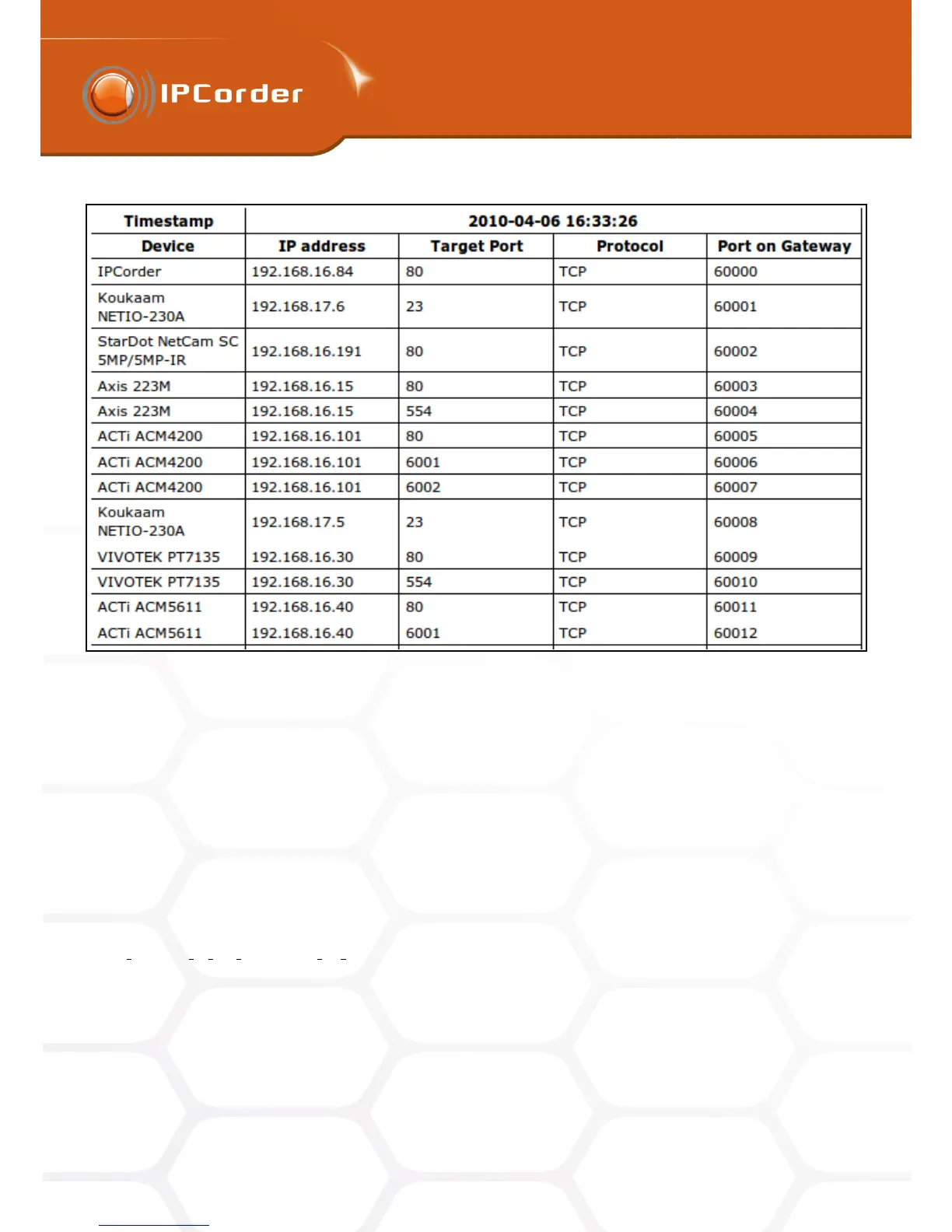
Figure 9: Static tunnels table
• Device – The name of the device (camera), for which a translation record is required.
• IP Address – The address of the target device within the local network where the data from the router
should be sent. On routers, this address is often labelled as Target IP Address.
• Target/To Port – Is the port on the device where the data should be sent. Together with the IP Address,
these two pieces of information define the final destination of the data. On routers, this port is often
labelled as the Target Port or the To Port.
• Protocol – Is the protocol of the IP base which is being used. On routers, it is usually labelled as Protocol.
• Port on Gateway – Is the port on the outer side of the router (Gateway) where the data from the outside
should be sent. This port belongs to the defined range and on routers is often labelled as the Source Port
or the From Port.
From the outside, the devices are available at the address consisting of:
Outer address of the router:Port on Gateway
It is necessary to input the values from this table to the Port Forwarding or NAT settings of the router (for
example with Asus WL500g, the final configuration should look like in figure 10) and keep them up to date, and
in accordance with the IPCorder settings.
If you have enabled the remote access, we recommend that you secure the access to cameras with password
(see the section 3 Device Management). If the remote access remains unprotected, it is possible to simply
15



 To Next Page