Basics of the P2V Software
11
Basics of the P2V Software
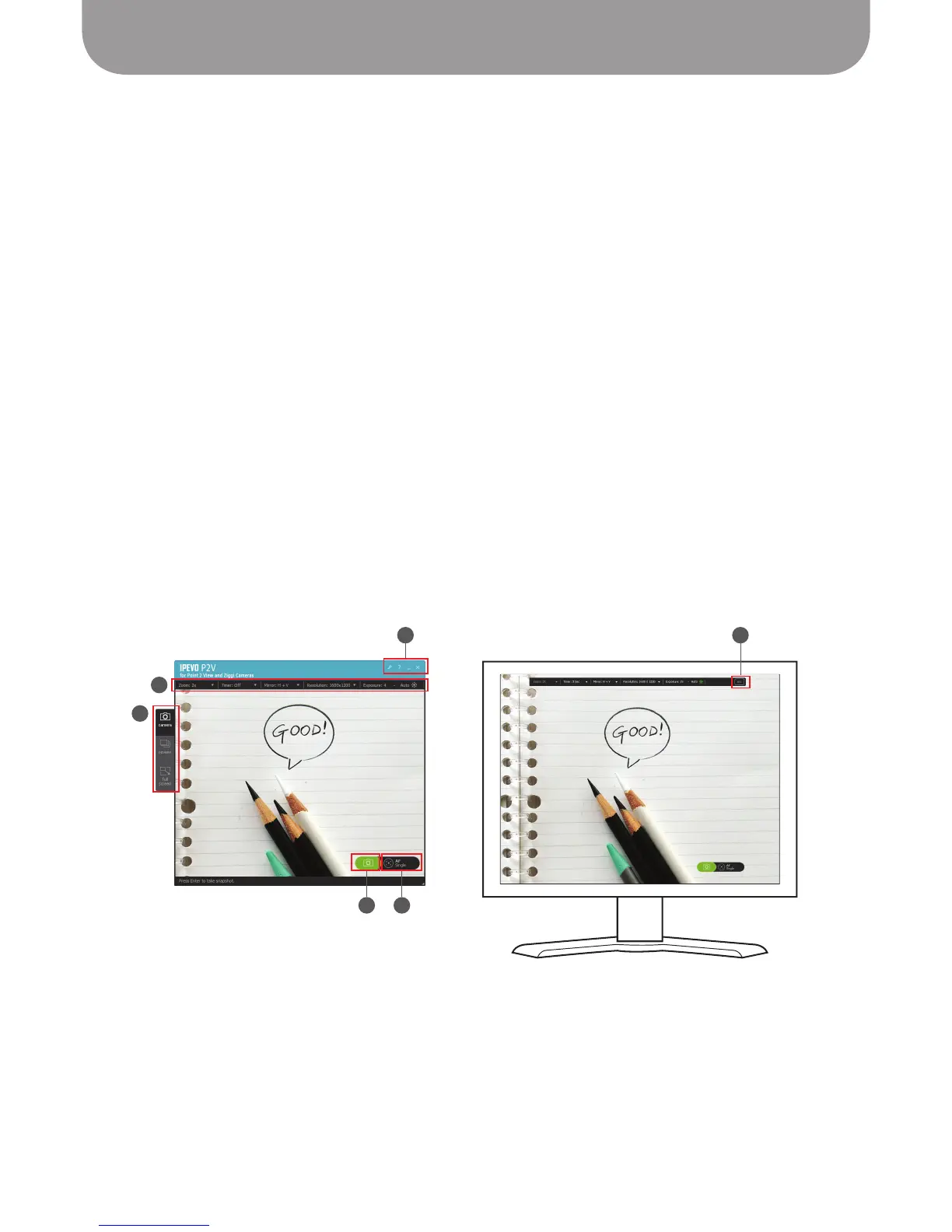
Please review the basic elements of the three modes of the P2V software:
A – Mode Tab
One of three modes can be selected by clicking on the appropriate button in the Mode Tab.
B – Camera Menu Tab
Several camera functions can be changed using the pulldown menus. These include: Zoom, Timer,
Mirroring Mode, Resolution, and Exposure. This tab will also communicate the current settings of
these functions.
C – Snapshot Button
Click the green camera icon to take a snapshot.
See Page 21 for more on taking snapshots.
D – Focus Button
Click the rectangular crosshairs icon to focus the image. To the right of this icon, the software will tell
you whether you are in Single or Continuous focus mode.
E – Operations (Windows only)
Here, you can access Advanced Settings (the Wrench icon), get Help (the Question Mark icon),
minimize the capture window, or exit the capture window.
F – ESC Button
In Full Screen mode, hit “Esc” or click the ESC Button to exit Full Screen mode and return to Camera
mode.
Camera mode Full Screen mode
A
B
E
C D
F



 To Next Page