Presets
IPG has developed preset programs and recommended wire feed rates dependent on material, wire alloy, wire diameter,
process gas, and material thickness. Refer to the Mode Table Chart (DOCCHRDMPSXX0025) attached to the
LightWELD for recommended wire feeder presets.
VIDEO: Part 3 - Process Development
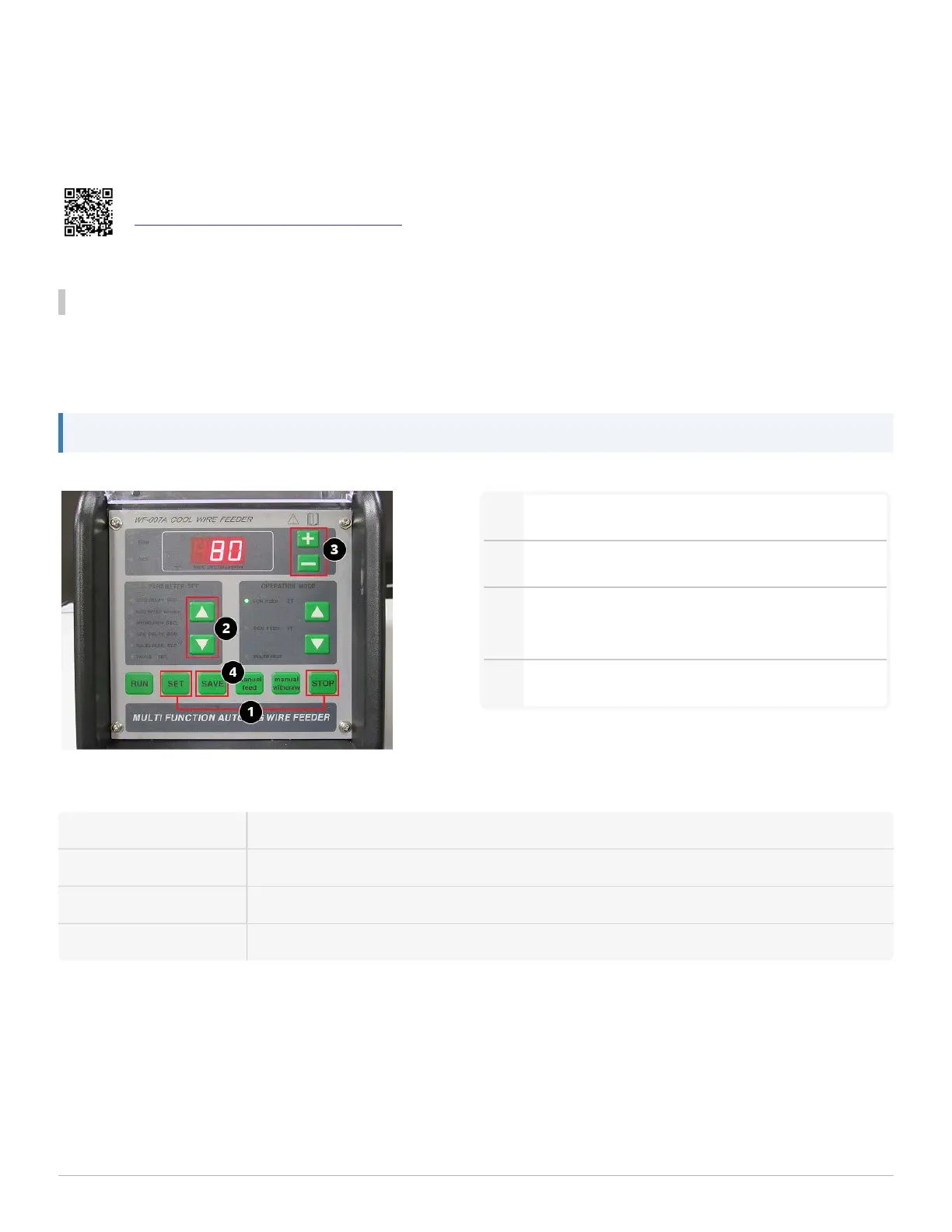
Wire Feeder Interface Overview
Set wire feed speed for the welding job on the wire feeder interface panel, referring to the Mode Table Chart
(DOCCHRDMPSXX0025) attached to the LightWELD as a guide. Be sure to enter the corresponding program on the
LightWELD unit before starting a job in order to calibrate the laser.
Note: The wire feed rate units are centimeter per minute. The default feed speed for this wire feeder is 80 cm/min.
1
To change parameters, press STOP, then SET.
2
Use the up/down buttons to select a parameter.
3
Use the plus/minus buttons to set the desired
value for the selected parameter.
4
Press 'SAVE' to save the parameters.
Suggested Parameter Settings:
FEED DELAYSEC 0
FEEDSPEED cm/min Refer to the Mode Table Chart (DOCCHRDMPSXX0025) attached to the LightWELD
WITHDRAW SEC 0
ARC DELAYSEC 0
1 Getting Started
LightWELD WireFeeder Set-Up Guide
21


 To Next Page