Ready to Weld
Once the wire feeder is setup and the desired settings are entered, the LightWELD is ready for use.
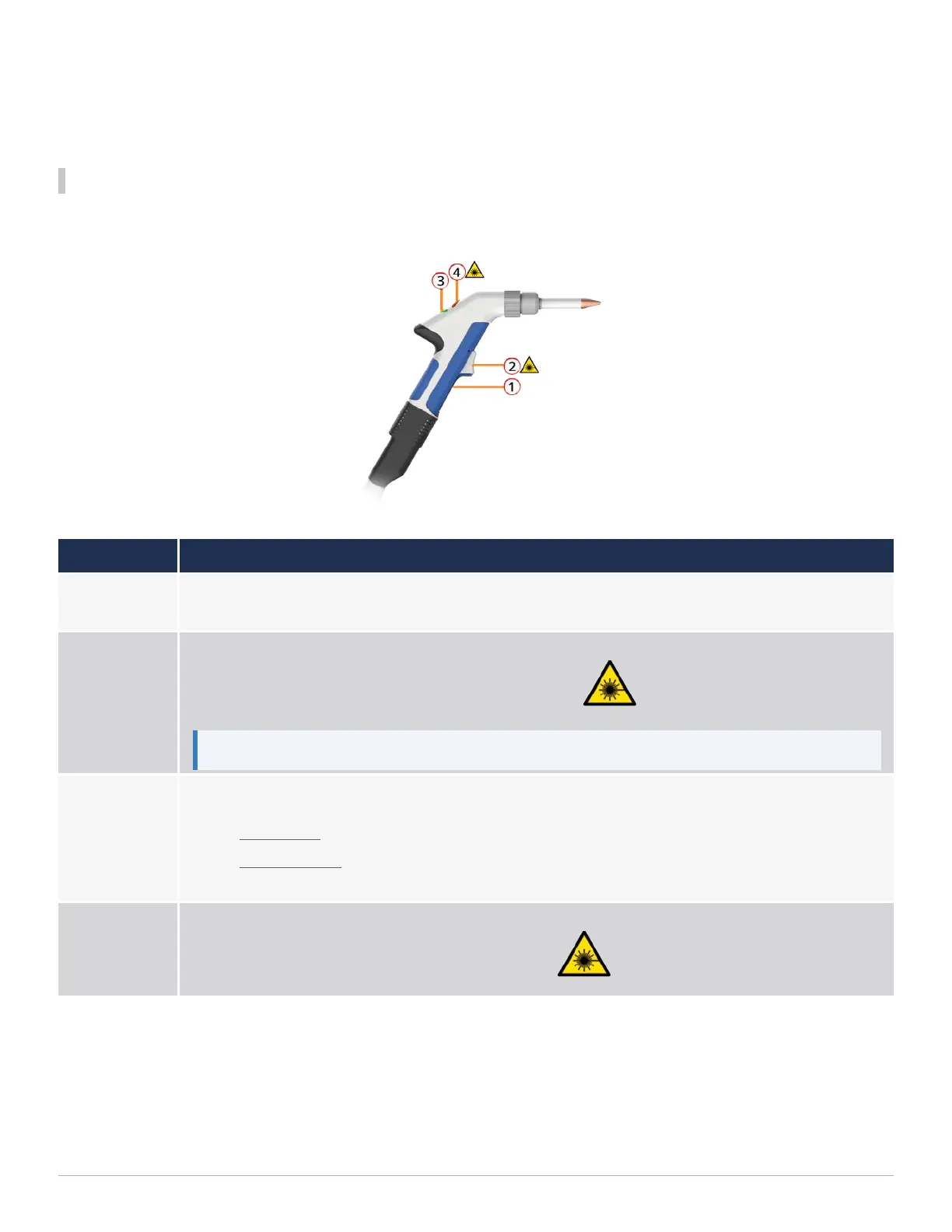
Weld Head Overview
Please refer to the LightWELDUser Guide for more details and safety descriptions.
Feature Description
1
Trigger 1
Press and Hold To Start Gas flow
2
Trigger 2
Press and hold to start Laser emission and feed the wire
Note: If the nozzle tip is not touching metal to complete safety circut, this will still feed the wire.
3
Green Status Indicator Light
l
Solid Green - while Trigger 1 is pressed and no errors are present.
l
Blinking Green - once all the interlocks are fully satisfied. This indicates that the system is
ready to fire. Operator can now press Trigger 2 control to start the laser emission.
4
Red Emissions Indicator Light
This will be lit red while laser emission is turned ON.
1 Getting Started
24


 To Next Page