46 Using Your Phone
If the call does not connect properly, you may see
one of the following messages:
Antenna Stowed or in the Down Position
When you receive a call:
• The phone chirps up to three times to alert
you of an incoming call
• The phone displays Call Attempt
You must rotate and extend the antenna as quickly
as possible to receive the call.
Rotate and fully extend the antenna as
described in “Holding the Phone” on page 40
You will see
Iridium Call Attempt. Do not
attempt to answer until the phone rings or
vibrates.
After several seconds, your phone will ring or
vibrate and display
Call followed by Answer? on
the next line.
To answer the call:
Press
O or any digit key (1 - 9, *
or
#).
You will see
Connected.
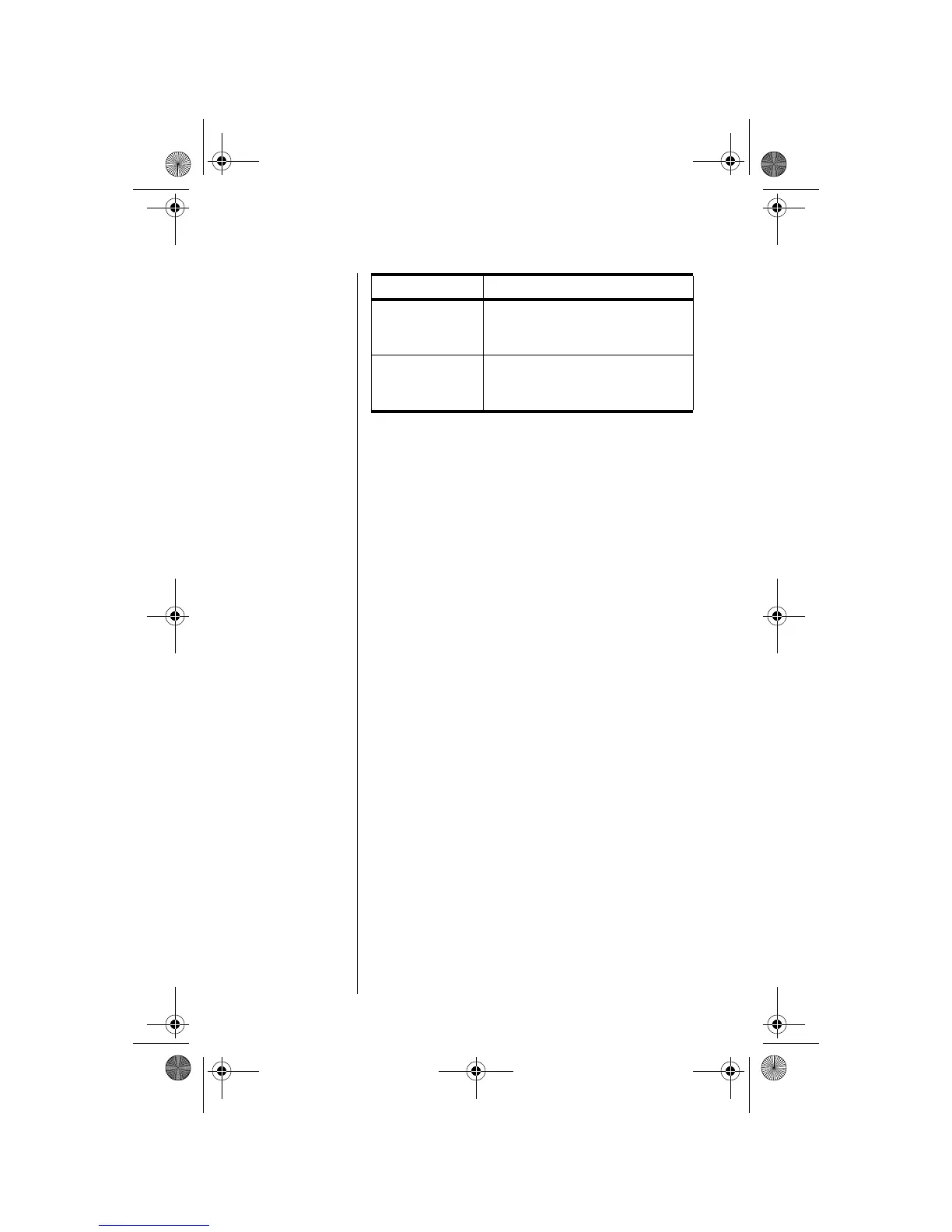
Message Description
Orient Antenna
You need to fully extend the
antenna upwards with a clear
unobstructed view of the sky.
Call Failed
The antenna is not properly
adjusted or the network signal is not
strong enough.
06Using-kg.fm Page 46 Wednesday, November 3, 2004 9:36 PM








 To Next Page