18
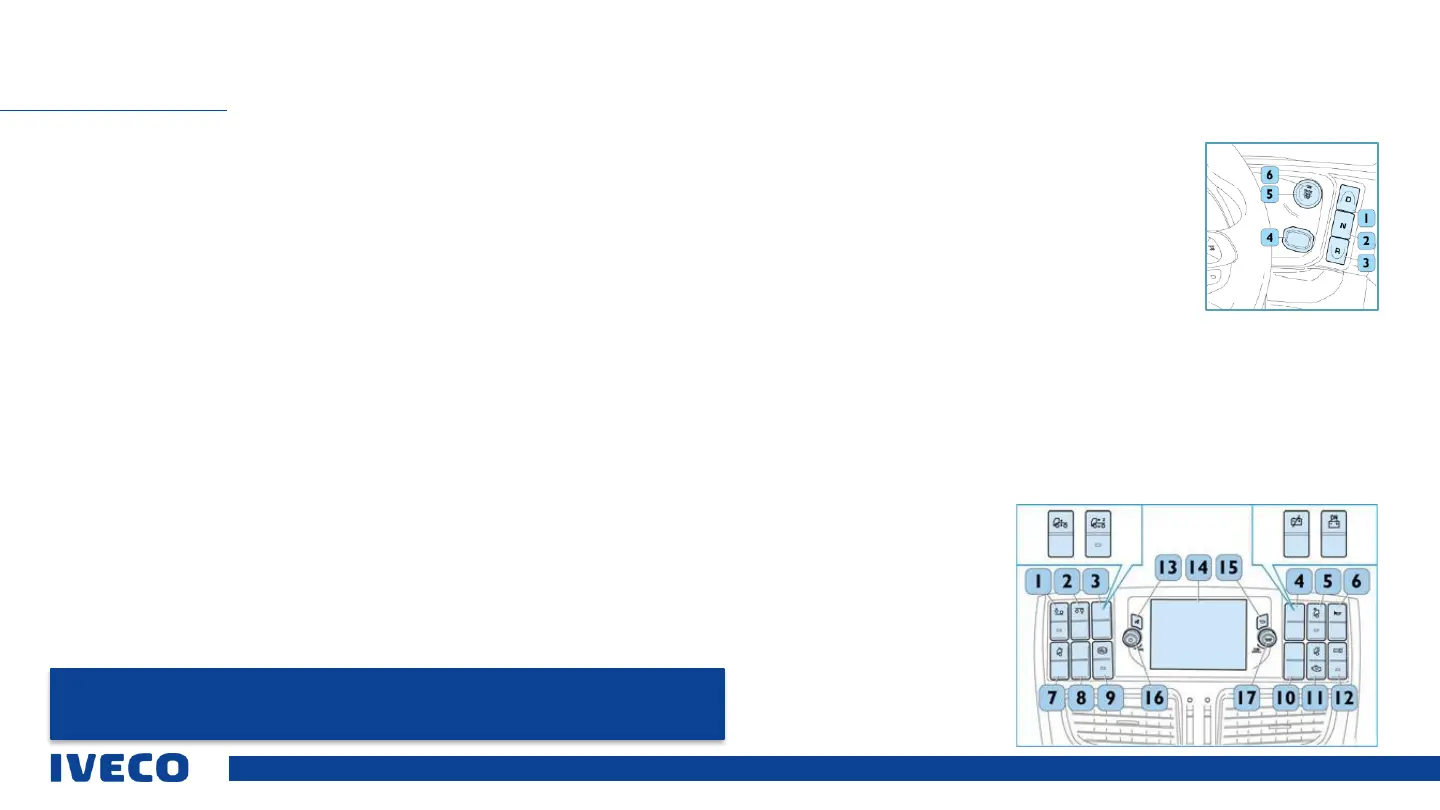
Operating elements on the edge of the dashboard
1 Automatic transmission: “Drive” button.
2 Automatic transmission: “Neutral” button.
3 Automatic transmission: “Reverse” button.
OPERATING ELEMENTS ON THE CENTRE CONSOLE (TOP)
NOTE: The positions and availability of buttons can vary depending on the equipment. Further
information is available in the Infotainment system manual.
4 Mount for the remote control with key detection to start the engine.
5 Button to start/stop the engine
6 Confirmation LED for successful detection of the electronic key, indicated when
the colour switches from ORANGE to GREEN.
Operating elements on the centre console (top)
1 Lowering of the auxiliary axle
2 Lifting of the lift axle
3 The following switches may be available as an alternative: ECAS switch for the
second stage of self-levelling (only for full air suspension models). ECAS switch for
self-levelling
4 TGC electric (battery disconnect switch) / TGC with ADR
5 Front work lights
6 Pneumatic signal horns
7 Electric roof hatch
8 Free
9 Hill holder
10 Free
11 Switch
Cab heating / auxiliary heating:
▪ Top: Cabin heating
▪ bottom: Engine block heater
▪ Not pressed: Cab and engine block heater (provided
for 6 kW water heater)
12 Activation/deactivation of the reverse warning buzzer (two volume levels)
13 Deactivation of volume, mute
14 Infotainment system display
15 Return to the previous page / previous process
16 Volume controller / Power button to switch off the screen and deactivate the
sound.
12 “Tune / scroll”
(Broadcaster search). Turn the
controller clockwise to increase the
radio broadcaster frequency, or
anti-clockwise to reduce it. Press
the “Enter / Browse” button (Send /
search) to make a selection.
17


 To Next Page