24
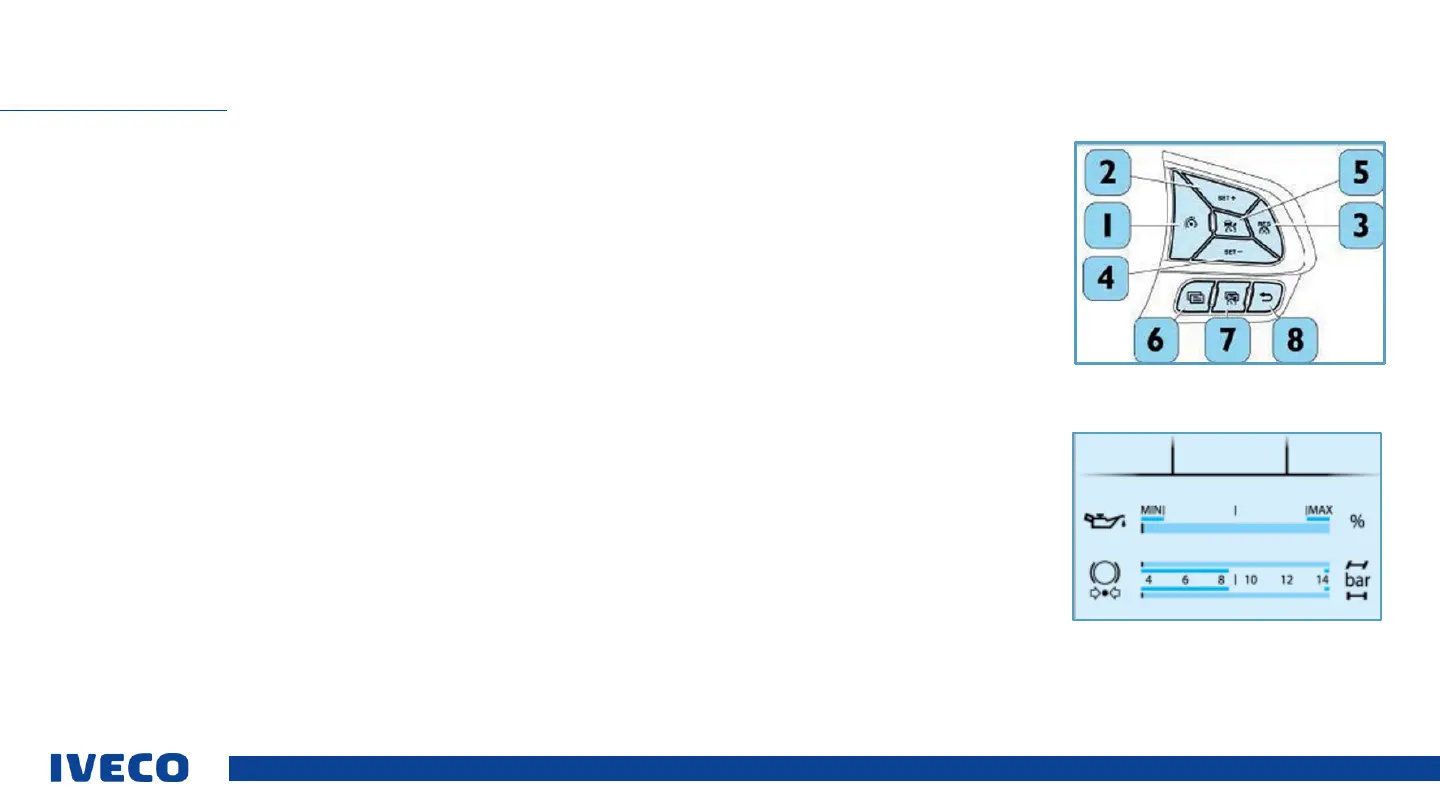
Quick Menu 1 can be accessed by pressing the (6) button (pressing it once will access Quick Menu 1, pressing it again will
leave the menu; alternatively, press the button (8) Return. The following functions can be activated:
▪ Activation of Predictive Drive PECC (if PECC option available).
▪ Activation request for the AEBS system by the driver.
▪ Activation of EcoRoll (if ECOROLL option available).
▪ Activation of Creep mode (only in vehicles with Hi-Tronix transmission).
Quick Menu 2 can be accessed by pressing the (7) button; each time the button is pressed, the system will move to a new
screen.
▪ Setting the distance ACC.
▪ Setting the positive interval for the cruise control.
The instrument panel will only display page 1 Oil level when the key is inserted and the Start / Stop button is pressed for 1 s.
▪ Only displayed if 30 min have passed since the last time the engine was shut down.
▪ Brake air pressure
CREEP mode
This function offers the option of starting up the vehicle by releasing the brake pedal and continuing to drive at a very low
speed; it is useful for precise manoeuvres at low speed.
QUICK MENU


 To Next Page