46
Central door locking
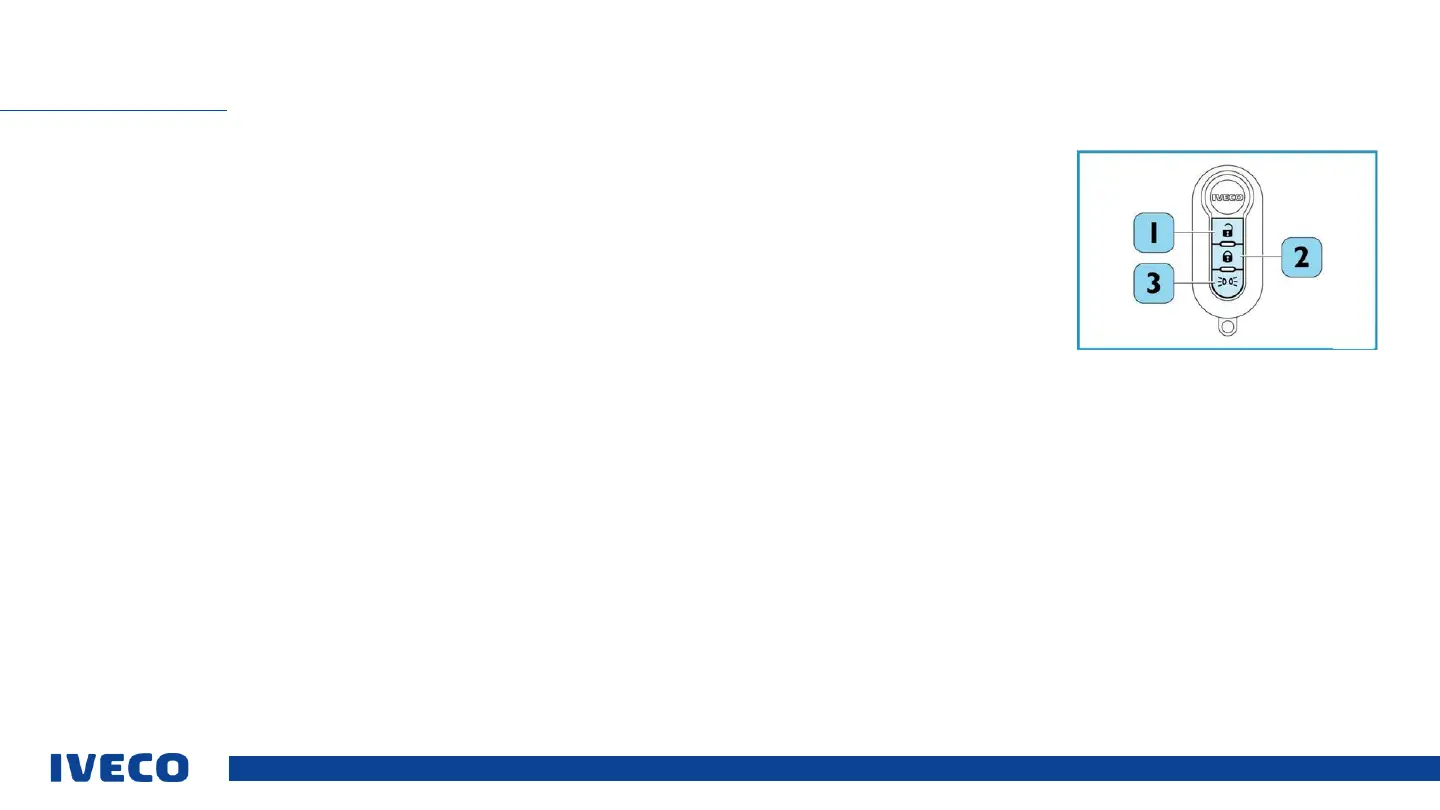
To open the driver’s door, press the (1) button once. The blinkers will be illuminated briefly
(2x briefly) in order to indicate
unlocking (only on the driver’s side).
To unlock all door locks, press the button (1) twice briefly. The blinkers
will be illuminated briefly (2x briefly) to indicate
unlocking of all door locks.
To lock, press button (2)briefly. The blinkers will be illuminated at the same time
(1x long) to indicate unlocking of all
door locks.
If an attempt is made to lock the doors via the remote control, but one of the two doors remains unlocked (because a
door is open or there is a fault in the electric locks), then the blinkers are activated 10x via brief flashing.
Pressing the button (3) for 2 seconds activates the exterior lighting of the vehicle for 20 seconds in order to check normal
operation. This function may not be used in public traffic. To deactivate this function prematurely, press the (3) button for
two seconds.
CENTRAL LOCKING MECHANISM (REMOTE CONTROL)
1 Unlock (open)
2 Lock (close)
3 Control lighting


 To Next Page