15
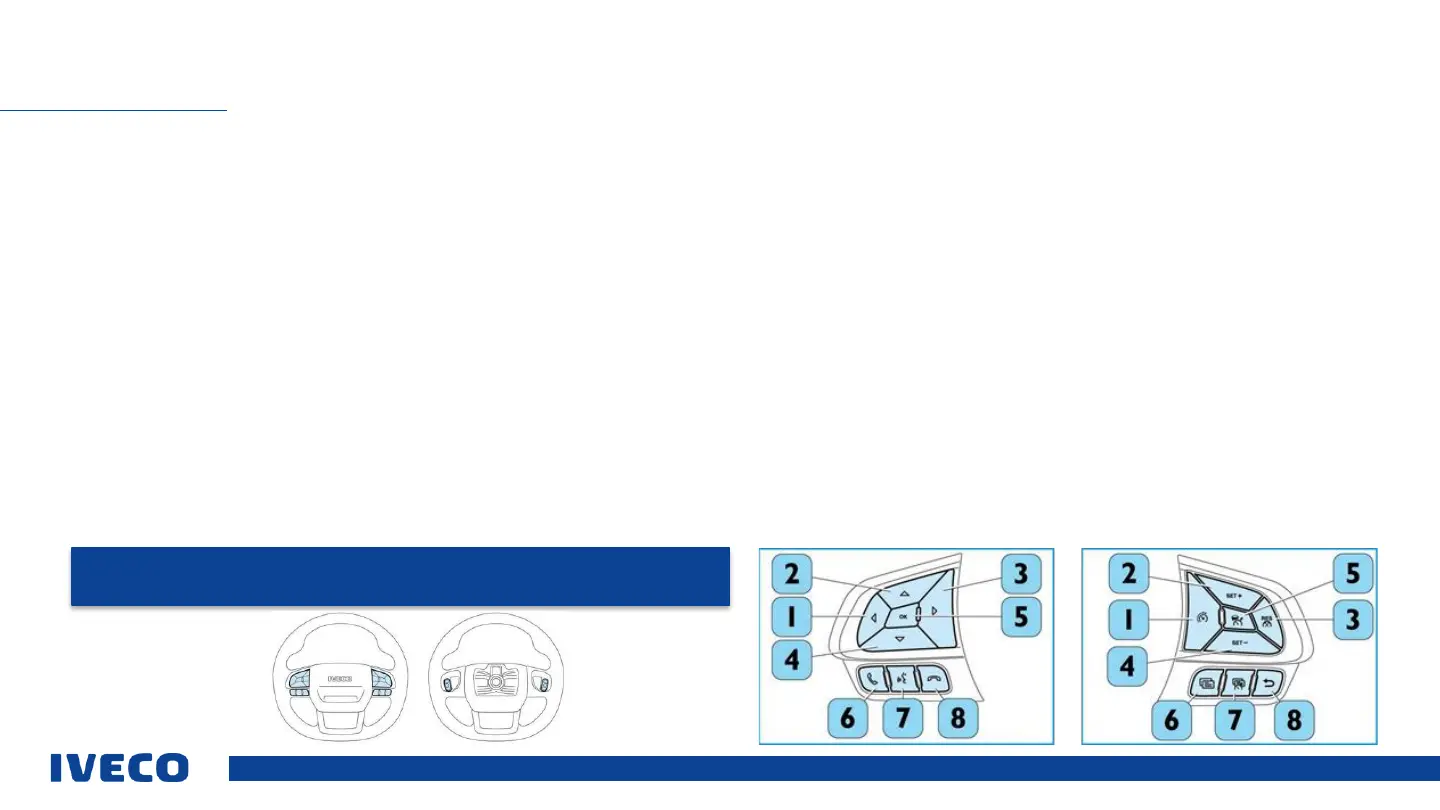
Operating elements on the steering wheel
The operating elements (if provided) for the display, phone, to activate the cruise control and adaptive cruise control – ACC are placed on the visible/top side of the steering
wheel. The operating elements for using the radio (if provided) can be felt on the non-visible, bottom side of the steering wheel.
OPERATING ELEMENTS ON THE STEERING WHEEL
NOTE: The descriptions apply to the steering wheel with the most extensive equipment.
Also please read the manual for your specific vehicle model.
Operating elements on left side
1 Access informational screens or sub-menus in the main menu, or leave the main
menu.
2 Scroll up in the main menu / sub-menus.
3 Access informational screens or sub-menus in the main menu.
4 Scroll down in the main menu / sub-menus.
5 Confirm a menu selection.
6 Receive a telephone call.
7 Phone hands-free device / activate the voice recognition function.
8 End a telephone call on the hands-free device.
Operating elements on the right side
1 SL speed limiter
2 SET+ for the functions ACC (Adaptive Cruise Control) and CC (Cruise Control).
3 RESUME function ACC (Adaptive Cruise Control).
4 SET– for the functions ACC (Adaptive Cruise Control) and CC (Cruise Control).
5 ACC (Adaptive Cruise Control).
6 Quick Menu 1.
7 Quick Menu 2.
8 “Back” to the last process.



 To Next Page