tecMIG 450/600
Operating manual Page 36
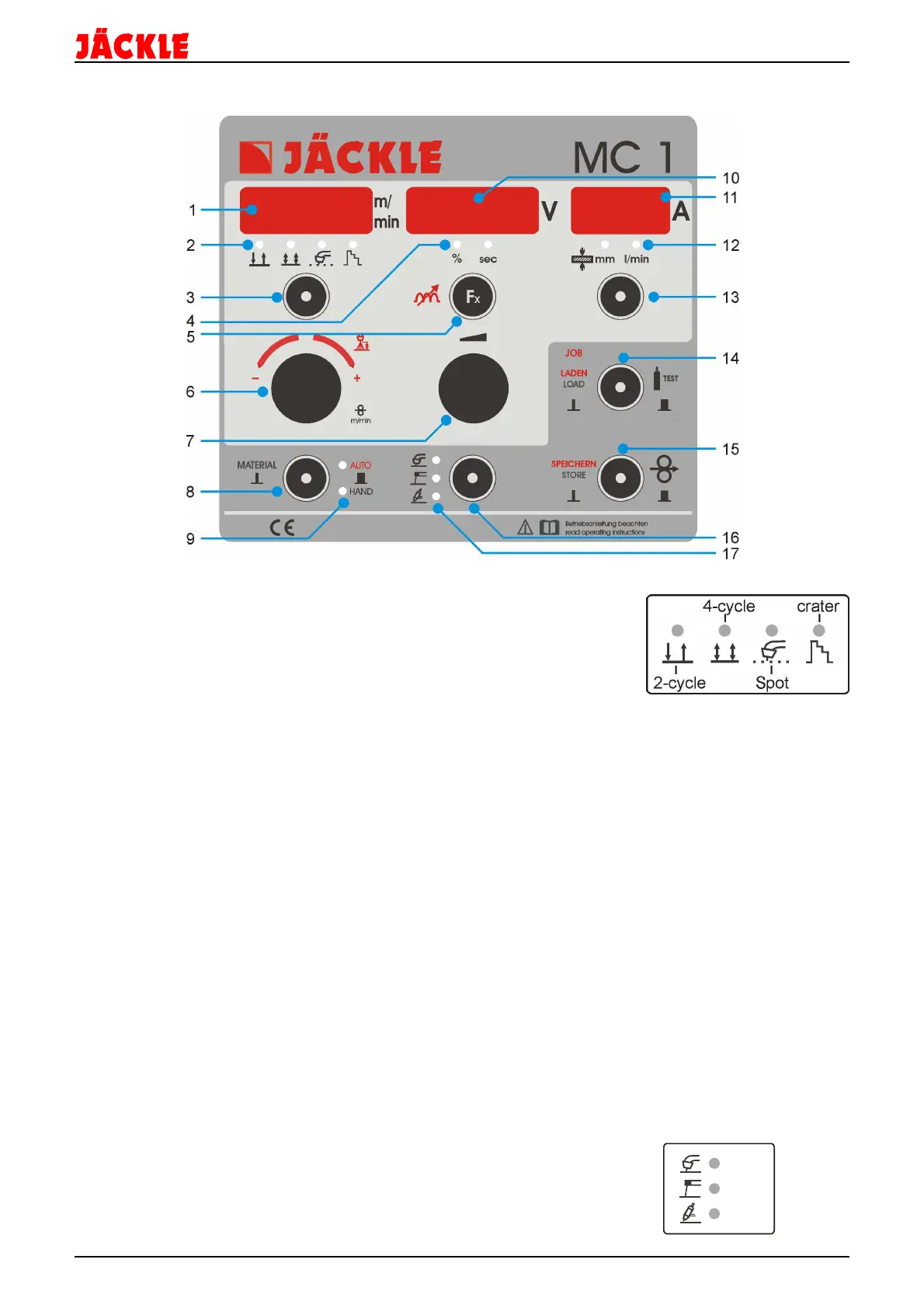
26. Control unit MC 1
1 – Display for wire speed m/min (HAND-9) or arc length correction from -3.0V to +3.0V (AUTO-9),
flashing dot: HOLD Function active
2 – LED display if 2-cycle, 4-cycle, 2-cycle - spot or 2c/4c crater function is active
3 – Control key to change between 2-cycle, 4-cycle, 2-cycle - spot or
crater function by tipping on the key
4 – LED display for the units % or seconds, if such a value is shown
in the middle display (10)
5 – Control key Fx to adjust the welding parameters (e.g. start speed, ..- tipping shorter then 0,5 seconds) or the
machine options (e.g. remote control,…- tipping longer then 1 second)
6 – Turning knob to change the value in the left display, e.g. material, arc length correction (HAND-9), wire
speed (HAND-9)…
7 – Turning knob for the welding power, all values of the functions and options, or other values in the middle
display
8 – Control key to open the material selection (tipping shorter then 0,5 seconds)
or to change between automatic or manual mode (tipping longer then 1 second)
9 – LED display, if AUTOmatic or manual (HAND) mode is active
10 – Display for the welding voltage in volt, flashing dot: HOLD function active also for the function or option
values
11 – Display for the welding current in ampere or the material thickness, as well as cooling medium flow indicator
12 – LED display for material thickness in mm or cooling medium flow indicator in l/min
13 – Control key to change between the welding current and material thickness (tipping shorter then 0,5
seconds), or the cooling medium flow indicator (tipping longer then 1 second)
14 – Control key to open and load the jobs (tipping shorter then 0,5 seconds),
or to activate the gas test function (tipping longer then 1 second)
15 – Control key to activate the wire-feed-in function or to store jobs, when this function is activated
16 – Control key mode to change between the operation mode MIG, MMA or TIG (only possible in tecMIG
machines)
17 – LED display if the operation mode MIG, MMA or TIG is active


 To Next Page