66
07610-004-37-13-R
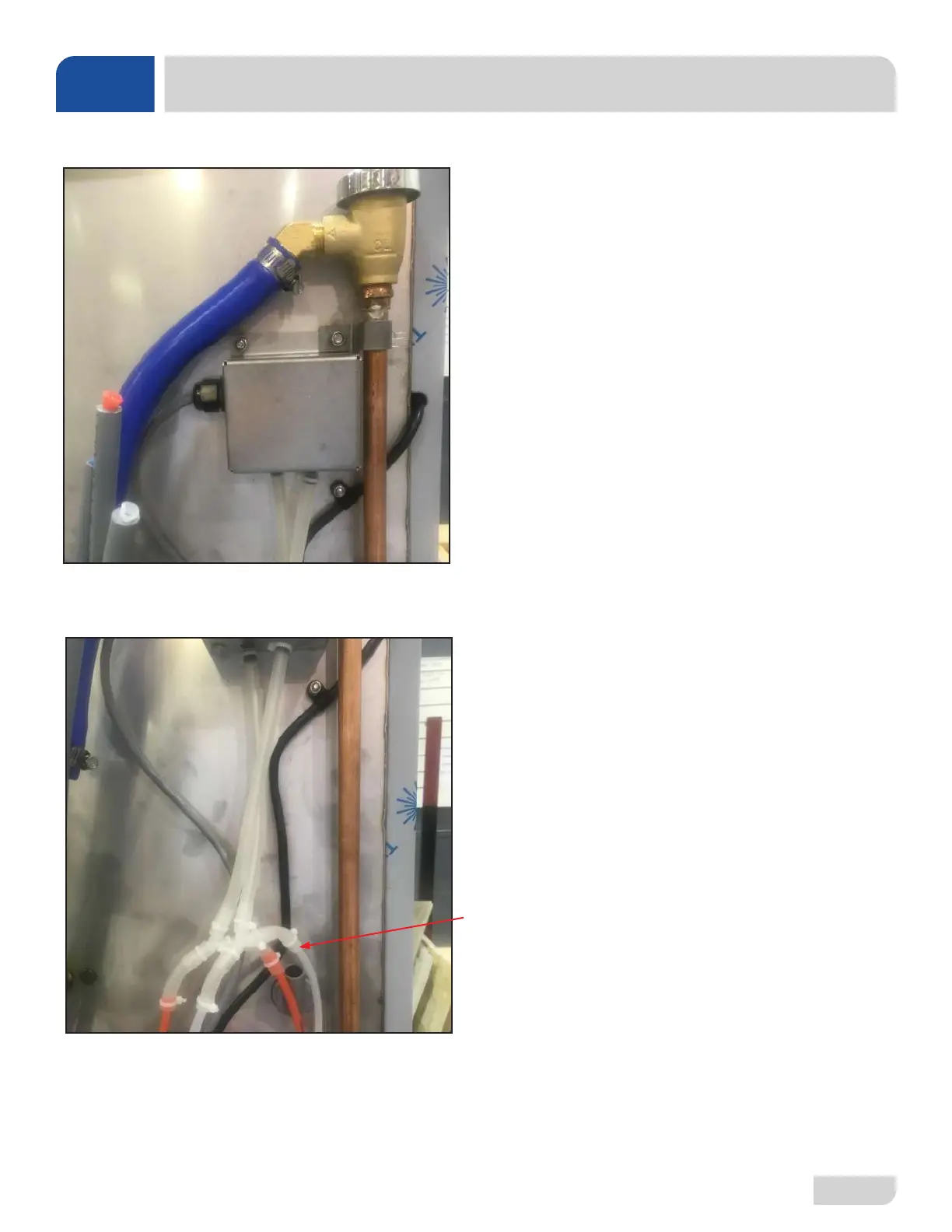
Remove locknut on plumbing support bracket and mount
switch box over existing stud. Reinstall bracket and route red
and white tubes behind blue hose as shown.
Route gray cable down back and under the tub along inlet
plumbing, remove wires from existing pressure switches, and
connect to gray cable per instructions below.
Detergent Switch (Red Tube)
1. Connect black wire from gray cable to black/yellow wire
from switch.
2. Connect brown wire from gray cable to blue wire from
switch.
Sanitizer Switch (White Tube)
1. Connect white wire from gray cable to white/yellow wire
from switch.
2. Connect red wire from gray cable to blue wire from switch.
After cutting the existing red and white tube approximately 12”
above the gray tube stiffener, insert the cut ends into the clear
tubes as shown.
Back of machine showing use of existing mounting hardware for
installation of vacuum switch assembly.
PARTS
LT/LT-H VACUUM SWITCH INSTALL





 To Next Page