43
Freeze Protecon
If the temperature sensors within the heater detect a low enough temperature, then the
pump(s) automacally acvate to provide freeze protecon. The pump(s) will run
connuously or periodically depending on the condions.
Clean Up Cycle (oponal)
When a pump is turned on by a buon press, a clean-up cycle begins 30 minutes aer the
pump is turned off or mes out and will run up to 4 hours depending on how long you
program it for. The pump and the ozone generator will run for 30 minutes more, depending
on the system. On some systems you can change this seng.
11.6 Time of Day
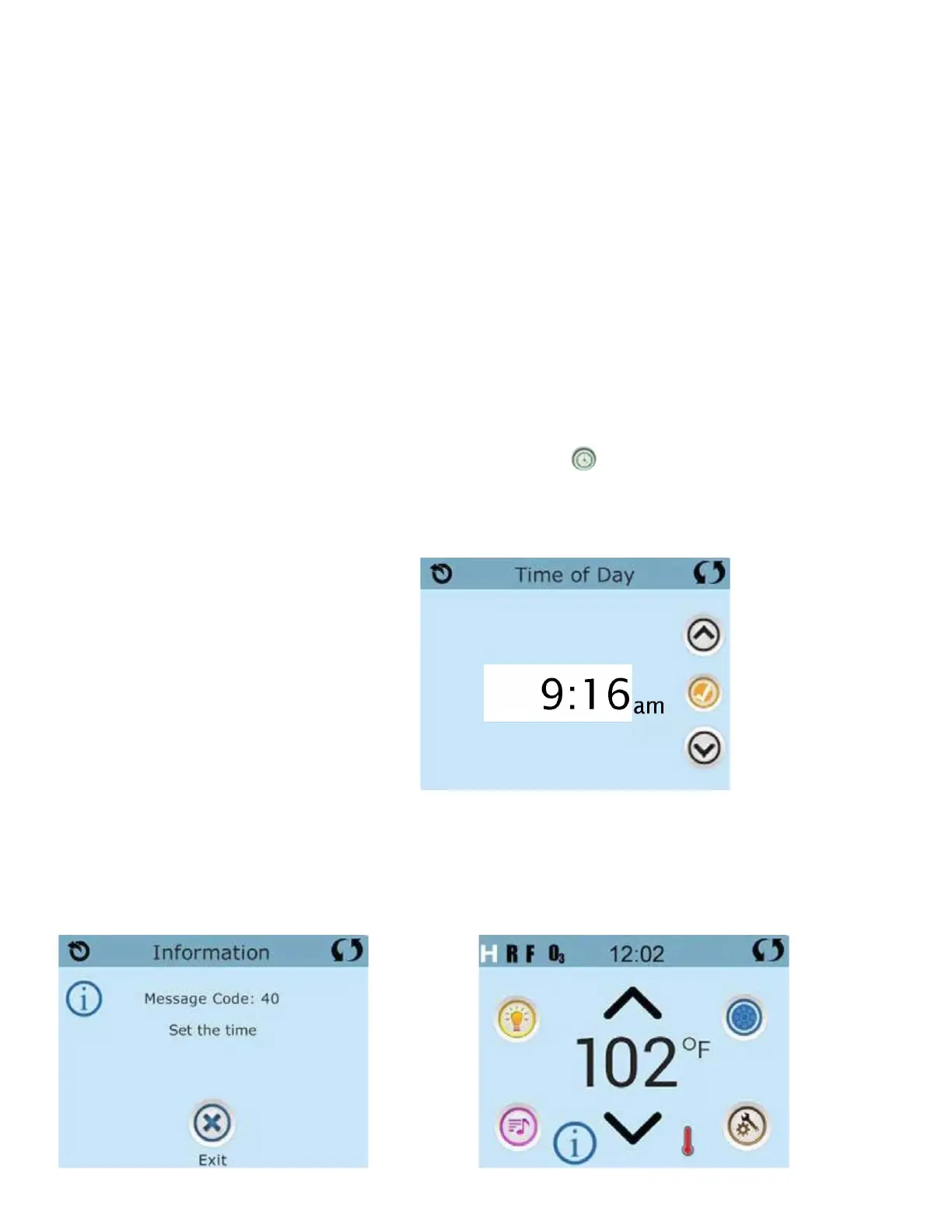
Be sure to set the Time of Day. Seng the me of day is important for determining the
filtraon mes and other background features. The Heat Icon on the Sengs Screen
takes you to a screen where you control the Time-of-Day.
On the Time-of-Day screen, simply select the Hours and Minutes. Use the Up and Down
buons to make changes, then Save.
If no Time-of-Day is set…
In the memory an informaon screen will appear. If you exit it an Informaon Icon will appear
at the boom of the Main Screen, unl the me-of-day has been set.



 To Next Page