49
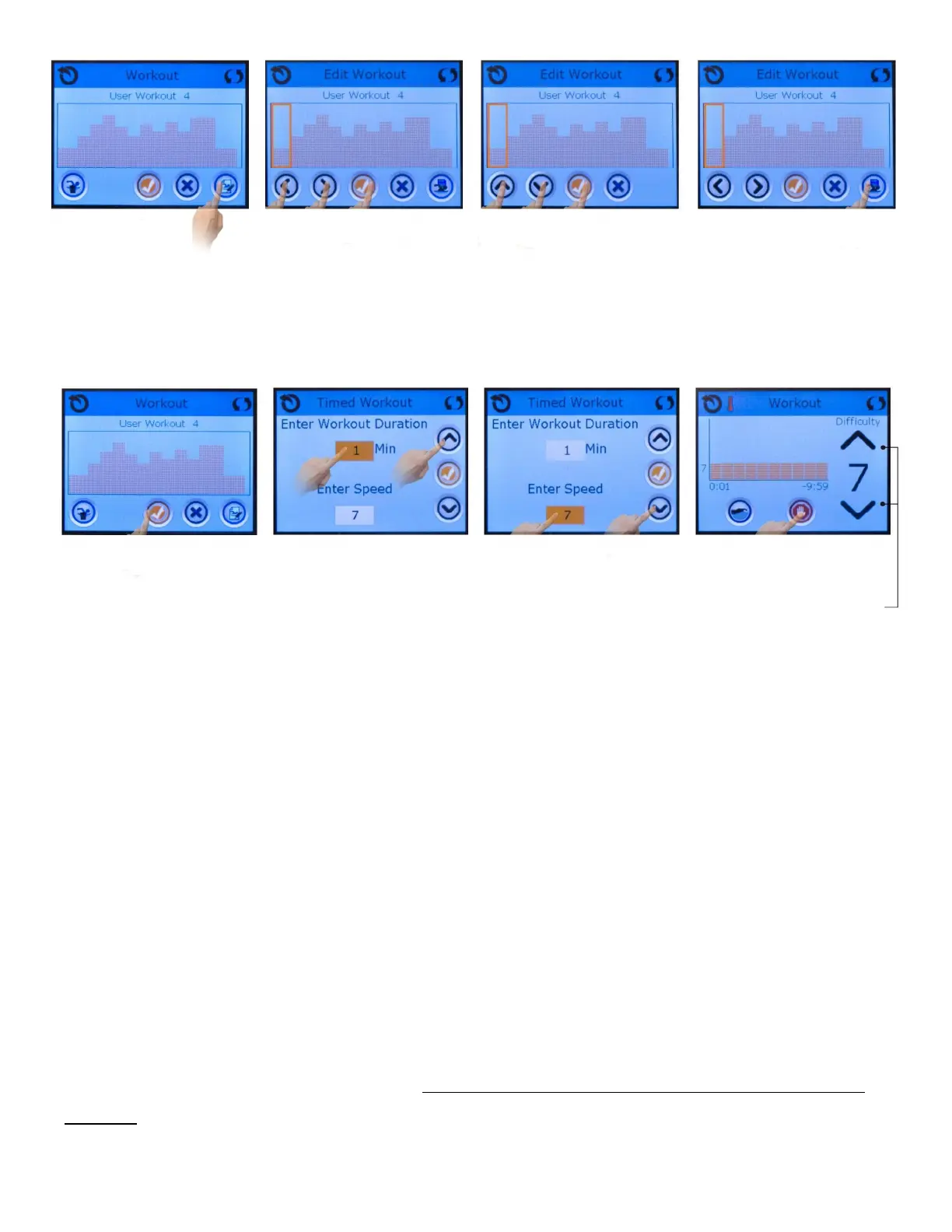
Press edit buon
1 - Move orange
selector box right/le
with arrow buons.
2 - Press check buon to
go to the next stage.
1 - Increase / decrease
water speed with arrow
buons.
2 - Press check buon to
go to the next stage.
Press save buon to
save the workout.
Press check buon to go
to the next stage
Select “Min” field and
increase / decrease
workout duraon with
arrow buons.
1 - Select “Enter Speed”
field and increase /
decrease water speed
with arrow buons.
2 - Press check buon
to go to the next stage.
This screen appears
during the workout.
Press the red buon to
stop the workout.
Press arrow buons to
change water speed
during workout if
desired.
13.0 Swim Spa Maintenance
Proper and regular maintenance of your swim spa will help it retain its beauty and
performance. Your authorized Jacuzzi® dealer can supply you with all the informaon,
supplies, and accessory products you will need to accomplish this.
13.1 Cleaning the Filter Cartridges
A reminder message appears on the control panel display aer a specified number of days to
remind you to clean the skimmer filters. This reminder must be reset at each filter cleaning
interval.



 To Next Page