45
Purge Cycles
In order to maintain sanitary condions, as well as protect against freezing, secondary water
devices will purge water from their respecve plumbing by running briefly at the beginning of
each filter cycle. (Some systems will run a certain number of purge cycles per day,
independent of the number of filter cycles per day. In this case, the purge cycles may not
coincide with the start of the filter cycle).
If the Filter Cycle 1 duraon is set for 24 hours, enabling Filter Cycle 2 will iniate a purge
when Filter Cycle 2 is programmed to begin.
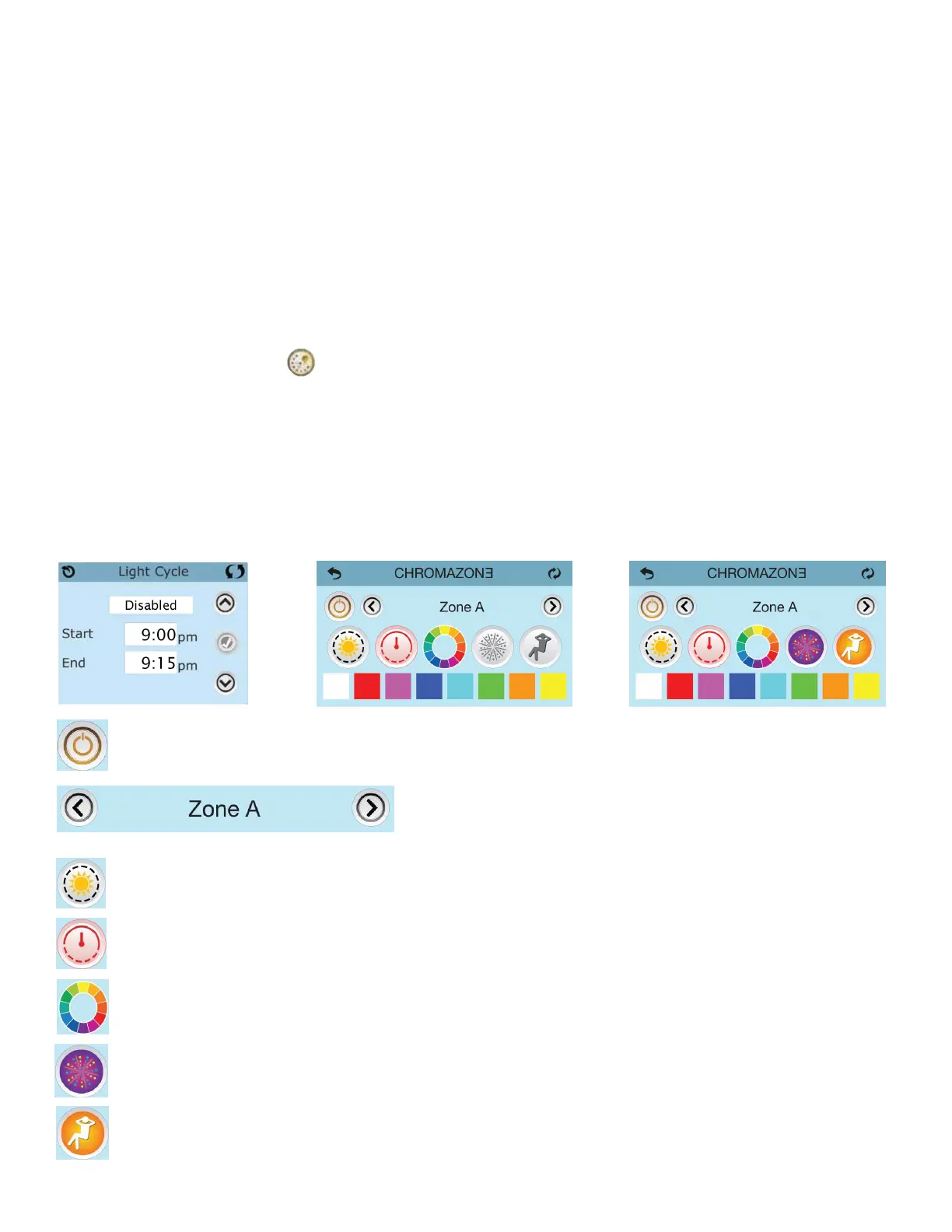
11.8 Light Cycle Opon
If the Light Cycle does not appear on the Sengs Screen, the Light Timer feature is not
enabled. The Light Cycle Icon on the Sengs Screen takes you to a screen where you control
the Light Cycle. When available, the Light Timer is (‘Disabled”) by default. Press “Disabled” to
change it to “Enabled” (ON). The sengs can be edited the same way that the Filter Cycles
are edited.
Power Buon: Powers On/Off all user controlled CHROMAZONE™ lights
Navigate between all available zones
Light Brightness Buon: Controls the brightness of the zone lighng
Speed Control Buon: Controls the speed for the light paerns
Colour Wheel Buon: This smoothly cycles through the full colour spectrum
Party Light Buon: This smoothly cycles through a fesve paern
Lounge Light Buon: This smoothly cycles a soothing paern



 To Next Page