53
GridVis
®
Collector www.janitza.de www.janitza.de GridVis
®
Collector
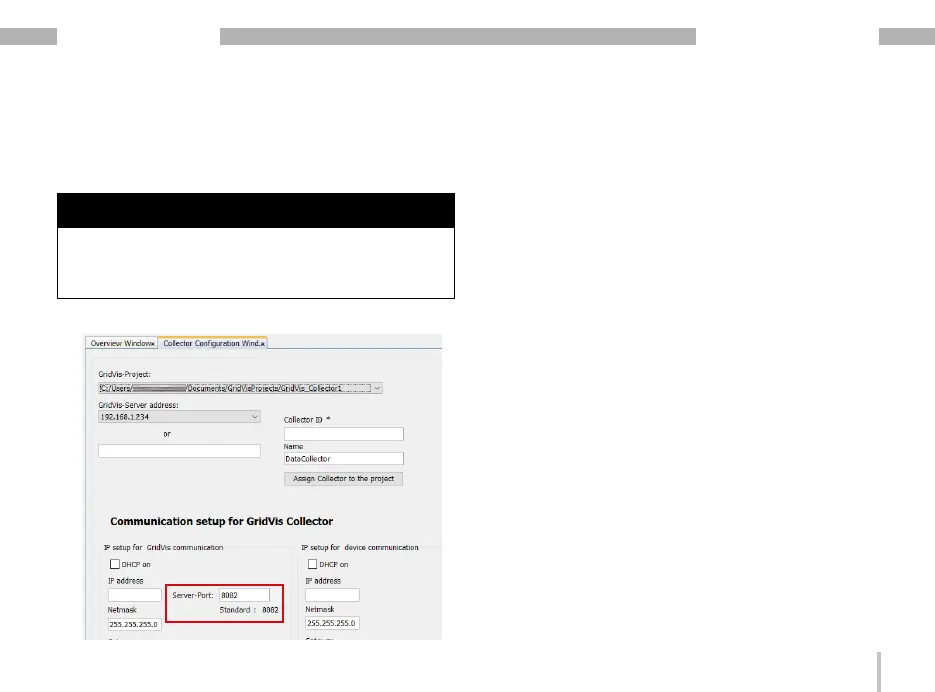
· Configure the communication port (server port) for
the data exchange between the GridVis
®
Collector
and your computer (GridVis software).
NOTE
Recommendation: Use communication port (server
port) 8082 or higher!
Do not use ports 8080 and 8081 as these are used by
the software editions "Service" and "Ultimate".
Step 6
The GridVis
®
Collector has two IP address ranges for IP
address entry:
1. IP address range for the devices on site (e.g. trans-
former station).
2. IP address range for the network (server) in which
the computer with the GridVis software is located.
The GridVis
®
Collector changes the IP addresses
depending on the operating mode: “Server mode" or
“Device mode".
In addition, the GridVis
®
Collector can send data via
WLAN to the GridVis software in the server network
(range in which the computer with the GridVis software
is located).
In a network with a DHCP server, the GridVis
®
Collector
automatically obtains the IP address when the DHCP
mode is activated. However, the user of the GridVis
®
Collector normally configures the IP addresses on
site, e.g. in the transformer station, due to a lack of a
connection.
When assigning IP addresses in the GridVis
®
Collector,


 To Next Page