68
GridVis
®
Collector www.janitza.de www.janitza.de GridVis
®
Collector
6. 5 Integration of RS-485 measurement devices
To be able to read measured values from RS-485 mea-
surement devices (UMG103-CBM, UMG96RM-CBM,
UMG96PA), first manually configure connected measu-
rement devices using the USB/RS-485 converter.
Step 1
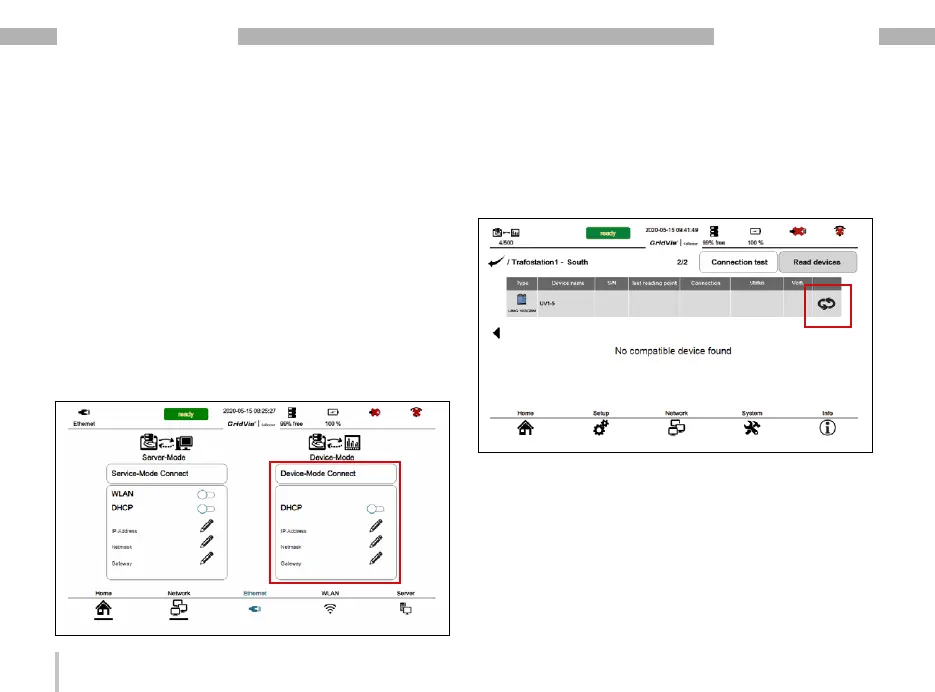
To integrate only RS-485 measurement devices, de-
activate the DHCP mode in the network settings. If no
further IP address is entered, the device mode is called
up more quickly because the GridVis
®
Collector does
not search for an Ethernet connection.
Step 2
Since the GridVis
®
Collector does not search for RS-
485 measurement devices automatically, now press the
"Binding" icon.
Step 3
Configure the RS-485 settings manually. To do so,
press the "Manual settings" button.


 To Next Page