89
GridVis
®
Collector www.janitza.de www.janitza.de GridVis
®
Collector
Collector Receiver as of the GridVis "Service"
edition
Step 1
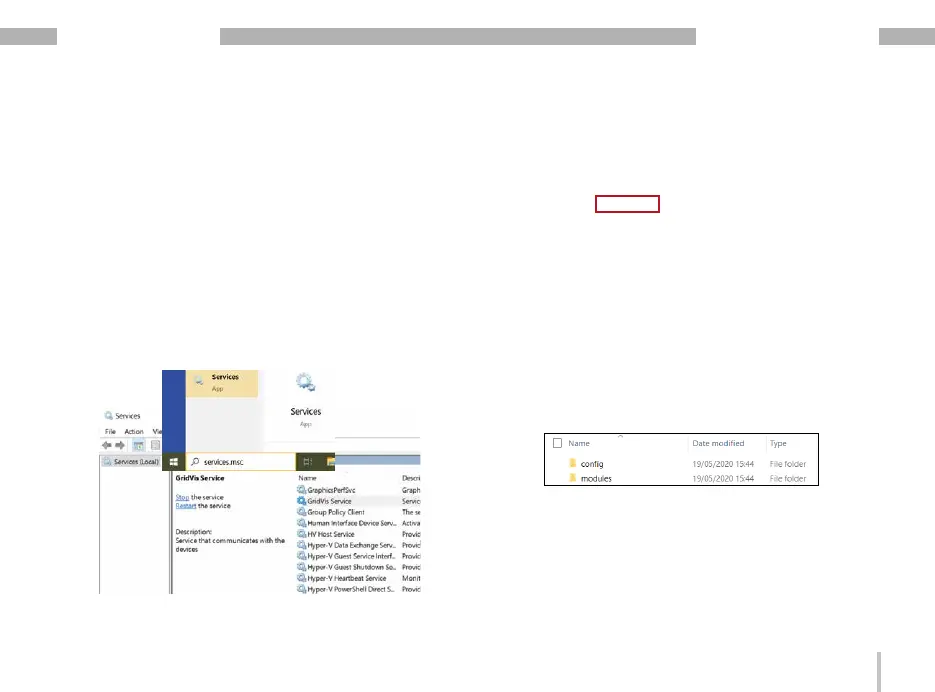
Close the GridVis system service:
· Press the Windows key.
· The start menu with the "Search" input field appe-
ars.
· Enter the command “Services" and confirm with the
"Return" key.
· The "Services (local)" window of your computer
(with the GridVis software) appears.
· In the "Services" window, use the mouse to select
the "GridVis Service" service and then click the
"Terminate service" button.
Step 2
· On the USB flash drive included in delivery, open
the directory "GridVis Service Collector Data Re-
ceiver".
· The "config" and "modules" directories appear.
· From the "config/modules" directory, copy the file
"de-janitza-pasw-scripting-plug-in-gricoserverrecv-
provider.xml" to the clipboard (mark the file with a
mouse click and then press "Ctrl + C").


 To Next Page