8
GridVis
®
Collector www.janitza.de www.janitza.de GridVis
®
Collector
2. 1 Device description
The GridVis
®
Collector
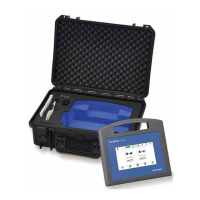
· is a powerful mobile readout device for all com-
patible Janitza measurement devices;
· increases the connectivity of the GridVis
®
soft-
ware.
Usually, measurement devices in the GridVis
®
software
are connected via interfaces such as Ethernet, RS-485
or modem. In cases where such connections are not
possible, the GridVis
®
Collector is used.
With the GridVis
®
Collector you can read out measure-
ment data from a Janitza measurement device on site,
e.g. at a transformer station. Then you can easily syn-
chronize the measurement data with the GridVis
®
data-
base in your company.
The large storage capacity the GridVis
®
Collector provi-
des means measurement devices that store measure-
ment data according to EN50160 or EN61000-2-4 can
also be read out.
2. Product description
No specialized knowledge of the GridVis
®
network visu-
alization software is needed to operate the mobile Grid-
Vis
®
Collector on site. An intuitive, capacitive 7” multi-
touch colour display with transparent menu navigation
ensures that the devices can be used with minimal trai-
ning for users/fitters.
Synchronization of the measurement data with the
GridVis database is done via WLAN or Ethernet. The
GridVis
®
Collector supports GridVis projects with
JANDB, MSSQL or MYSQL databases.
In the GridVis
®
software you can easily synchronize
measurement devices with the measurement data
collected by the GridVis
®
Collector. Integration of the
GridVis
®
Collector into the GridVis
®
software requires a
one-time configuration of the Collector using the Grid-
Vis plug-ins included in the scope of delivery.
With a basic knowledge of the GridVis
®
software, users
can carry out the integration on their own. If desired, we
can also carry out the integration during the installation
of the GridVis
®
software or in a separate appointment.


 To Next Page