92
GridVis
®
Collector www.janitza.de www.janitza.de GridVis
®
Collector
7. 6 Importing new measurement devices into the
GridVis
®
Collector
The following example shows the import of new mea-
surement devices into the GridVis
®
Collector. Measu-
rement device names that have been changed are
also transferred to the GridVis
®
Collector in this way.
In contrast to commissioning, you do not need a USB
flash drive for the data transfer.
Step 1
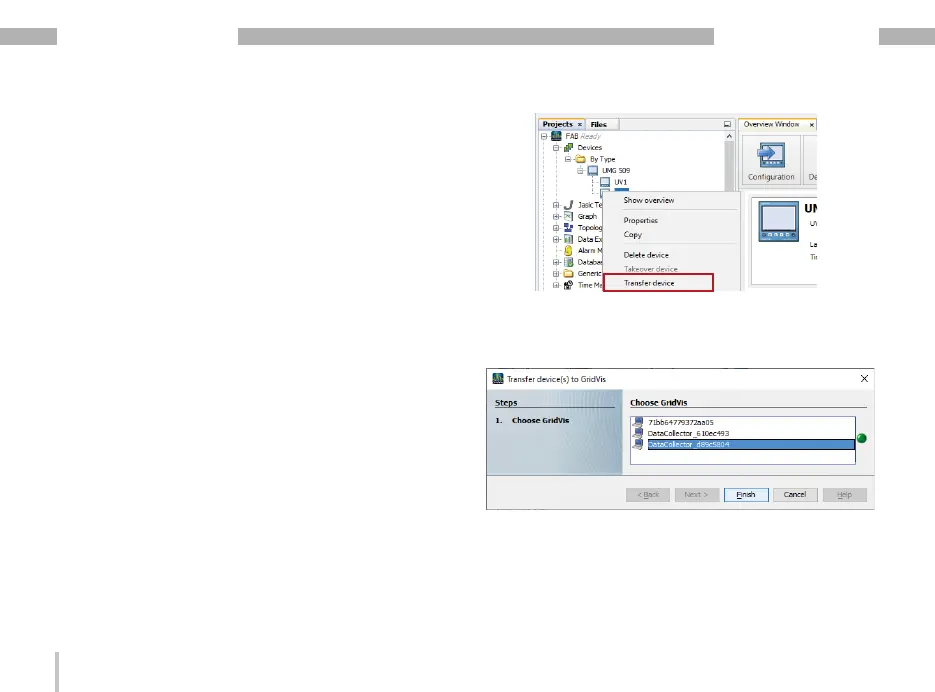
Integrate the new measurement device "UV2" from the
GridVis software into the GridVis
®
Collector.
· Right-click on the new measurement device in the
GridVis software.
· In the drop-down menu, select the item "Assign
device".
· The "Transfer devices to a GridVis" window appe-
ars.
· Select the GridVis
®
Collector. If you have seve-
ral GridVis
®
Collectors installed, please note the
"Collector ID". Check the "Collector ID" in the "Info"
menu of your GridVis
®
Collector.
· Click the “Finish" button.


 To Next Page