93
GridVis
®
Collector www.janitza.de www.janitza.de GridVis
®
Collector
Step 2
· Then connect the GridVis
®
Collector to the network
(of the GridVis software).
· In the GridVis
®
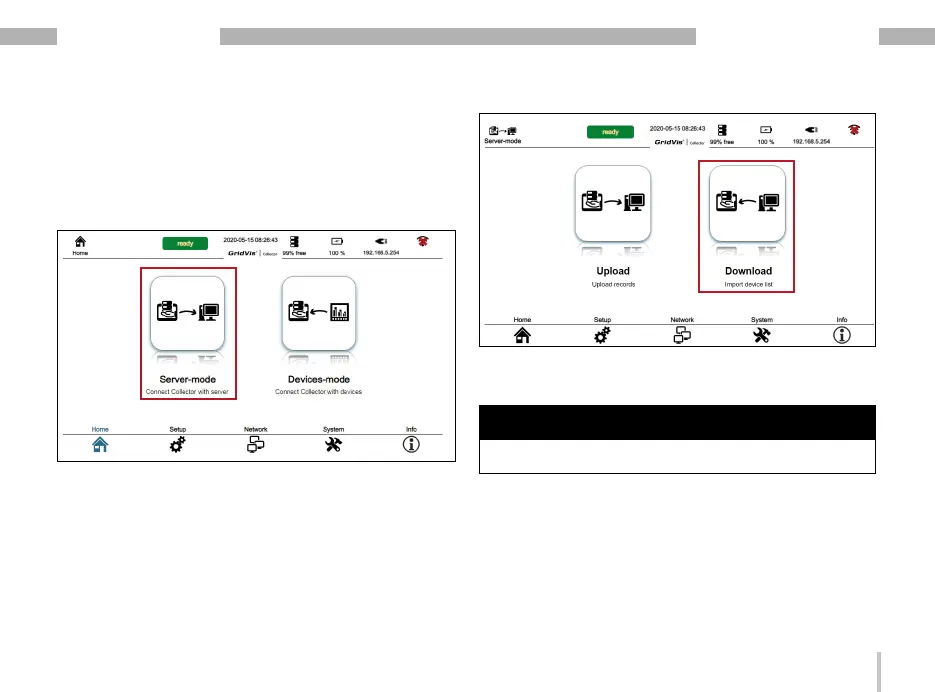
Collector, open the “Server mode"
by pressing the button.
· In server mode, press the "Download" button.
· The GridVis
®
Collector synchronizes the list of mea-
surement devices from your GridVis project.
NOTE
The GridVis
®
Collector restarts automatically after syn-
chronization.


 To Next Page