82
GridVis
®
Collector www.janitza.de www.janitza.de GridVis
®
Collector
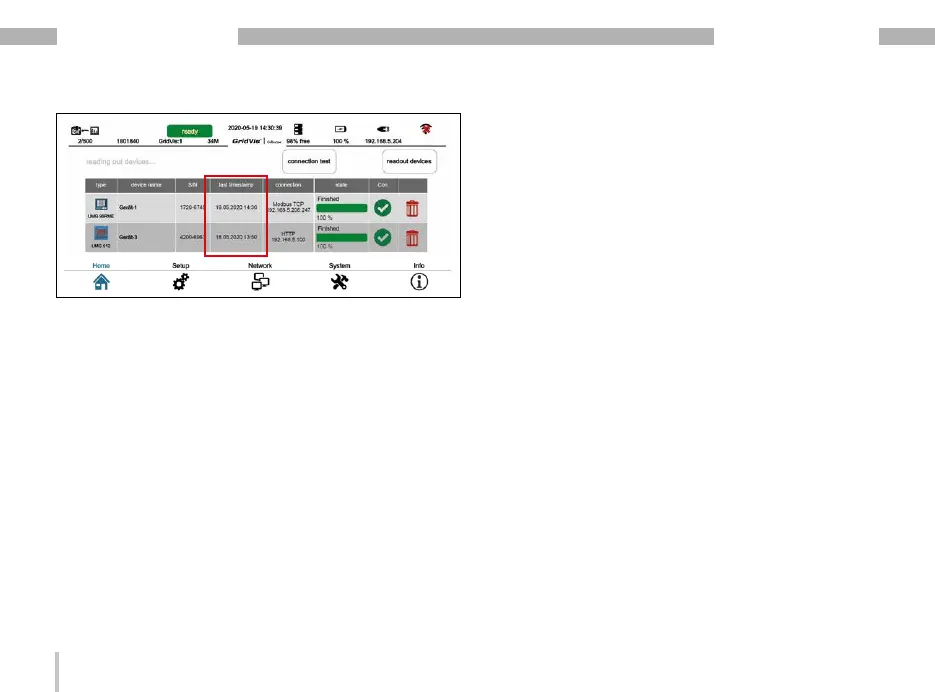
The device list of the GridVis
®
Collector shows the data
of the on-site measurement device, such as:
· The type of measurement device.
· The name of the measurement device.
· The serial number.
· The last readout time (date, time) of the measured
values in the data memory of the GridVis
®
Collector.
· The IP address.
· Status and connection information.
You can then synchronize measurement devices (mea-
sured values) with the database of the GridVis software
or read out further measurement devices (see section
„7. 3 Synchronizing measured values with the GridVis
software database“ on page 84).
7. 2 Reading out measured values from RS-485
measurement devices
To read measured values from RS-485 measurement
devices (measurement devices connected via USB/RS-
485 converter), first connect your device as described
in section „6. 5 Integration of RS-485 measurement de-
vices“ on page 68.
Readout after the initial setup
The GridVis
®
Collector first checks the serial number
before reading out a measurement device. The serial
number is used by the GridVis
®
Collector to uniquely
identify the measurement device.
Since the GridVis
®
Collector does not perform an
automatic connection test for an RS-485 connection
to a measurement device (via USB/RS-485 converter),
first check the connection by pressing the "Connection
test" button.


 To Next Page