71
GridVis
®
Collector www.janitza.de www.janitza.de GridVis
®
Collector
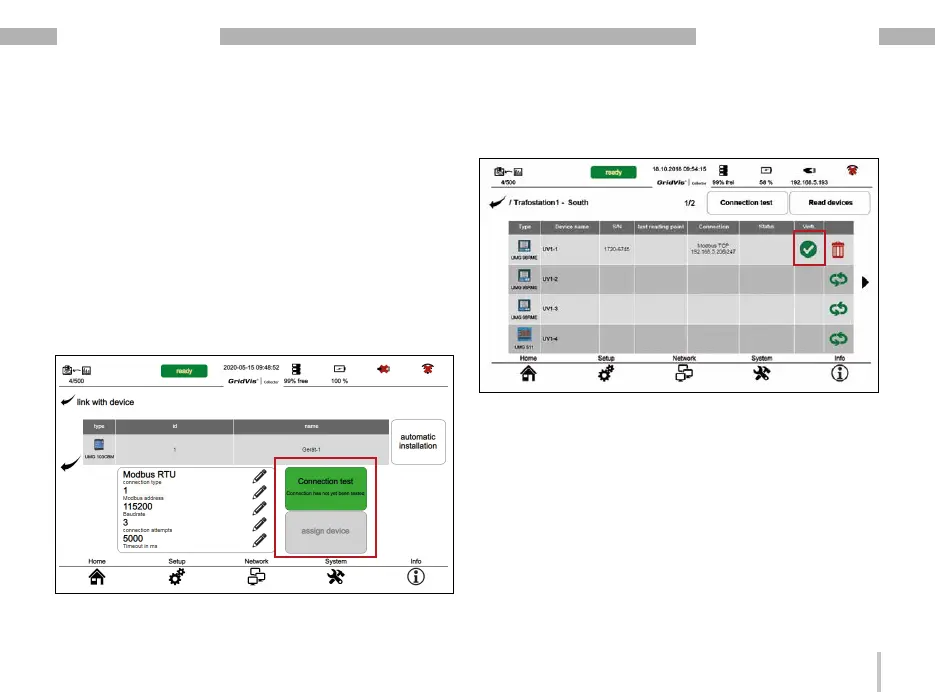
When a connection is established, a green check mark
appears in the device list in the "Connection" column.
If the connection test is negative, the "Connection test"
button is red on the display of the GridVis
®
Collector.
Check and if necessary change:
· Their connection settings.
· Terminals A and B on your USB/RS-485 converter.
Only after a positive "connection test" (green button)
can your RS-485 measurement device be assigned
to the GridVis
®
Collector!
Press the "Assign device" button.
The description for reading out your RS-485 measure-
ment device (connection via USB/RS-485 converter)
can be found in section „7. 2 Reading out measured va-
lues from RS-485 measurement devices“ on page 82.


 To Next Page