Section 7 Page
7. Troubleshooting
ALPHAM4/V1 SEPT 2011
3
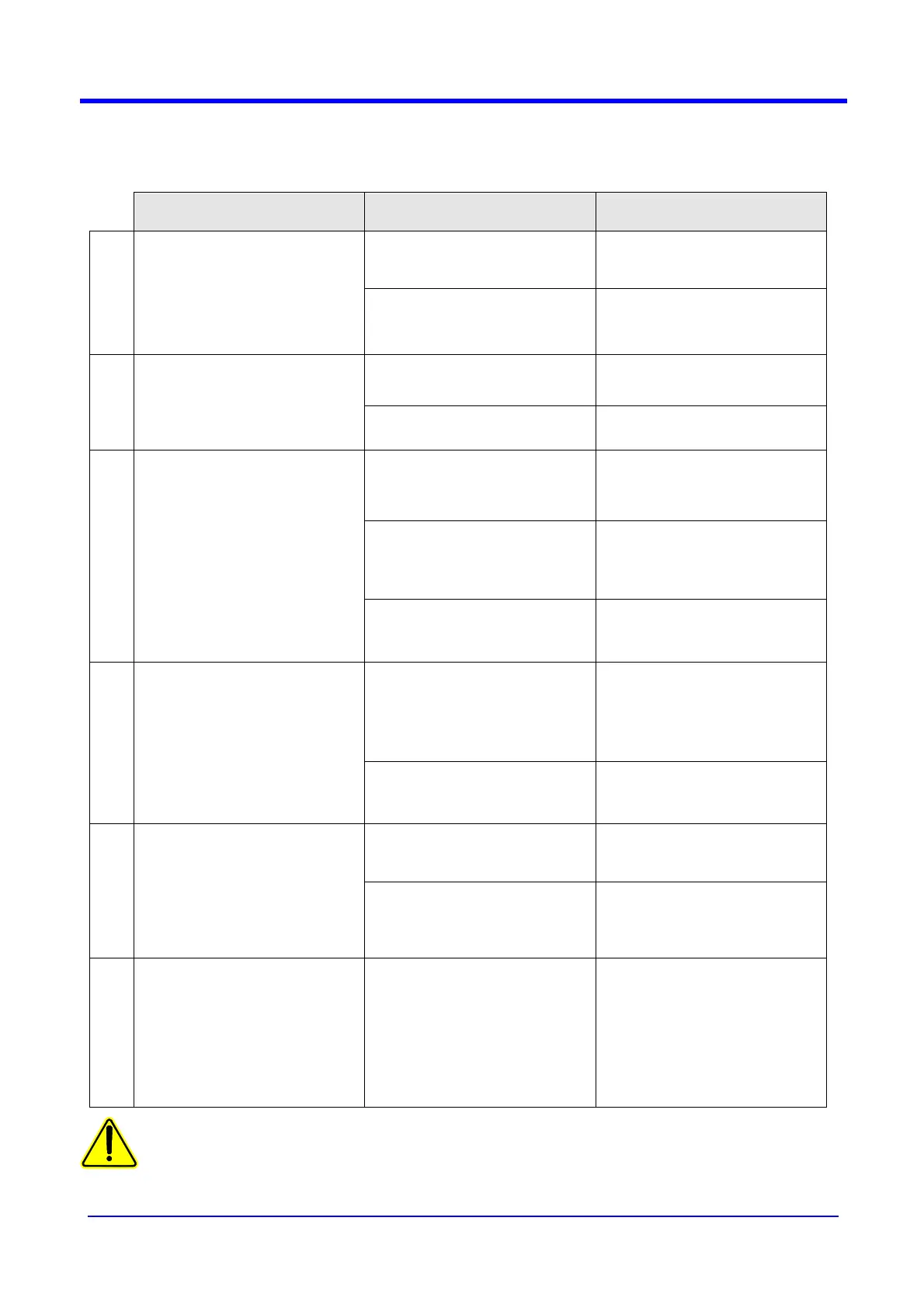
7.3 Troubleshooting
SIGN POSSIBLE REASONS SOLUTIONS
a) no power from the main
a) check if the plug is well
switched on.
1
The machine doesn’t run, when
switching on no led lights up
b) fuse damaged.
b) check the circuit breaker FL1
in the electric box or call the
service engineer.
a) the emergency stop button is
engaged
a) disengage the button
2
No motion when you press on
the buttons on the control
board : only the red LED light
« electric fault » on.
b) the contactor KM1 is locked b) check its running
a) there is no supply on the PLC
a) check the green led on the
PLC or call the service
engineer
b) there is no supply on the 24
Vcc card which drives the
actuators
b) check the fuse 1 on the 24
Vcc card or call the service
engineer
3
No motion when you press on
any key of the keyboard : the
screen remains dark.
c) there is no supply on the
inverter
c) check the fuse F4 or the
inverter (read message) or call
the service engineer.
a) there is a paper jam (open the
guard to check)
a) close the guard and proceed
as indicated on section 7.2.1
4
No motion when you press a
button on the control board :
only the red LED ligh
« jamming » on.
b) no paper (open the guard to
check)
b) clean the sensors under the
tool and their reflectors
a) the confetti tray is full a) empty the confetti tray
5
No motion when you press one
button on the control board : the
red led light « confetti tray » on
and message « tray full » (see
section 7.1)
b) the sensor and/or its reflector
are dirty
b) clean the sensors under the
tool and their reflectors
6
Message « tool overloading » F1
return
a) Paper jammed under the tool
b) Hard point on driving or on
tool
c) Inverter blocked
d) fuse F2
a) remove paper
b) turn by hand the green belts
to check the driving
c) check the message and call
JBI
d) call the JBI after sales
service
NOTICE : NEVER FORCE AN UNIT NEVER INSIST ON AN OPERATION
IN THAT CASE : CALL THE SERVICE DEPARTMENT JBI
FOR REPLACEMENT OF SPARES CALL THE SERVICE DPT JBI


 To Next Page