20
1
2
3
4
5
9
6
7
8
10
12
11
Mode
Band
APS Clock Mute
PTYAFTA
SEL
CH
1
2
3
4 5 6
INT
RPT
RDM
13
14
15
16
17
18
19
20
21
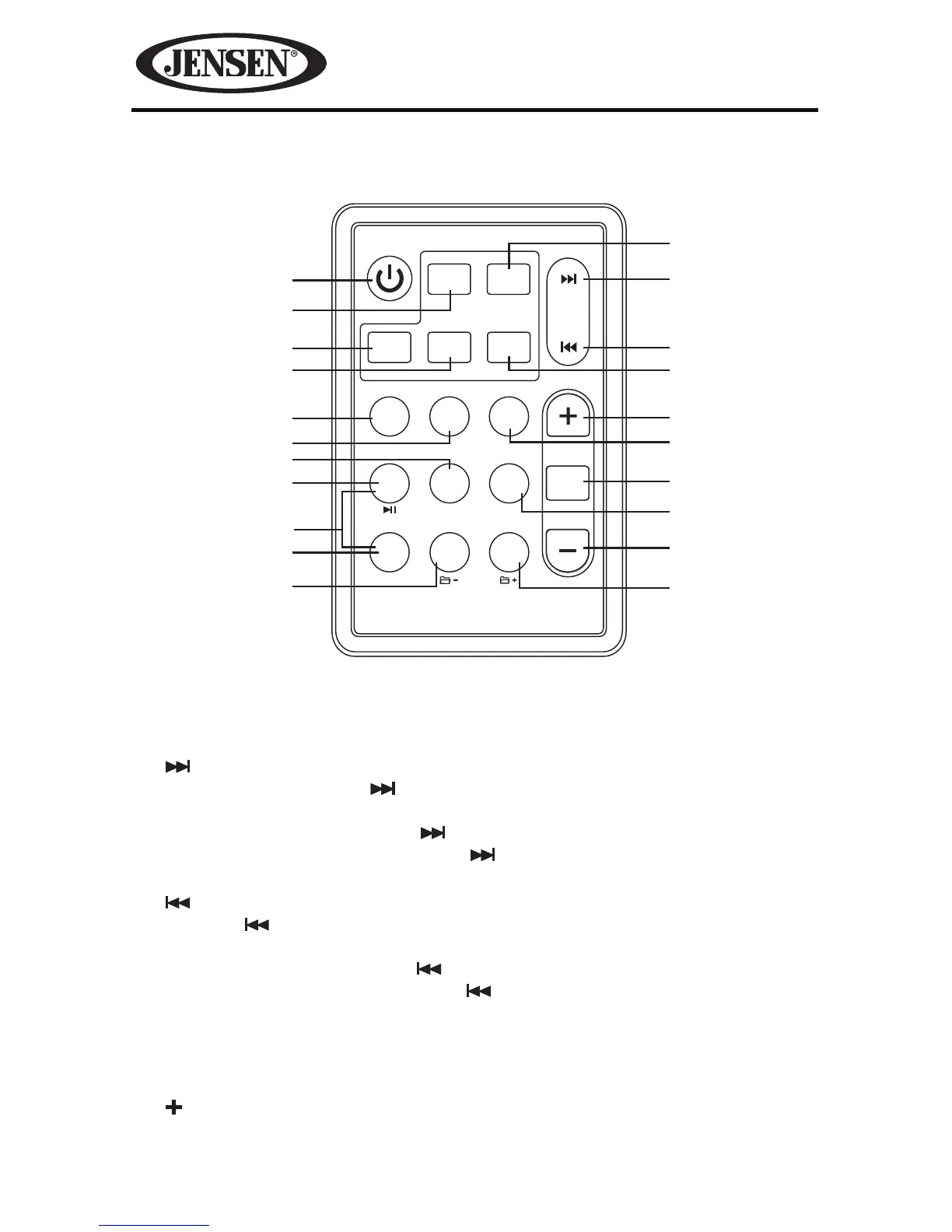
Remote Control Functions
1. Band Button
Press this button to select or change the radio band (FM1, FM2, FM3, AM1 or
AM2).
2. (Stations Tune/ Seek Up / Track Up) Button
In radio mode, press the button briey to activate the automatic seek
function and tune to next strong station.
In MP3/WMA mode, press the button to move to the following track.
In iPod® or iPhone® mode, press the button to play the next track in the
current category.
3. (Stations Tune/ Seek Down / Track Down) Button
Press the button briey to activate the automatic seek function and tune
to the previous strong station.
In MP3/WMA mode, press the button to move to the previous track.
In iPod® or iPhone® mode, press the button to play the previous track in
the current category.
4. Mute Button
Press this button to mute the audio. Press this button again to unmute the
audio.
5. (Increase Volume) Button
Press this button to increase the volume.


 To Next Page