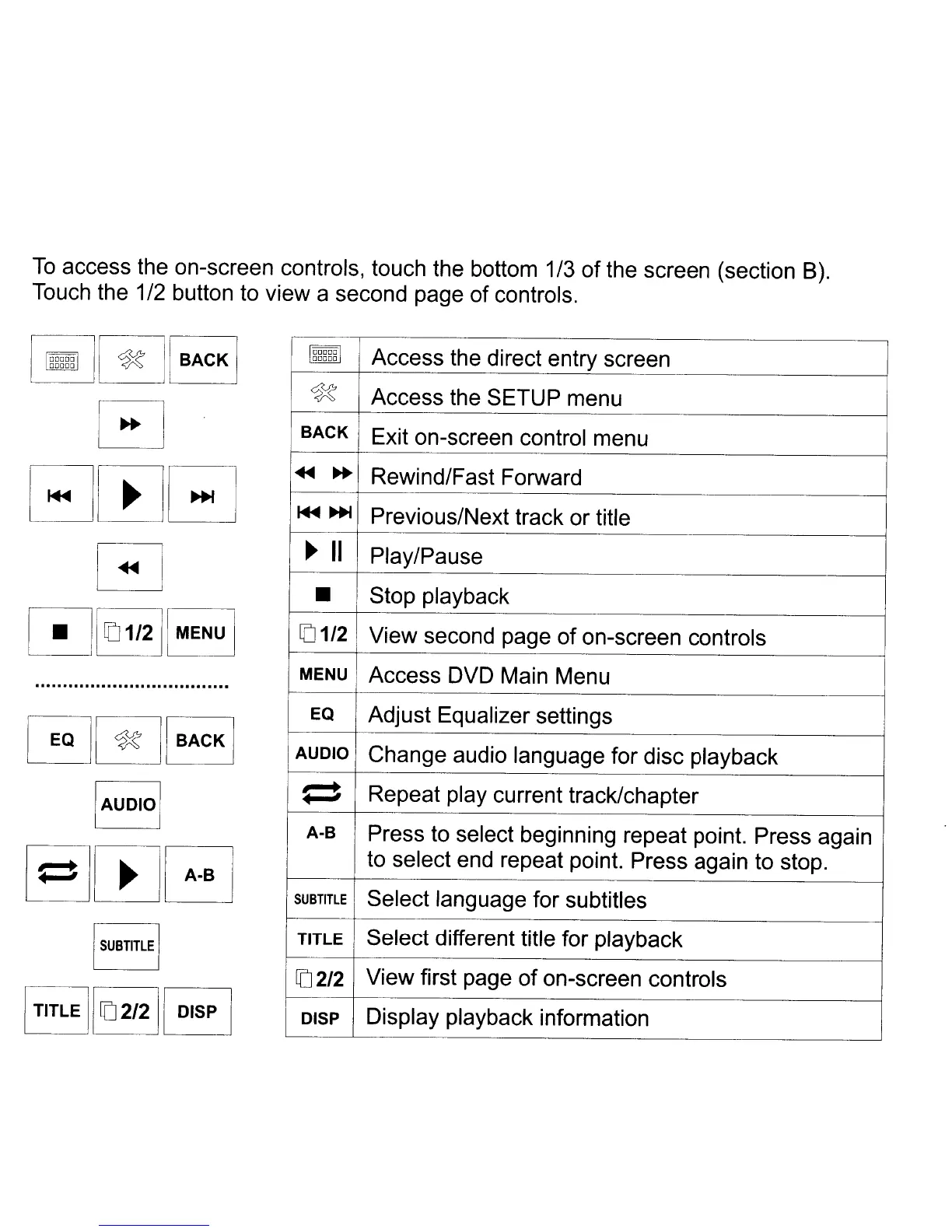
To
access the on-screen controls, touch the bottom 1/3
of
the screen (section
B).
Touch the 1/2 button to view a second page of controls.
"""""
I~II
BACK
j
00000
~
o
EJmB
[~
[!J1~1I211
MENU
I
G~IBACKI
IAUDlol
00000
Access the direct entry screen
00000
~
Access the SETUP menu
BACK
Exit on-screen control menu
...
~
Rewind/Fast Forward
~~
Previous/Next track or title
..
II
Play/Pause
•
Stop playback
[01/2
View second page
of
on-screen controls
MENU
Access DVD Main Menu
EQ
Adjust Equalizer settings
AUDIO
Change audio language for disc playback
1 t
Repeat play current track/chapter
A-B
Press to select beginning repeat point. Press again
to select end repeat point. Press again to stop.
SUBTITLE
Select language for subtitles
TITLE Select different title for playback
[02/2
View first page
of
on-screen controls
DISP
Display playback information



 To Next Page