Bluetooth
Operation
(continued)
I
:f4
p
I I
, I
i i
I i
I I
I
i
~=~I
Menu
1
List
~
(1'41
(15\,1
/1\
(16)
(2\
\y'yy)
Y
~~
I I
~
I I
i% .
>"/'
,
~
..
~
L
==1==;,
';,
01
02
'
AM
1/
Ii
(/~J'
i~
~
Disconnected
I,:
~~~""
:
',\1
UJ"
o~F1
11"
~
~~~----1
I:
\~~:
~Bijjj
o~CJ
0
\.~,
.~
,
I:
\ I
i I !
(,
I~
aW
r1
Missed Calls
~/I
i 2 Received Calls
I : 3 Dialed Calls
I
~
Phone
Book
i
I
3
I !
:~ ~)
~J
~,
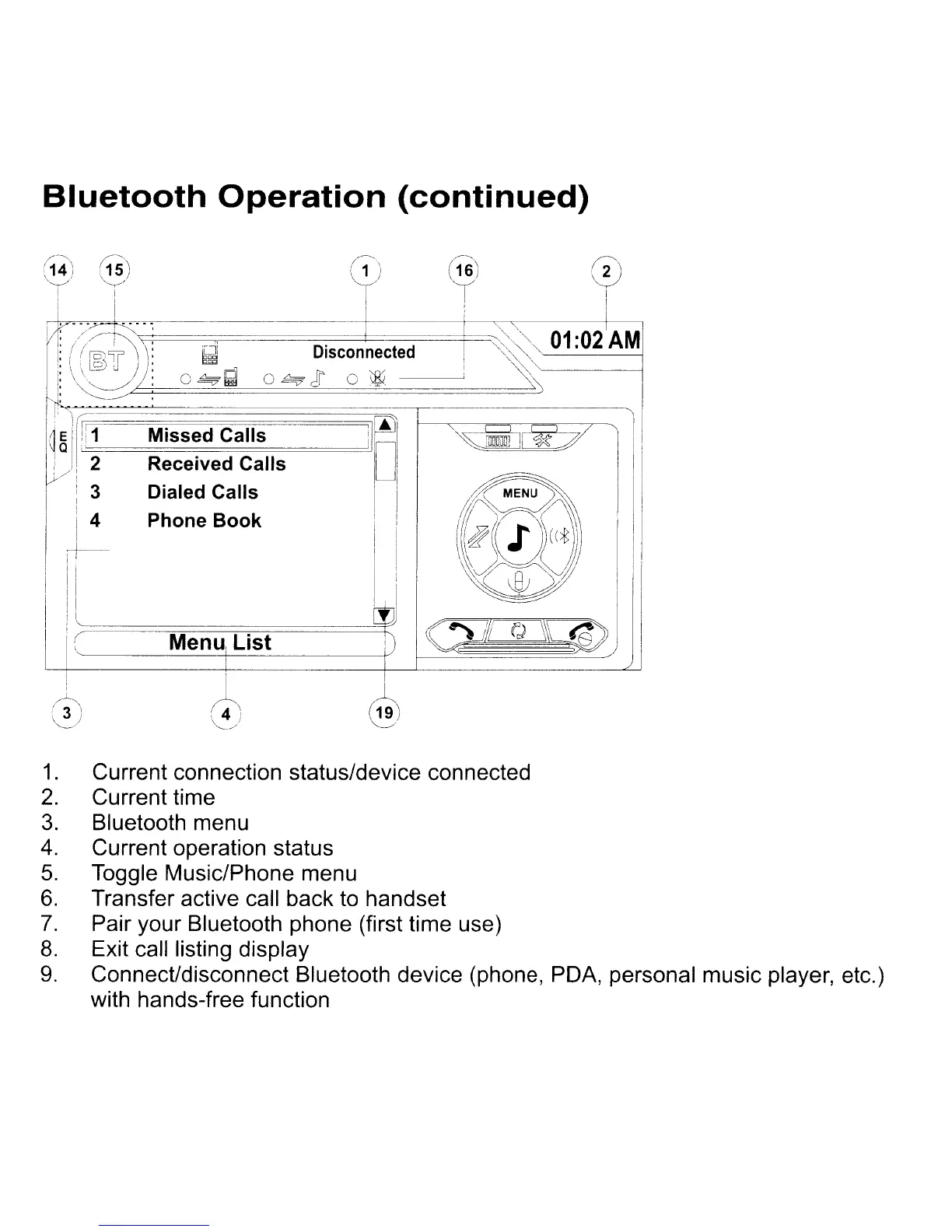
1.
Current connection status/device connected
2.
Current time
3.
Bluetooth menu
4.
Current operation status
5.
Toggle Music/Phone menu
6.
Transfer active call back to handset
7.
Pair your Bluetooth phone (first time use)
8.
Exit call listing display
9.
Connect/disconnect Bluetooth device (phone, PDA, personal music player, etc.)
with hands-free function



 To Next Page